
Disclosure: This page may contain affiliate links. Prices were checked on the date shown and may change.
An introduction to Waves Enigma, based on information from the maker and distributors: what it does, how to use it and who it may suit. It is not scored.
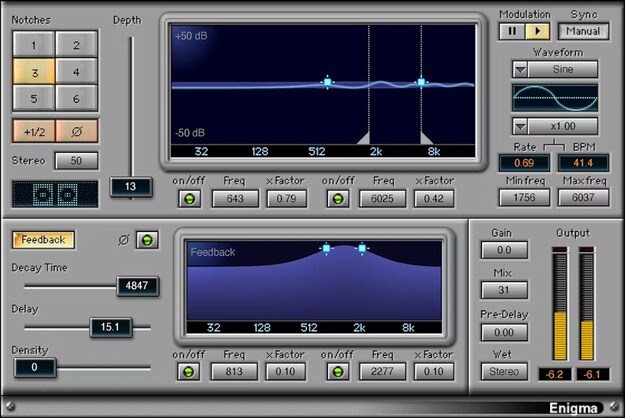
Enigma combines comb filtering, modulation, filtered feedback, a reverb-like processor, and time delay to weave enigmatic sonic webs around anything
— Waves official site
What is Enigma?
Enigma is a sound-design effect from Waves. It combines comb filtering, modulation, filtered feedback, a reverb-like processor and time delay to build unusual sonic webs around a source.
The source can be voice, synth, white noise, found sounds or guitar, and automating the controls creates ever-evolving textures.
The range listed includes novel flanging, rising barber-pole effects, resonant reverbs, bell and wind-chime sounds, alien voices and dub echoes.
Unlike an ordinary reverb or delay, it aims to transform the source's identity, and it ships with 34 presets.
Key features
Notch filtering with filtered feedback
Notch filtering is combined with filtered echo or reflection feedback, which may help create resonant or metallic textures.
Multi-waveform modulation
Several waveforms are available, with play/stop control and host sync, which may suit rhythmic movement.
Barber-pole effects
It can make sounds seem to rise endlessly, which could be used for builds.
Transforming sources
It aims to turn ordinary instrument sounds into new identities, which may help when you want unexpected tones from a source.
Ear candy
Adding small ear-catching touches to a production is a listed use, for example at breaks between sections.
34 presets
34 presets show the range of effects, so you can start from one and adjust by ear.
Specifications
| Item | Details |
|---|---|
| Type | Sound-design effect |
| Presets | 34 |
| Formats | Mac: VST / AU / AAX, Windows: VST / AAX |
| OS | macOS Monterey 12 to Sequoia 15 / Windows 10+ |
What is included and system requirements
- Enigma plug-in
- 34 presets
- Mac (VST / AU / AAX), Windows (VST / AAX)
How to use it
- Buy at Plugin Boutique and find the serial number.
- Create a Waves account and register the serial under Register New Products.
- Download and install Waves Central.
- Install Enigma through Waves Central.
- Insert it on a track in your DAW.
- Start with a preset.
- Move modulation rate and depth to hear the changes.
- Write the movements you like as automation.
Where it may come in handy
Vocal processing
It might add odd resonance or an altered character to a voice.
Synth and sound-effect design
Running synths or noise through it could produce bell-like or constantly changing textures.
Transitions
A barber-pole style effect could be placed before a build.
Dub-style echoes
Dub-like echoes might be added for short sections.
Who it may suit
- People looking for an unusual effect that reshapes tone
- Sound designers and SFX creators
- Producers who want to add ear candy
Good to know before you buy
- A Waves account and licence management through Waves Central are required.
- It is not a replacement for a standard reverb; the effect is pronounced.
- On Windows the formats are VST and AAX; AU is Mac only.
Price
$79 (Plugin Boutique, checked 2026-10-27). Prices can vary by region and promotion, so check the official page before buying.
See Enigma on the product page
More of the same kind
Other introduction articles of the same kind.
- McDSP 6060 Ultimate Module Collection Native v7
- Boz Digital Labs ProVocative
- W. A. Production BassShaper
- United Plugins Electrum
- Native Instruments Molekular
- Wave Alchemy Tapewave
We have introduced 215 other products from Waves.
See the full list in Product database: Effects.
Sources: pluginboutique.com (checked 2026-10-27)










Comments