
Disclosure: This page may contain affiliate links. Prices were checked on the date shown and may change.
An introduction to Waves Renaissance Reverb, based on information from the maker and distributors: what it does, how to use it and who it may suit. It is not scored.
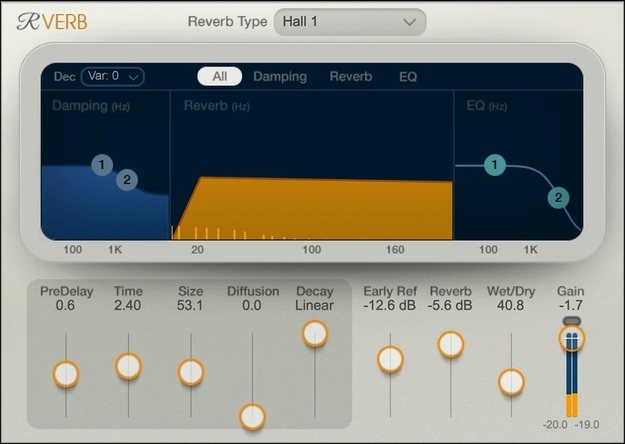
Renaissance Reverb updates the technology behind vintage reverb sounds for a smoother, more luscious tone, and expands your sonic scenarios by integrating 12 different reverb types.
— Waves official site
What is Renaissance Reverb?
Renaissance Reverb is a Waves algorithmic reverb that updates vintage-style reverb technology for a smoother tone, according to the seller.
Algorithmic reverb feeds reflections back recursively to build complex tails, and is highly customisable.
It integrates 12 reverb types including halls, chambers and plates.
An advanced early-reflection system, dual-band EQ for the tail, custom damping and standard parameters are included, along with 265 presets from award-winning mix engineers.
Key features
12 reverb types
Halls, chambers, plates and more in one plug-in.
Early-reflection system
Increases realism and depth.
Dual-band EQ
Shapes highs and lows of the tail.
Damping
Controls how the tail decays.
Standard parameters
Familiar controls for intuitive adjustment.
265 presets
Start from presets by award-winning mix engineers.
Specifications
| Item | Details |
|---|---|
| Type | Algorithmic reverb |
| Reverb types | 12 |
| Presets | 265 |
| Mac OS | macOS Monterey 12 to Sequoia 15 |
| Activation | Waves account, serial number and Waves Central |
What is included and system requirements
- Mac: macOS Monterey 12 to Sequoia 15
- Installed with a Waves account, serial number and Waves Central
How to use it
- Create a Waves account and register the serial.
- Install through Waves Central.
- Load it on an aux send.
- Start from a preset.
- Choose a reverb type.
- Shape the tail with dual-band EQ and damping.
Where it may come in handy
Vocal hall
A hall or plate may add space to a voice.
Drum chamber
A chamber may help glue drums.
Instrument depth
Early-reflection tweaks may add depth.
Who it may suit
- Those who want several reverb types in one
- People who want to start fast from presets
- Users who like tail control
Good to know before you buy
- A Waves account and Waves Central are required.
- The regular price could not be confirmed, so none is listed.
Price
Please check the official page for the price.
See Renaissance Reverb on the product page
More of the same kind
We have introduced 112 reverbs. Here are some of the others.
- Eventide UltraReverb
- LANDR VoxVerb
- UJAM UFX Reverb 2
- Rob Papen RP-VERB 2
- Black Rooster Audio RO-140
- Eventide Temperance Lite
We have introduced 215 other products from Waves.
- Waves H-Reverb Hybrid Reverb
- Waves IR1 Convolution Reverb
- Waves TrueVerb
- Waves IR360 Convolution Reverb
- Waves Magma Springs
For a side-by-side comparison scored on the same criteria, see our comparison of reverbs.
See the full list in Product database: Effects.
Sources: pluginboutique.com (checked 2026-10-27)










Comments