
Disclosure: This page may contain affiliate links. Prices were checked on the date shown and may change.
An introduction to Antelope Audio SonaVerb, based on information from the maker and distributors: what it does, how to use it and who it may suit. It is not scored.
SonaVerb is a clean, early-digital-style reverb designed for subtle enhancement and transparent spatial depth.
— Antelope Audio official site
What is SonaVerb?
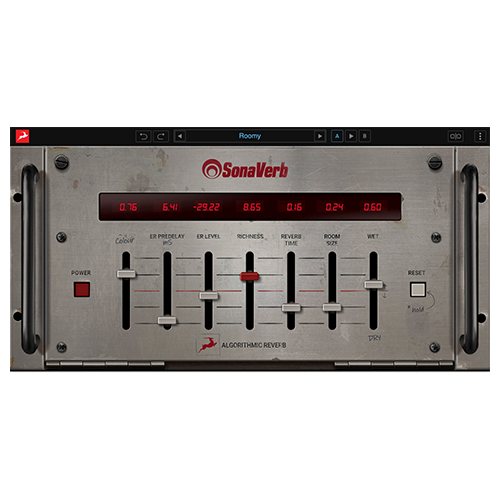
SonaVerb is a native reverb plug-in from Antelope Audio. Antelope describes it as a design aiming for subtle, transparent space in the manner of early digital reverbs.
Operation centers on three controls: Room Size, Reverb Time and Color. Keeping to a minimal set is meant to let you reach the desired ambience quickly.
The shape and timing of early reflections can also be adjusted to change how front-to-back placement is perceived. It is intended for adding air while keeping the clarity of vocals, guitars, keys and acoustic instruments.
It runs natively in your DAW with no extra hardware. It is also part of Antelope Cosmos, a collection of 75+ native plug-ins, and a 14-day free trial is advertised.
Key features
Early-digital character
It aims for a smooth, unobtrusive ambience reminiscent of classic early digital units, intended to add cohesion without harsh or metallic tails.
Three core controls
The control set is limited to Room Size, Reverb Time and Color, which keeps decisions simple and quick during mixing.
Early reflection control
Early reflection shape and timing can be adjusted, which helps decide whether a sound sits forward or further back.
Clean, natural sound
The goal is to add air and depth while preserving the clarity of vocals, guitars, keys and acoustic instruments.
Mix-ready ambience
It is aimed at modern pop, indie and rock productions, helping instruments and vocals sit together.
Quick reset
Plugin Boutique's description lists a quick reset function, which makes it easy to return to a starting point while experimenting.
Specifications
| Item | Details |
|---|---|
| Type | Room / early-digital reverb (native plug-in) |
| Main controls | Room Size, Reverb Time, Color, early reflections |
| Availability | Also part of Antelope Cosmos |
| Trial | 14-day free trial (Cosmos) |
What is included and system requirements
- SonaVerb native plug-in (macOS / Windows)
- No additional hardware required
How to use it
- Buy from Antelope or a retailer, or start the Cosmos trial.
- Create an account and run the installer.
- Rescan plug-ins in your DAW.
- Load SonaVerb on a send or insert.
- Set the space size and length with Room Size and Reverb Time.
- Adjust brightness or darkness with Color.
- Tune early reflections and check front-to-back placement.
Where it may come in handy
Vocal ambience
It may suit adding light space while keeping the vocal clear.
Blending acoustic instruments
It could help guitars and keys sit within a mix.
Gluing a mix
It could be used on a send to place several instruments in the same space.
Who it may suit
- People who want a reverb with few controls for quick results
- Those mixing pop, indie or rock
- Existing Antelope plug-in users
Good to know before you buy
- Available as a standalone purchase and as part of Antelope Cosmos, a subscription collection.
- Check Antelope's System Requirements page for detailed requirements.
How it differs from similar products
We do not pick a winner; the official figures are placed side by side.
IK Multimedia CSR Hall Reverb
SonaVerb is a room / early-digital reverb centered on three controls. CSR Hall targets a large hall and has two display modes, Easy and Advanced.
Price
$149 (Plugin Boutique, checked 2026-10-27). Prices can vary by region and promotion, so check the official page before buying.
See SonaVerb on the product page
More of the same kind
We have introduced 112 reverbs. Here are some of the others.
- IK Multimedia T-RackS FAME Studio Reverb
- Acon Digital Verberate Immersive 2
- iZotope Equinox
- Waves TrueVerb
- D16 Group Spacerek
- Universal Audio Galaxy Tape Echo
We have introduced 54 other products from Antelope Audio.
- Antelope Audio Shimmer
- Antelope Audio Antelope Audio Springer
- Antelope Audio Stages
- Antelope Audio VMEQ-5
- Antelope Audio Antelope Audio x903
For a side-by-side comparison scored on the same criteria, see our comparison of reverbs.
See the full list in Product database: Effects.
Sources: en.antelopeaudio.com pluginboutique.com (checked 2026-10-27)










Comments