
Disclosure: This page may contain affiliate links. Prices were checked on the date shown and may change.
An introduction to BLEASS BLEASS Spectral Reverb, based on information from the maker and distributors: what it does, how to use it and who it may suit. It is not scored.
BLEASS Spectral Reverb unlocks new realms of reverberation and ambience effects, conjuring unique and dramatic sonic vistas in which to stage your music’s instruments and parts.
— BLEASS official site
What is BLEASS Spectral Reverb?
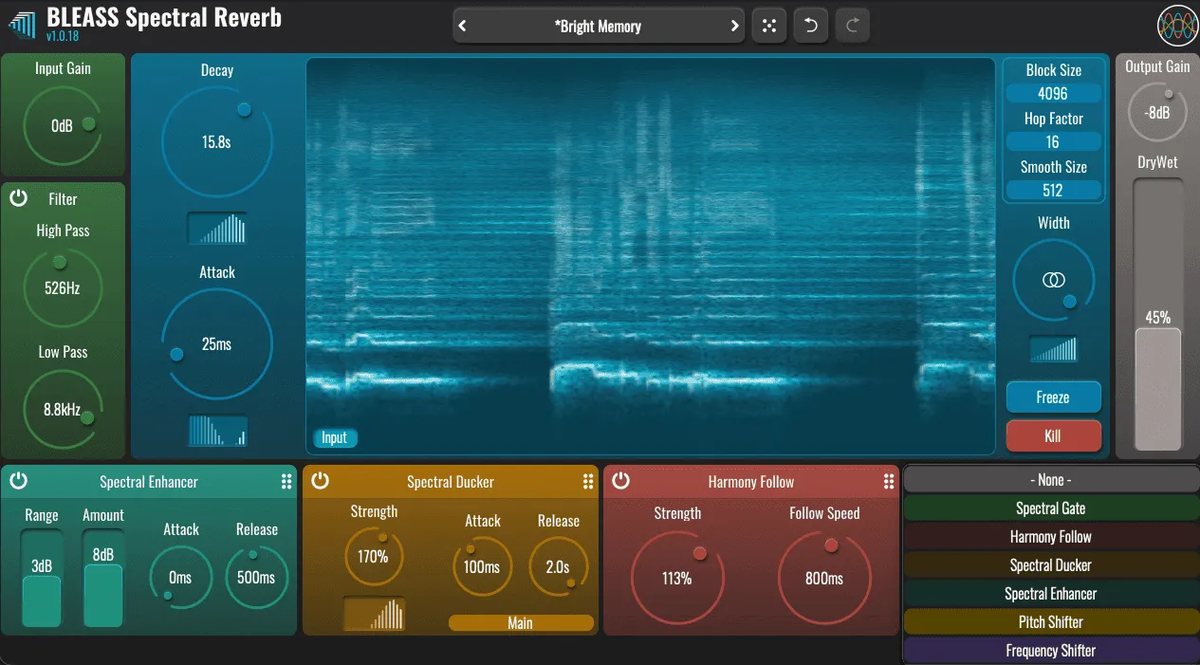
BLEASS Spectral Reverb is a reverb plug-in that lets you shape how the reverb behaves frequency by frequency. A typical reverb applies one decay time to the whole spectrum, but here the Decay, Attack and Width of the reverb can each be varied across the frequency range.
For example, you can make the low end die away quickly while the highs ring on, or widen the stereo image around one frequency only. This is done with the Spectral Map, a bar-graph style control you shape by dragging with a mouse or finger, rather than typing in numbers.
There are four processing slots, and each can host one of six spectral processors: a gate, Harmony Follow, a ducker, an enhancer, a pitch shifter and a frequency shifter. The idea is to treat the reverb sound itself as material to be reshaped, which differs from simply adding effects after a conventional reverb.
It supports external sidechains and exposes most parameters to DAW automation and modulators. The maker says the efficient engine keeps the load on your system light, and that lowering the processing settings can turn the result into a grittier, lo-fi style reverb.
Key features
Draw frequency-dependent shapes with Spectral Maps
Dragging a Spectral Map horizontally moves the peak, and dragging vertically sharpens a peak or a trough. It works together with the rotary knob, so you can set how strongly each band is affected by hand.
Decay, Attack and Width by frequency
Decay sets the length, Attack the build-up and Width the stereo spread. Each has its own Spectral Map, so the lows can be short and the highs long, for example.
Four slots, six spectral processors
Choose up to four from the Spectral Gate, Harmony Follow, Spectral Ducker, Spectral Enhancer, Pitch Shifter and Frequency Shifter. They are options for changing the character of the reverb in a bigger way.
Harmony Follow keeps the reverb on the current pitch
When you play successive notes into a long reverb, the tail of the previous note can clash with the next. Harmony Follow boosts the parts of the reverb that match the incoming spectrum and reduces earlier tails.
Sidechain-capable Spectral Ducker
The ducker analyzes the spectrum of the input, or of a sidechain signal, and reduces that spectrum in the reverb. It may help keep a dry source such as a vocal from getting lost in the reverb.
Adjustable FFT processing resolution
Block Size, Hop Factor and Smooth Size set how the internal FFT processing runs. Higher values give finer, smoother results with a heavier load, while lower values give a rougher texture and a lighter load.
Freeze and Kill
Freeze holds the current reverb and stops new input from adding to it, while Kill instantly clears the sounding reverb. Both are handy for dramatic moments.
Specifications
| Item | Details |
|---|---|
| Type | Reverb (spectral processing) |
| Processing slots | 4 slots / 6 spectral processors |
| Frequency-dependent controls | Decay, Attack, Width |
| Input filters | High-pass and low-pass |
| Other controls | Freeze, Kill, Dry/Wet, input and output gain |
| Platforms | Mac, Linux, Windows (also iPhone and iPad) |
| Sidechain | External sidechain supported |
What is included and system requirements
- Spectral Gate (threshold, attack, release)
- Harmony Follow (strength, follow speed)
- Spectral Ducker (strength, attack, release, main/sidechain source)
- Spectral Enhancer (range, amount, attack, release)
- Pitch Shifter (in semitones, dry/wet)
- Frequency Shifter (in Hz/kHz, dry/wet)
- Platforms: Mac, Linux and Windows; an iPhone and iPad version is also listed by the maker
How to use it
- If you bought it through Plugin Boutique, enter your account code on the BLEASS registration page and submit your email address.
- Download the installer for your operating system from the license email and run it.
- Open the plug-in in your DAW, click UNREGISTERED and enter your email address and serial number.
- Start by moving Decay and Dry/Wet to set the basic amount of reverb.
- Drag the Decay Spectral Map horizontally to choose which frequencies should ring longer or shorter.
- Drag vertically to adjust how sharp the peak or trough is.
- If needed, put processors such as the Spectral Gate or Ducker in the four slots, and use the high-pass and low-pass filters to shape the input.
- To adjust the grit of the sound, change Block Size and Hop Factor and check the load and texture.
Where it may come in handy
Ambient and pads
Because the decay can differ by band, it may suit wide spaces where only the highs trail on. Freeze can also hold the reverb in place.
Creating space for vocals
With the Spectral Ducker, the matching frequencies of the reverb may stay in the background while the voice is singing and come back when it stops.
Sound design and effects
Putting the pitch or frequency shifter on the reverb may give textures that are hard to get from an ordinary reverb. It could also be a raw material for game or video effects.
Sustained synths and guitars
Harmony Follow may keep the tail of the previous chord or phrase from muddying the next one.
Who it may suit
- People who want to sculpt reverb band by band
- People who want changing spaces for ambient music or sound design
- People who want to combine reverb with sidechain and dynamic processing
- People who like a touch-friendly, hands-on way of building effects
Good to know before you buy
- License registration with a serial number is required.
- Higher Block Size and Hop Factor values give finer processing but use more resources.
- A list of plug-in formats (VST3, AU and so on) was not found in the pages checked, so please confirm it on the maker’s page before buying.
How it differs from similar products
We do not pick a winner; the official figures are placed side by side.
BLEASS Reverb
The maker describes BLEASS Reverb as a mutable reverb with a freeze mode and a built-in ducker. Spectral Reverb adds frequency-dependent decay, attack and width, plus slots for six spectral processors.
Price
$39 (Plugin Boutique, checked 2026-10-27). Prices can vary by region and promotion, so check the official page before buying.
See BLEASS Spectral Reverb on the product page
More of the same kind
We have introduced 112 reverbs. Here are some of the others.
- NUGEN Audio NUGEN Audio Paragon
- Audio Ease Altiverb 8
- Leit Audio Places
- ADPTR AUDIO Utopia
- Cherry Audio Galactic Reverb
- Antinode CLEAR
We have introduced 16 other products from BLEASS.
- BLEASS BLEASS Shimmer
- BLEASS BLEASS Tides
- BLEASS BLEASS Spectral Resonator
- BLEASS BLEASS Motion EQ
- BLEASS BLEASS Delay
For a side-by-side comparison scored on the same criteria, see our comparison of reverbs.
See the full list in Product database: Effects.
Sources: bleass.com pluginboutique.com (checked 2026-10-27)










Comments