
Disclosure: This page may contain affiliate links. Prices were checked on the date shown and may change.
An introduction to MeldaProduction MeldaProduction MDelayMB, based on information from the maker and distributors: what it does, how to use it and who it may suit. It is not scored.
MDelayMB is a powerful multiband delay featuring 2 synchronizable taps per band, each with 3 different delay algorithms.
— MeldaProduction official site
What is MeldaProduction MDelayMB?
MDelayMB, from the Czech company MeldaProduction, is a multiband delay that splits the signal into up to six bands, each with its own delay. This lets you keep the low end clean while giving the mids and highs longer repeats, for example.
Each band has two taps that can be synchronized to tempo, and each tap can use one of three delay algorithms. Four global modulators are available, working as LFOs, level followers, ADSR envelopes, pitch detectors and more, and they can drive nearly any parameter.
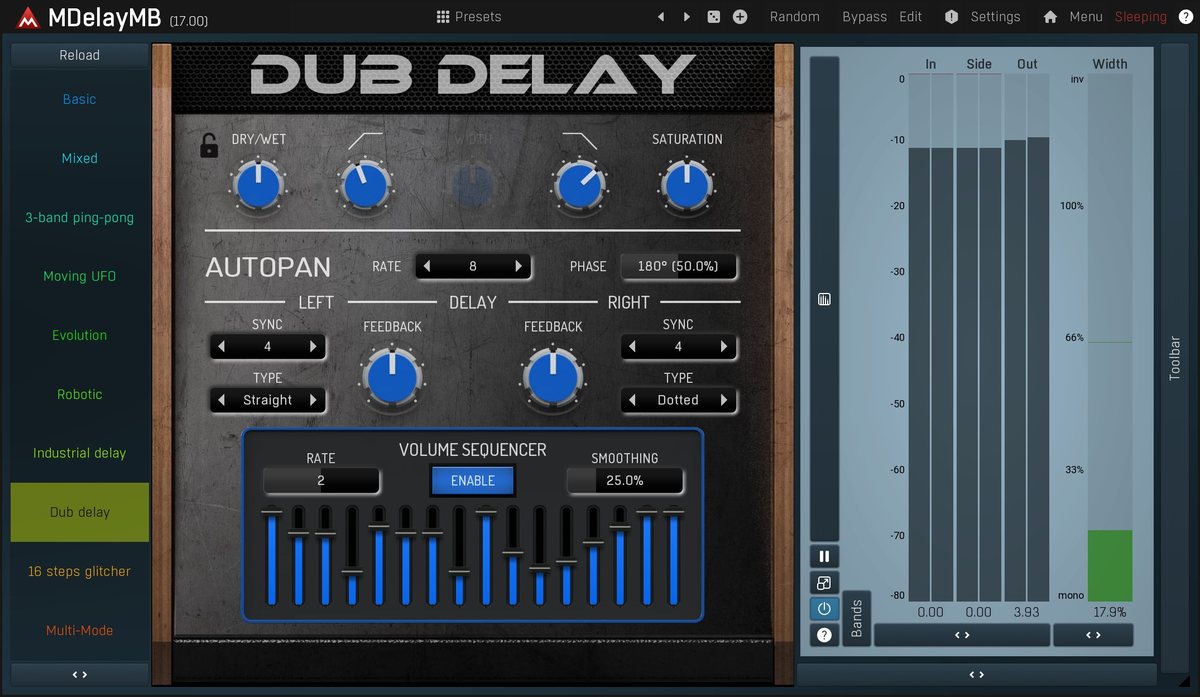
The interface has two modes. You can start with a simple mode with a few knobs and presets, and move to an advanced mode that exposes every feature when you need it. It also has the resizable, restylable interface common to MeldaProduction plug-ins.
The crossover can be analog, linear-phase or hybrid. The plug-in handles up to eight channels of surround as well as stereo, which the maker says makes it suitable for film and game audio.
Key features
Up to six independent bands
Split the signal into 1 to 6 bands with adjustable limits and input gain, with peak meters for each band and the master. It is useful when you want repeats that behave differently in each range.
Two taps per band, three algorithms each
Every band has two tempo-syncable taps, each with a choice of three delay algorithms, for multitap and rhythmic repeats.
Three crossover types
Bands can be split with analog, linear-phase or hybrid crossovers, so you can choose the behavior that suits the job.
Four global modulators
LFOs, followers, MIDI- or audio-triggered ADSRs and pitch detectors can be assigned to any parameter, including other modulators. They are a way to keep the sound from sitting still.
Easy and advanced modes
The simple mode lets you pick a predefined behavior and use a few knobs. The advanced mode gives access to all features.
Randomization and preset sharing
One button generates new settings, and holding Ctrl only modifies the current settings slightly. Presets can be shared and downloaded online.
Surround, MIDI learn and tempo sync
It supports up to eight channels, lets you map any parameter to a MIDI controller, and syncs oscillators and modulators to the host tempo.
Specifications
| Item | Details |
|---|---|
| Type | Multiband delay |
| Bands | 1 to 6 |
| Taps | 2 per band (tempo-syncable) |
| Algorithms | 3 per tap |
| Crossover | Analog / linear-phase / hybrid |
| Modulators | 4 global |
| Channels | Up to 8-channel surround |
| Formats | VST, VST3, AAX (Windows) / VST, VST3, AU, AAX (macOS) |
| Operating systems | Windows 8/10/11 (64-bit), macOS 10.14 or later (Apple Silicon supported) |
What is included and system requirements
- MDelayMB itself (with a set of presets and active presets)
- Operating systems: Windows 8/10/11 (64-bit), macOS 10.14 or later (Intel and Apple Silicon)
- Formats: VST, VST3, AAX (Windows); VST, VST3, AU, AAX (macOS)
- A processor with SSE2 support
How to use it
- Create a MeldaProduction account, install MPluginManager and sign in.
- If you bought it at Plugin Boutique, enter the serial under LICENCES & ACTIVATION using Redeem serial code from a reseller.
- On the PLUGINS tab select MDelayMB and click INSTALL / CHANGE.
- Load it on a track in your DAW and audition the presets in simple mode first.
- Choose the behavior you want and set the delay amount with the few knobs.
- If you need more, switch to advanced mode and set the number of bands.
- Adjust each band’s tap times, algorithm and input gain.
- Assign a modulator to add movement to the repeats.
Where it may come in handy
Vocal delays
Leaving the low end without repeats and delaying only the mids and highs may add space without clouding the core of the voice.
Movement for synths and leads
Moving the time or feedback with a modulator may bring change to sustained sounds.
Rhythmic multitap patterns
Syncing two taps per band to tempo may let you build complex repeat patterns.
Film and game sound
With support for up to eight channels, it may be useful for surround sound work.
Who it may suit
- People who want to build delays band by band
- People who want moving, modulated repeats
- People who prefer starting from simple presets and going deeper later
- Users of other MeldaProduction plug-ins
Good to know before you buy
- A MeldaProduction account and license activation in MPluginManager are required.
- It has many features, so starting from the simple-mode presets matches the maker’s guidance.
- The maker’s page offers a free trial (Try for free).
How it differs from similar products
We do not pick a winner; the official figures are placed side by side.
MSpectralDelay
MDelayMB applies delay to up to six bands. The maker describes MSpectralDelay as a delay that processes individual frequencies.
Price
$54 (Plugin Boutique, checked 2026-10-27). Prices can vary by region and promotion, so check the official page before buying.
See MeldaProduction MDelayMB on the product page
More of the same kind
We have introduced 62 delays. Here are some of the others.
- Eventide Precision Time Align
- Native Instruments REPLIKA XT
- PSP Audioware Lexicon PSP 42
- W. A. Production Spectron by Curbi
- Cherry Audio Stardust 201 Tape Echo
- Klevgrand Røverb
We have introduced 32 other products from MeldaProduction.
- MeldaProduction MeldaProduction MFreeformEqualizer
- MeldaProduction MeldaProduction MPhaserMB
- MeldaProduction MChorusMB
- MeldaProduction MFreeformAnalogEq
- MeldaProduction MFilter
For a side-by-side comparison scored on the same criteria, see our comparison of delays.
See the full list in Product database: Effects.
Sources: meldaproduction.com pluginboutique.com (checked 2026-10-27)










Comments