
Disclosure: This page may contain affiliate links. Prices were checked on the date shown and may change.
An introduction to MeldaProduction MeldaProduction MFreeformEqualizer, based on information from the maker and distributors: what it does, how to use it and who it may suit. It is not scored.
Just draw the equalization that you want and the plugin will make it happen!
— MeldaProduction official site
What is MeldaProduction MFreeformEqualizer?
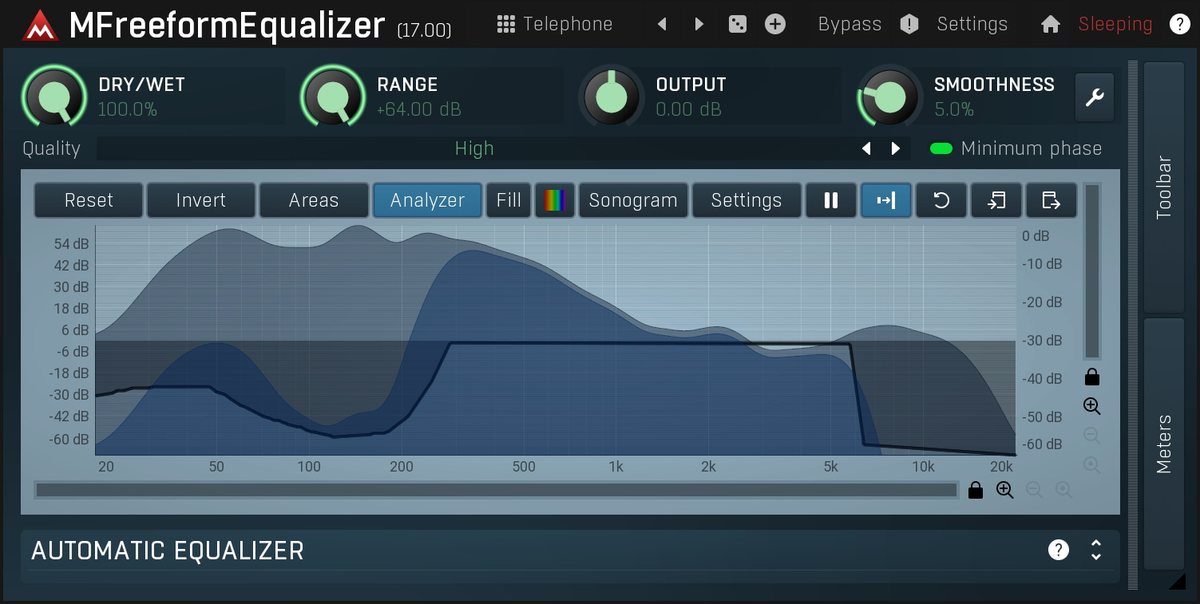
MFreeformEqualizer is an FFT-based linear-phase equalizer from MeldaProduction. Instead of adding bands one by one, its distinguishing approach is that you draw the frequency response curve you want.
The maker's page says that things hard to do with a traditional equalizer, such as a very steep low-pass filter, become possible through its spectral processing. It is positioned as an option when other methods have not worked.
It also includes automatic equalization (applying the tonal tendencies of one audio item to another), which the maker says can be used in reverse as EQ separation to reduce spectral overlap. The result can be exported as an impulse response file for use in any processor that supports convolution.
It is available for Windows and Mac in VST, VST3, AU and AAX formats, and the maker's site offers a free trial.
Key features
Draw the response freely
Using the MeldaProduction Envelope System, the response can be edited over a range of -64 dB to 64 dB. It may help when you want to treat a problem range in detail or use the curve as an effect.
Built-in spectrum analyzer and sonogram
A display showing spectrum and its change over time is built in, with a feature that raises resolution in the bass and another that makes fundamentals easier to see.
Automatic equalization
This applies the tonal tendencies of one item to another. The maker says it has been used on individual instruments as well as master tracks.
Impulse response export
The curve you create can be exported as an impulse response, which may be handy if you want to use it in another convolution-capable processor.
Up to 8-channel surround
Beyond mono and stereo, it handles up to 8 channels of surround audio, so it may be considered for film and game work.
MIDI learn and presets
Any parameter can be mapped to a MIDI controller, and presets are shared across songs. 16x upsampling and A–H preset slots for comparison are also included.
Specifications
| Item | Details |
|---|---|
| Maker | MeldaProduction |
| Type | Linear-phase equalizer (FFT-based) |
| Gain range | -64 dB to 64 dB |
| Channels | Up to 8 |
| Processing | 64-bit, recommended maximum sample rate 384 kHz |
| Formats (Windows) | VST / VST3 / AAX (64-bit) |
| Formats (Mac) | VST / VST3 / AU / AAX |
What is included and system requirements
- Supported OS: Windows 8 / 10 / 11 (64-bit), macOS 10.14 or later (64-bit)
- Native Apple Silicon (ARM) support
- Intel or AMD processor with SSE2 support (Windows)
How to use it
- Download the trial or purchased version from the maker's site and activate it with the plugin manager.
- Insert it on the target track in your DAW.
- Check the frequency distribution of the material with the analyzer.
- Draw the curve over the range you want to correct and set the amount.
- If needed, use automatic equalization to bring in the tendency of a reference.
- Compare settings using preset slots A to H.
- Consider exporting the result as an impulse response if that suits your workflow.
Where it may come in handy
Correcting problem ranges
It may be worth trying when you want to treat a specific muddy or resonant range by drawing the curve.
Matching a reference
It may be a candidate when you want to bring the tonal tendency of a reference closer to your own material.
Untangling overlapping parts
Using the separation idea, it could reduce spectral collisions between two tracks.
Making IRs for guitar
The maker gives guitar processing as an example of using the exported impulse response.
Who it may suit
- People who want to draw a frequency response freely
- People looking for a linear-phase equalizer
- People who want to try automatic EQ matching
- People working with surround material
Good to know before you buy
- The maker says the audio quality may not reach the level of its high-end parametric equalizers.
- Licenses are activated in the plugin manager (Plugin Boutique purchases use a serial code).
Price
$54 (Plugin Boutique, checked 2026-10-27). Prices can vary by region and promotion, so check the official page before buying.
See MeldaProduction MFreeformEqualizer on the product page
More of the same kind
We have introduced 122 EQs. Here are some of the others.
- McDSP 6020 Ultimate EQ Native v7
- DDMF ColourEQ
- Three-Body Technology Tube Bell
- Zynaptiq BALANCE
- Waves API 550
- Antelope Audio Antelope Audio Gyratec XIV
We have introduced 32 other products from MeldaProduction.
- MeldaProduction MFreeformAnalogEq
- MeldaProduction MCenter
- MeldaProduction MAutoVolume
- MeldaProduction MPolySaturator
- MeldaProduction MBitFunMB
For a side-by-side comparison scored on the same criteria, see our comparison of EQs.
See the full list in Product database: Effects.
Sources: meldaproduction.com pluginboutique.com (checked 2026-10-27)










Comments