
Disclosure: This page may contain affiliate links. Prices were checked on the date shown and may change.
An introduction to Waves CLA MixHub, based on information from the maker and distributors: what it does, how to use it and who it may suit. It is not scored.
Mixing on a big analog console is magical. Now, CLA MixHub brings the rich sound of mix legend Chris Lord-Alge’s custom 4400-series console channel strips—into your DAW.
— Waves official site
What is CLA MixHub?
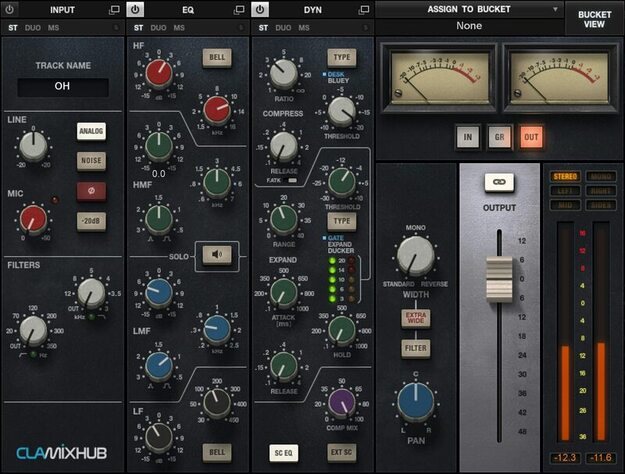
Waves CLA MixHub brings the custom 4400-series console channel strips of mixer Chris Lord-Alge into the DAW. It aims to offer his workflow as well as his console sound.
One plugin window handles groups of eight channels called buckets, up to 64 channels in all. As on a physical console, you can see and adjust EQ and dynamics across several tracks in the context of each other.
Each channel has Input, Dynamics, EQ and Output modules whose order can be changed freely. The input section models the line amp in Chris's console.
Dynamics include sidechaining, his super-gate and the 1176 Bluey. More than 240 presets are included, by Chris himself and others such as Dave Pensado and Greg Wells.
Key features
Up to 64 channels in one window
Eight buckets of eight channels give 64 channels from one plugin. It helps when you want to balance several tracks in one view.
Bucket and single-channel views
You can flip between views at any time, moving between an overview and focused work on one track.
Input, Dynamics, EQ and Output modules
Each channel has these four modules with a reorderable chain, so you can try EQ-first or dynamics-first processing.
Console line-amp input section
The input section models the line amp in Chris's console. It suits anyone who wants to try how input level changes tone.
Dynamics with super-gate and 1176 Bluey
Sidechaining, the super-gate and the 1176 Bluey are included, which may suit tidying drums or shaping compression.
Extra insert and Lite version
Any Waves plugin can be added as an extra insert per channel, and CLA MixHub Lite is included for lighter CPU use.
240+ presets
Settings by Chris Lord-Alge, Dave Pensado, Greg Wells and others are included.
Specifications
| Item | Details |
|---|---|
| Type | Console channel strip |
| Channels | Up to 64 (8 buckets of 8) |
| Modules | Input / Dynamics / EQ / Output |
| Also included | CLA MixHub Lite |
| Presets | 240+ |
| Formats (Mac) | VST / AU / AAX |
| Formats (Windows) | VST / AAX |
| OS (Mac) | macOS Monterey 12 / Ventura 13 / Sonoma 14 / Sequoia 15 |
| OS (Windows) | Windows 10 or later |
What is included and system requirements
- CLA MixHub plugin
- CLA MixHub Lite (lighter on CPU)
- Over 240 presets
- Formats: VST / AU / AAX (Windows VST / AAX)
How to use it
- Insert CLA MixHub on one of the tracks you want to mix, and set up further instances or linking for the others.
- Use the bucket view to see eight channels in one window.
- On each channel open the Input, Dynamics, EQ and Output modules you need.
- Reorder the modules to suit the source.
- When using dynamics, consider whether sidechain or the super-gate is needed.
- Pick a preset close to what you want and adjust from there.
- Switch to the single-channel view for detailed work on one track.
- Set the overall balance while listening to how the tracks relate.
Where it may come in handy
Band mixes in rock and pop
Drums, guitars and bass can be grouped in buckets and adjusted for EQ and dynamics while hearing how they relate.
Trying a console-style workflow
It may suit anyone who wants a taste of working on a large console inside a DAW.
Tidying drums
The gate and 1176 Bluey may help shape individual drum tracks.
CPU-conscious mixing
The Lite version may help keep load down on larger sessions.
Who it may suit
- People who want to handle several channels together as on a console
- Those interested in Chris Lord-Alge's approach
- Users who want EQ and dynamics in one plugin
- Anyone who likes to learn from presets
Good to know before you buy
- Plugin Boutique lists VST / AU / AAX on Mac and VST / AAX on Windows.
- Check that your DAW and OS version are supported before buying.
- Waves licences are managed through a Waves account and its app.
How it differs from similar products
We do not pick a winner; the official figures are placed side by side.
Waves Kramer HLS Channel
CLA MixHub handles up to 64 channels in one window with Input, Dynamics, EQ and Output modules. Kramer HLS Channel is a single-channel model of a Helios console with a 3-band EQ and mic/line preamp section.
Price
$149 (Plugin Boutique, checked 2026-10-27). Prices can vary by region and promotion, so check the official page before buying.
See CLA MixHub on the product page
More of the same kind
We have introduced 51 channel strips. Here are some of the others.
- IK Multimedia White Channel
- Harrison Audio Bass Flow
- Softube Chandler Limited Zener-Bender for Console 1
- Metric Halo ChannelStrip v4
- AudioThing Dials
- Antelope Audio Antelope Audio VEQ-4K PINK
We have introduced 215 other products from Waves.
- Waves AudioTrack
- Waves Abbey Road EMI TG12345 Channel
- Waves SSL EV2 Channel
- Waves Eddie Kramer Vocal Channel
- Waves Abbey Road REDD Consoles
See the full list in Product database: Effects.
Sources: pluginboutique.com (checked 2026-10-27)










Comments