
Disclosure: This page may contain affiliate links. Prices were checked on the date shown and may change.
An introduction to Waves GEQ Graphic Equalizer, based on information from the maker and distributors: what it does, how to use it and who it may suit. It is not scored.
GEQ has what you want from a graphic equalizer—30 precise ISO bands, with stereo/mono link.
— Waves official site
What is GEQ Graphic Equalizer?
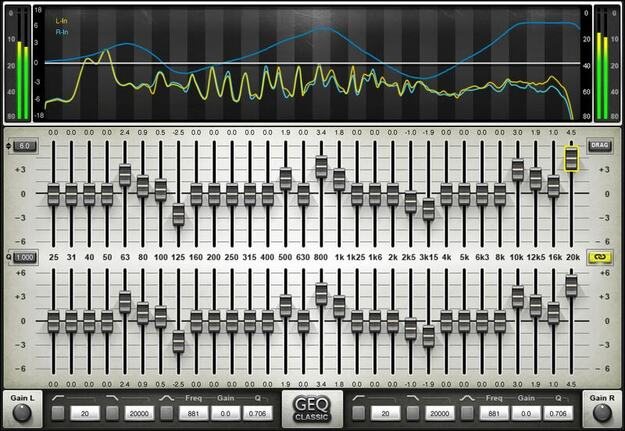
Waves GEQ Graphic Equalizer is a 30-band graphic EQ with bands placed on ISO-standard frequencies. It brings the slider-based feel of a hardware graphic equalizer into the DAW, and includes stereo/mono linking.
Beyond the basics, it lets you choose between two filter designs: a modern topology in which neighbouring bands do not interact, and a classic proportional-Q design in which the filter narrows as gain increases.
It also adds a dual-input real-time analyzer, high-pass and low-pass filters, and a floating parametric stage with a bell response. That puts graphic-style quick moves and parametric fine-tuning in one window.
Gain range is plus or minus 18 dB, and the plugin is described as zero-latency. It is aimed at studio mixing as well as broad corrections such as matching a venue's acoustics, and the interface is touchscreen-friendly for drawing curves.
Key features
30 ISO bands
Thirty bands sit on ISO-standard frequencies, each with its own slider. It suits shaping overall tonal balance while seeing every band at a glance.
Modern or classic filter topology
The modern mode avoids interaction between bands, while the classic mode uses proportional Q that narrows with gain. You can pick the character that fits the material.
Floating parametric stage
A bell-shaped parametric stage can be placed freely, apart from the graphic bands. It is useful when a fixed centre frequency is not quite where you need to act.
Dual-input real-time analyzer
Two signals can be compared on screen, and the analyzer can be calibrated. It helps you see what the EQ is actually changing.
High-pass and low-pass filters
Filters for trimming the extreme low and high ends are built in, so basic clean-up can be done inside the same plugin.
±18 dB and zero latency
Each band moves up to 18 dB either way, and processing adds no latency. The spec is aimed at live as well as studio, so adjusting while playing back should be comfortable.
Touchscreen-friendly interface
The interface is designed so that curves can be drawn directly. It suits anyone with a touch-capable display who wants to sketch EQ moves by hand.
Specifications
| Item | Details |
|---|---|
| Type | 30-band graphic EQ |
| Gain range | ±18 dB |
| Latency | Zero |
| Formats (Mac) | VST / AU / AAX |
| Formats (Windows) | VST / AAX |
| OS (Mac) | macOS Monterey 12 / Ventura 13 / Sonoma 14 / Sequoia 15 |
| OS (Windows) | Windows 10 or later |
What is included and system requirements
- GEQ Graphic Equalizer plugin (VST / AU / AAX; Windows VST / AAX)
- OS: macOS Monterey 12 to Sequoia 15, or Windows 10 and later
- Filter design: switchable between modern and classic
How to use it
- Insert GEQ on a track or bus in your DAW.
- Choose between the modern and classic filter design first.
- Open the analyzer to see where the problem area sits.
- Move the relevant band sliders in small steps and check the effect within a few dB.
- If the issue falls between slider frequencies, place the parametric stage on it.
- Tidy the extreme lows and highs with the high-pass and low-pass filters.
- Use the stereo/mono link to decide whether both sides move together or separately.
- Compare against the bypassed sound to make sure you have not overdone it.
Where it may come in handy
Overall tone shaping in a mix
Placed on a bus or the master, the 30 bands let you view and adjust overall balance. Sliders may make it quick to find a band that bothers the ear.
Matching a room or venue
The maker cites matching a venue's acoustics. With no latency, it may also suit adjusting by ear during a rehearsal.
Voice for streaming or narration
Muddy or harsh areas in a voice could be found with the sliders and corrected lightly.
Learning EQ
Seeing the amount in each band may help someone learn how different frequency areas sound.
Who it may suit
- People who like moving EQ bands with sliders they can see
- Those who want to try both modern and classic filter behaviour
- Users who like to work with an analyzer in view
- Anyone after a latency-free EQ that also suits live correction
Good to know before you buy
- Plugin Boutique lists VST / AU / AAX on Mac and VST / AAX on Windows.
- Check that your DAW and OS version are supported before buying.
- Waves licences are managed through a Waves account and its app.
How it differs from similar products
We do not pick a winner; the official figures are placed side by side.
Sonnox Oxford EQ
GEQ is a 30-band graphic EQ with ±18 dB, while Oxford EQ is a five-band parametric EQ with four EQ types. GEQ shows every band as a slider; Oxford EQ gives frequency, gain and Q on fewer bands.
Price
$149 (Plugin Boutique, checked 2026-10-27). Prices can vary by region and promotion, so check the official page before buying.
See GEQ Graphic Equalizer on the product page
More of the same kind
We have introduced 122 EQs. Here are some of the others.
- Eventide EQ45
- Antelope Audio VEQ-55A
- Three-Body Technology Modern G-31
- Boz Digital Labs David Bendeth's The Hoser 2
- Sonnox Oxford EQ
- Soundtoys Sie-Q
We have introduced 215 other products from Waves.
- Waves SSL G-Equalizer
- Waves PuigTec EQs
- Waves Manny Marroquin EQ
- Waves eMo Q4 Equalizer
- Waves Renaissance Equalizer
For a side-by-side comparison scored on the same criteria, see our comparison of EQs.
See the full list in Product database: Effects.
Sources: pluginboutique.com (checked 2026-10-27)










Comments