
Disclosure: This page may contain affiliate links. Prices were checked on the date shown and may change.
An introduction to Blue Cat Audio Blue Cat Audio FreqAnalyst Multi, based on information from the maker and distributors: what it does, how to use it and who it may suit. It is not scored.
A multi-track spectral analysis tool for mixing or mastering.
— Blue Cat Audio official site
What is Blue Cat Audio FreqAnalyst Multi?
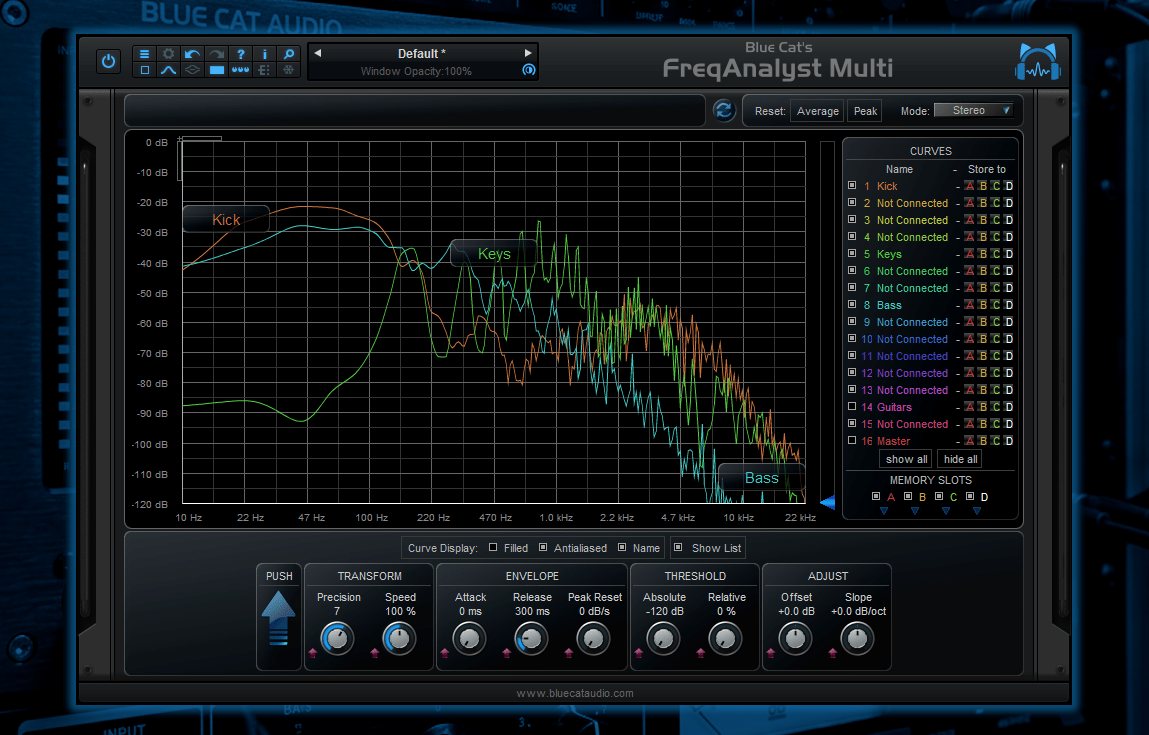
Blue Cat's FreqAnalyst Multi is a real-time analyzer that shows the spectrum of several tracks on a single screen. The maker presents it as a tool for seeing which instrument occupies which frequency range while mixing or mastering.
The maker's description lists detecting frequency overlap as a use. A 'Diff' view shows the difference between spectra from several instances, which the maker says helps with EQ matching and response curve measurement.
Each channel offers three display modes, instant, peak and average, and up to 16 curves can be overlaid on one graph. Four memory slots store curves so you can compare setups or sections of a project.
It is available for Windows and Mac in VST, VST3, AU and AAX formats. A demo can be downloaded from the maker's site.
Key features
Multiple tracks on one screen
Spectra from several tracks can be shown together, which may help you check whether instruments overlap in the same range.
Diff view
The difference between curves from several instances is calculated and displayed, which may give a clue for EQ matching or response measurement.
Instant, peak and average modes
Each channel can show instant, peak or average curves, so you can switch between short-term response and overall tendency.
Zoom and measurement
Zooming and coordinate display let you measure specific points on the spectrum, and note information is shown as well.
Four memory slots
Curves can be stored and compared, for example between settings or different parts of a project.
Routing and customization
Settings can differ per track, window opacity and layout can be adjusted, and the maker says a custom interface can be created with its skinning language.
Specifications
| Item | Details |
|---|---|
| Maker | Blue Cat Audio |
| Type | Multi-track spectrum analyzer |
| Formats (Mac) | VST / VST3 / Audio Unit / AAX |
| Formats (Windows) | VST / VST3 / AAX |
| Maximum curves | 16 |
| Memory slots | 4 |
What is included and system requirements
- Supported OS (per Plugin Boutique): Mac OS 10.9 or later (Intel / Apple Silicon), Windows 7 / 8 / 10
- A DAW supporting VST / VST3 / AU / AAX (32-bit or 64-bit)
- Mono, stereo and mid/side analysis
- MIDI control and learn, preset manager, undo/redo
How to use it
- Install the demo or the purchased version.
- Insert an instance on each of the tracks you want to analyze.
- Name the tracks and set the display mode (instant, peak or average) for each instance.
- Show them together on one screen and look at overlapping ranges.
- Zoom into areas of interest and check position by coordinates or note name.
- Store curves in memory to compare before and after EQ changes.
- Use the Diff view to see the difference between two curves.
Where it may come in handy
Sorting out mix ranges
It may be a candidate when you want to check overlap between instruments sharing a range, such as bass and kick or vocals and guitar.
Before and after EQ
Stored curves may help you compare changes before and after adjustment.
Comparing with a reference
You might place the spectrum of a reference next to your mix to see differences in tendency.
Measuring response
The maker lists response curve measurement as a use of the Diff view.
Who it may suit
- People who want to see frequency clashes in a mix
- People who want to try EQ matching or response measurement
- People who want to view several tracks in one window
- People who like to customize their interface
Good to know before you buy
- For a single-track analyzer with a spectrogram view and audio-to-MIDI, the maker points to its FreqAnalyst Pro.
- To analyze several tracks, an instance has to be inserted on each.
- The maker's demo has limitations.
How it differs from similar products
We do not pick a winner; the official figures are placed side by side.
Blue Cat Audio FreqAnalyst Pro
The maker distinguishes FreqAnalyst Multi, for viewing several tracks on one screen, from FreqAnalyst Pro, a single-track analyzer with a spectrogram view and audio-to-MIDI capability.
Price
$99 (Blue Cat Audio official site, checked 2026-10-27). Prices can vary by region and promotion, so check the official page before buying.
See Blue Cat Audio FreqAnalyst Multi on the product page
More of the same kind
We have introduced 14 meters and analyzers. Here are some of the others.
- Voxengo SPAN
- Waves Dorrough Stereo
- MAAT 2BC multiCORR
- MAAT DRMeter MkII
- Waves VU Meter
- Awesonix Simple Meter
We have introduced 21 other products from Blue Cat Audio.
- Blue Cat Audio Blue Cat's Oscilloscope Multi
- Blue Cat Audio Blue Cat's FreqAnalyst Pro
- Blue Cat Audio Blue Cat's StereoScope Pro
- Blue Cat Audio Blue Cat's Miaow Wah
- Blue Cat Audio Blue Cat's Connector
For a side-by-side comparison scored on the same criteria, see our comparison of meters and analyzers.
See the full list in Product database: Effects.
Sources: bluecataudio.com pluginboutique.com (checked 2026-10-27)










Comments