
Disclosure: This page may contain affiliate links. Prices were checked on the date shown and may change.
An introduction to McDSP AE600 Active EQ Native v7, based on information from the maker and distributors: what it does, how to use it and who it may suit. It is not scored.
The AE600 is the next generation of active equalization.
— McDSP official site
What is AE600 Active EQ Native v7?
AE600 Active EQ is the Native version (v7) of McDSP's active equalizer. An HD version for Pro Tools users running AAX DSP is sold separately, and this article covers the Native version.
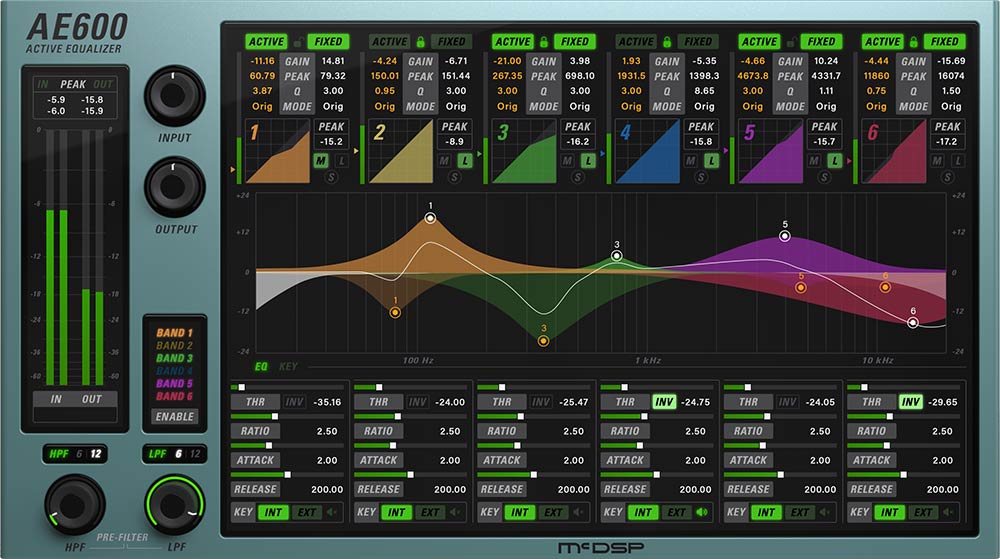
Active EQ means the EQ response changes according to the level of the input. Fixed EQ bands and active bands, which respond according to threshold, attack and release, can be controlled independently.
Each band has gain, frequency, Q and mode controls. The mode options include parametric, proportional-Q parametric, 5x-Q parametric, Baxandall shelving, vintage-style, X-style shelving and filtering. Bands can overlap completely.
A ratio control sets how sensitive the response is to input level, which the maker says is unique to the AE600 and AE400. A sidechain input can also be used as the trigger.
Key features
Six overlapping bands
Six fixed and active EQ bands are available, and they can overlap, each with independent parameters.
Selectable EQ modes
Each band can use a mode such as parametric, Baxandall shelving or vintage-style.
Threshold, attack and release
Active bands respond according to threshold, attack and release, bringing dynamics-style behavior into the EQ.
Ratio control
The ratio sets sensitivity to input level and shapes how the band reaches its maximum active response.
Sidechain and readouts
A sidechain input can drive the bands. Peak text readouts of each band's key signal help set thresholds.
Zero latency and double precision
The listing mentions zero-latency algorithms, double-precision processing and real-time analyzers.
Specifications
| Item | Details |
|---|---|
| Type | Active EQ (6 bands) |
| Formats | AAX Native / AU / VST3 |
| Operating systems | macOS 10.13 or higher (64-bit, Apple Silicon supported); Windows 7, 8 and 10 (64-bit) |
| License | Two activations per license |
What is included and system requirements
- AE600 Active EQ Native v7
- Mono and stereo versions
- New presets
- The HD version is sold separately
How to use it
- Activate the license with your McDSP account and install it.
- Insert AE600 on a track in the DAW.
- Set the basic tone with the fixed bands first.
- Set frequency and gain for an active band.
- Adjust the threshold while watching the peak readout.
- Move attack, release and ratio to hear how it responds.
- Use the sidechain as the trigger if needed.
Where it may come in handy
Harsh vocal ranges
It may be useful when you want to reduce a range when the level is high.
Drum bus shaping
It may suit trying an EQ whose response changes on harder hits.
Controlling resonance
It may help reduce a range that becomes bothersome only at louder levels.
Who it may suit
- People who want to try EQ combined with dynamics
- People who want per-band EQ mode choices
- People who want to use McDSP in DAWs other than Pro Tools
Good to know before you buy
- This is the Native version; the HD version for AAX DSP is a separate product.
- License and update terms can differ by store, so check the maker's subscription information too.
Price
Please check the official page for the price.
See AE600 Active EQ Native v7 on the product page
More of the same kind
We have introduced 122 EQs. Here are some of the others.
- Cockos ReaEQ ReaPlugs
- MAAT SantaCruzEQ6
- Harrison Legacy EQ
- Antelope Audio VEQ-STU 089
- Waves Renaissance Equalizer
- Universal Audio Manley Massive Passive EQ
We have introduced 53 other products from McDSP.
- McDSP 6020 Ultimate EQ Native v7
- McDSP 4020 Retro EQ Native v7
- McDSP AE600 Active EQ
- McDSP 4020 Retro EQ
- McDSP FilterBank
For a side-by-side comparison scored on the same criteria, see our comparison of EQs.
See the full list in Product database: Effects.
Sources: mcdsp.com pluginboutique.com (checked 2026-10-27)










Comments