
Disclosure: This page may contain affiliate links. Prices were checked on the date shown and may change.
An introduction to MeldaProduction MFreeformAnalogEq, based on information from the maker and distributors: what it does, how to use it and who it may suit. It is not scored.
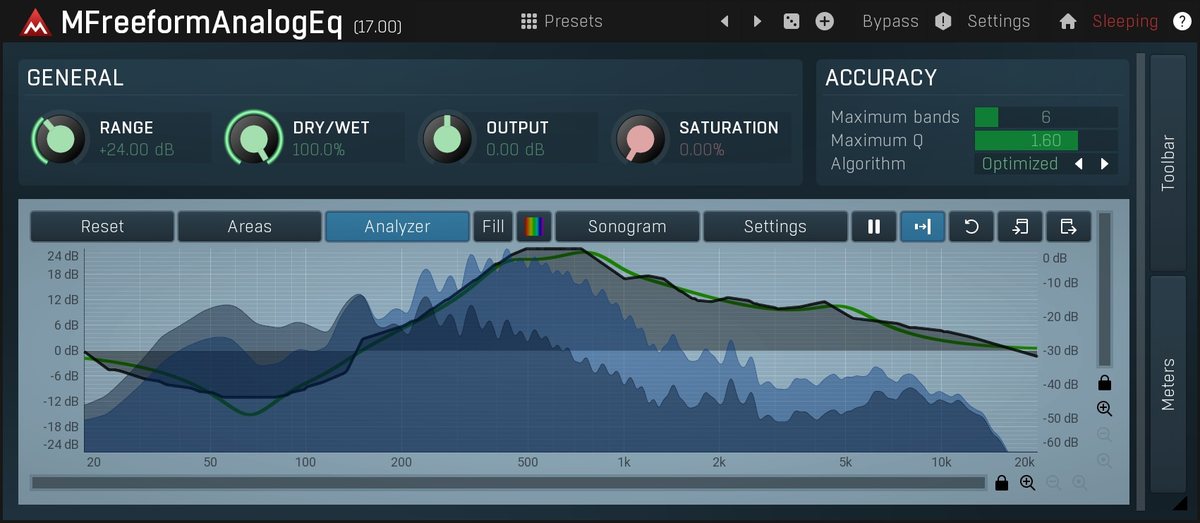
MFreeformAnalogEq is a unique equalizer, that allows you to draw any frequency response you wish and then attempts to match the response by applying analog filters
— MeldaProduction official site
What is MFreeformAnalogEq?
MFreeformAnalogEq is an equalizer from MeldaProduction. You draw the frequency response you want, and the plug-in finds analog-type filter settings that approximate it. The maker says this removes the need to worry about complicated parametric EQ settings.
This is done with MeldaProduction's Filter Adaption technology (MFA). If the curve you draw can be achieved with analog filters, it will be created; otherwise the plug-in approximates it. The workflow centres on drawing the shape you want instead of searching for bands with knobs.
A spectrum analyzer and sonogram are built into the display. The maker mentions super-resolution, which gives higher resolution in the bass, and deharmonization, which makes fundamental frequencies easier to analyze. It says your ears should remain the main judge.
Other features include tube saturation, surround processing up to 8 channels, MIDI learn and preset management. It supports VST / VST3 / AAX on Windows and VST / VST3 / AU / AAX on Mac, with native Apple Silicon support.
Key features
Draw-your-own EQ curve
Draw a frequency response and the plug-in finds analog-filter settings to approximate it. The range is -64 to +64 dB, edited with MeldaProduction's Envelope System (MES).
Filter Adaption technology (MFA)
The system works out whether the drawn curve can be achieved and reproduces it with parametric analog-type filters, reducing the need to set multiple filters by hand.
Analyzer and sonogram
A spectrum analyzer and sonogram are built in, with super-resolution for bass detail and deharmonization to make fundamentals easier to see.
Tube saturation
Built-in tube saturation is described as adding a vintage analog feel.
Surround up to 8 channels
Besides mono and stereo, it handles surround up to 8 channels, usable for film and game production.
Upsampling
Upsampling can be adjusted to reduce aliasing. The stated factors differ between the store and maker pages, so no figure is given here.
MIDI learn and presets
Any parameter can be mapped to a MIDI controller. Presets are shared across the computer, and A-H slots allow comparisons.
Specifications
| Item | Details |
|---|---|
| Type | Freeform equalizer |
| Range | -64 to +64 dB (edited with MES) |
| Analysis | Spectrum analyzer, sonogram |
| Saturation | Built-in tube saturation |
| Channels | Surround up to 8 channels |
| Windows | Windows 8 / 10 / 11 (64-bit), VST / VST3 / AAX, Intel/AMD processor with SSE2 |
| Mac | macOS 10.14 or newer, VST / VST3 / AU / AAX, Intel/AMD/M1, native Apple Silicon |
What is included and system requirements
- The plug-in itself (Windows: VST / VST3 / AAX; Mac: VST / VST3 / AU / AAX)
- PDF product documentation (including installation instructions)
- Supported systems: Windows 8 / 10 / 11 (64-bit), macOS 10.14 or newer
- A free trial is offered on the maker's site
How to use it
- Insert the plug-in on a track in your DAW.
- Open the analyzer to see the frequency distribution of the source.
- Draw the frequency response you want on the display.
- The plug-in finds analog-filter settings that approximate the curve.
- Where the drawn shape cannot be achieved, it is approximated, so check the resulting curve.
- If needed, adjust the amount of tube saturation.
- Check the upsampling setting and choose it with CPU load in mind.
- Store alternatives in the A-H preset slots and compare them by ear.
Where it may come in handy
When you already have a target curve in mind
If you know the shape you want, drawing it may suit your workflow.
When parametric EQ settings feel confusing
It may reduce the effort of combining the frequency, Q and gain of several bands.
Working while checking the spectrum visually
You could use the analyzer and sonogram to look for imbalances.
Surround work for film or games
With up to 8 channels supported, it may be used on surround material.
Who it may suit
- Users who prefer shaping EQ by curve rather than numbers
- People not yet comfortable with parametric EQ settings
- Anyone who wants to adjust while looking at an analyzer
Good to know before you buy
- The store page lists upsampling of 1x-4x, while another maker page mentions up to 16x, so the figures differ.
- The maker lists 55 US dollars and Plugin Boutique lists 54 US dollars.
- The maker states that your ears should be the main judge.
- Licensing and installation follow the PDF documentation supplied with the product.
How it differs from similar products
We do not pick a winner; the official figures are placed side by side.
MeldaProduction MAutoEqualizer
MFreeformAnalogEq approximates a drawn curve with analog-type filters and is listed at 55 US dollars by the maker. MAutoEqualizer is described by the maker as a linear-phase equalizer with an automatic equalization feature, listed at 167 US dollars.
Price
$54 (Plugin Boutique, checked 2026-10-27). Prices can vary by region and promotion, so check the official page before buying.
See MFreeformAnalogEq on the product page
More of the same kind
We have introduced 122 EQs. Here are some of the others.
- Antelope Audio VEQ-STU 900
- Tokyo Dawn Labs Tokyo Dawn Labs TDR Nova GE
- Boz Digital Labs David Bendeth's The Hoser 2
- Kuassa EFEKTOR Paten Graphic Equalizer
- Antelope Audio VEQ-HA32C
- Antelope Audio Antelope Audio VEQ-55B
We have introduced 32 other products from MeldaProduction.
- MeldaProduction MeldaProduction MFreeformEqualizer
- MeldaProduction MCombMB
- MeldaProduction MHarmonizerMB
- MeldaProduction MMatcher
- MeldaProduction MFilter
For a side-by-side comparison scored on the same criteria, see our comparison of EQs.
See the full list in Product database: Effects.
Sources: meldaproduction.com pluginboutique.com (checked 2026-10-27)










Comments