
Disclosure: This page may contain affiliate links. Prices were checked on the date shown and may change.
An introduction to Leapwing Audio RootOne, based on information from the maker and distributors: what it does, how to use it and who it may suit. It is not scored.
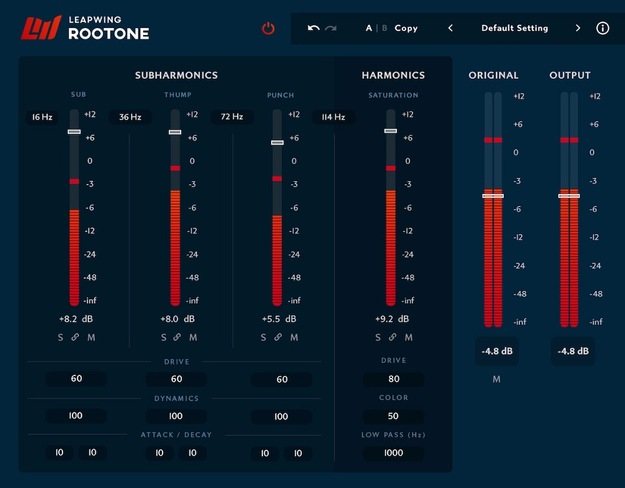
RootOne lets you add and shape 3 bands of subharmonic content for the perfect tonal balance.
— Leapwing Audio official site
What is RootOne?
RootOne from Leapwing Audio adds subharmonics, content below the original frequencies, to low-end material such as kicks and basses.
According to the maker, it uses an analysis-synthesis algorithm based on pitch detection rather than pitch shifting, aiming for clean, phase-aligned subharmonics that sit with the source.
The effect is split into three bands, each with controls for dynamics, release and drive, and lower-midrange harmonics can also be added to help the new low end fit.
The interface keeps the common controls on one screen with finer adjustments one click away. It may suit kicks, bass guitar and synth bass.
Key features
Phase-aligned subharmonics
Subharmonics are generated from pitch detection, aiming to stay aligned with the original so the added low end blends in, which may help when reinforcing kicks or bass.
Three-band generation
Subharmonics are added in three bands, so a band can be set separately to fill only the region that needs support.
Dynamics, release and drive per band
Each band has dynamics, release and drive controls, allowing the added low end to be shaped to the tempo and tone of a track.
Lower-midrange harmonics
The maker says lower-midrange harmonics can be added, which may help the new bass remain noticeable on smaller speakers.
Clear interface
Common controls are on one screen and detailed settings are a click away, with visual feedback of adjustments.
Works across sources
The maker says the algorithm works across a wider range of sources, giving kick, bass guitar and synth plucks as examples.
Specifications
| Item | Details |
|---|---|
| Type | Subharmonic generator |
| Bands | 3 |
| Formats (Mac) | VST2, VST3, AU, AAX |
| Formats (Windows) | VST2, VST3, AAX |
| macOS | 10.13 High Sierra and later (Intel / Apple Silicon, 64-bit) |
| Windows | Windows 8 – 10 (64-bit) |
What is included and system requirements
- RootOne plugin
- Supported systems: macOS 10.13+ / Windows 8-10 (64-bit)
How to use it
- Check the serial in your Plugin Boutique account and redeem it on the Leapwing Audio page.
- Create a Leapwing Audio account and download the installer.
- Run the installer and restart the DAW.
- Insert RootOne on a kick or bass track.
- Enter your registered email and serial to authenticate.
- Raise the amount in the band you want to reinforce.
- Adjust drive and release to find a position that blends with the original.
- Recheck the overall balance when using other low-end processors.
Where it may come in handy
Reinforcing a kick
If a kick feels thin, subharmonics can be added and adjusted for weight.
Steadying bass guitar
The added content may help even out low end that varies with playing.
Synth bass
Short plucks might gain extra range from the added lower content.
Who it may suit
- People who want to reinforce kicks and bass
- Those looking for a low-end tool aiming at clean results
- Users who want to shape the low end by band
Good to know before you buy
- A Leapwing Audio account and serial authentication are required after purchase.
- Subharmonics can sound very different between playback systems, so checking on several is sensible.
Price
Please check the official page for the price.
See RootOne on the product page
More of the same kind
Other introduction articles of the same kind.
- Eventide H949 Harmonizer
- Sound Particles Density
- MeldaProduction MMicSim
- Universal Audio Manley VOXBOX Channel Strip
- Universal Audio API Vision Channel Strip Collection
- NUGEN Audio Halo Vision
We have introduced 5 other products from Leapwing Audio.
- Leapwing Audio Al Schmitt
- Leapwing Audio CenterOne 3
- Leapwing Audio StageOne 2
- Leapwing Audio Joe Chiccarelli
- Leapwing Audio UltraVox 2
See the full list in Product database: Effects.
Sources: pluginboutique.com (checked 2026-10-27)










Comments