
Disclosure: This page may contain affiliate links. Prices were checked on the date shown and may change.
An introduction to Waves Greg Wells MixCentric, based on information from the maker and distributors: what it does, how to use it and who it may suit. It is not scored.
a plugin that packs his entire mix bus chain into a single knob.
— Waves official site
What is Greg Wells MixCentric?
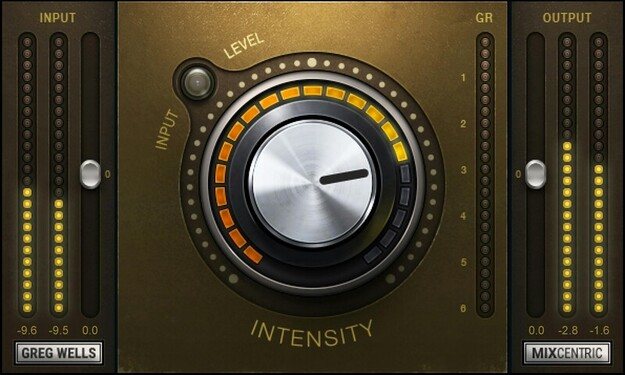
Greg Wells MixCentric is a mix-bus plugin made by Waves with producer/mixer Greg Wells. It packs his mix bus chain into a single knob.
Under the hood are an EQ that gently lifts the upper mids, extra low end, compression and subtle harmonic distortion. Settings come in and out and change as the knob moves.
Waves presents it as a way to glue a mix together and add final brightness and sheen. It can also be used on groups such as a drum bus.
Formats are VST / AU / AAX on Mac and VST / AAX on Windows. Pairing it with a limiter to build a mastering chain is also mentioned.
Key features
One knob
There is a single knob, and multiple internal settings are said to move together as you turn it.
EQ, compression and harmonic distortion
It combines an upper-mid lift, extra low end, compression and subtle harmonic distortion, which is quicker to try than building each separately.
Gluing the mix
It is presented as adding cohesion and final brightness to a full mix.
Usable on groups
It can sit on groups such as a drum bus, so you can try it at several levels.
Pairing with a limiter
Pairing it with your limiter of choice to make a mastering chain is suggested.
Specifications
| Item | Details |
|---|---|
| Maker | Waves |
| Type | Mix bus (multi-effect) |
| Control | One knob |
| Designed with | Greg Wells |
| Formats (Mac) | VST / AU / AAX |
| Formats (Windows) | VST / AAX |
What is included and system requirements
- Mac: macOS Monterey 12, Ventura 13, Sonoma 14, Sequoia 15
- Windows: Windows 10 or later
How to use it
- Install via Waves Central and activate the license.
- Insert it on the master bus before your limiter.
- Turn the knob up from a low position gradually.
- Compare with bypass at matched loudness.
- Try it on groups such as a drum bus if needed.
- Finish with your limiter for level.
Where it may come in handy
Finishing a mix
Insert it on a nearly finished mix and check how the cohesion changes.
Drum bus adjustment
On a drum group, it may change weight and brightness.
Quick mastering chain
With a limiter, it may let you build a rough finish quickly.
Who it may suit
- People who want to try mix-bus processing quickly
- People who get stuck on EQ and compressor settings
- People who want a rough mastering chain
Good to know before you buy
- With one knob, fine adjustment is not available.
- Plugin Boutique showed a time-limited sale (until Nov 01).
How it differs from similar products
We do not pick a winner; the official figures are placed side by side.
Scheps Parallel Particles
MixCentric packs mix-bus processing into one knob, while Scheps Parallel Particles uses four knobs (Sub, Air, Thick, Bite) to steer character.
Price
$149 (Plugin Boutique, checked 2026-10-27). Prices can vary by region and promotion, so check the official page before buying.
See Greg Wells MixCentric on the product page
More of the same kind
Other introduction articles of the same kind.
- Sound Particles Doppler
- Klevgrand REAMP
- Metric Halo SpectraFoo
- MeldaProduction MMatcher
- Polyverse Music I Wish
- Moog Moogerfooger MF-101S Lowpass Filter
We have introduced 215 other products from Waves.
- Waves JJP Strings & Keys
- Waves Feedback Hunter
- Waves Vitamin Sonic Enhancer
- Waves Nx Ocean Way Nashville
- Waves MV2
See the full list in Product database: Effects.
Sources: pluginboutique.com (checked 2026-10-27)










Comments