
Disclosure: This page may contain affiliate links. Prices were checked on the date shown and may change.
An introduction to Digital Brain Instruments Voxpat Pro, based on information from the maker and distributors: what it does, how to use it and who it may suit. It is not scored.
Voxpat Pro is a standalone software developed to create high quality monster, other world creatures and robotic sounds for games, films, music and multimedia projects in just a few minutes.
— Digital Brain Instruments official site
What is Voxpat Pro?
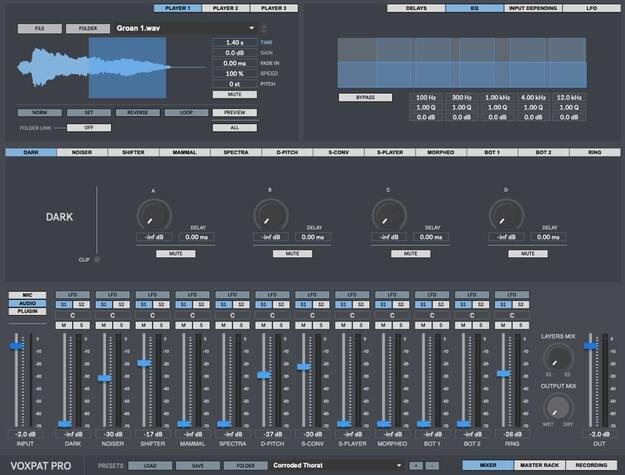
Voxpat Pro is a standalone application from Digital Brain Instruments for processing voices and audio files. It is presented for creating monster, otherworldly creature and robotic sounds for games, films, music and multimedia projects.
The input can be your own voice, up to three audio files at once, or a virtual instrument. The signal can be run through up to 12 effects at the same time, and the description says procedural audio, audio synthesis and convolution are used to build multiple layers of sound.
Effects can be crossfaded for morphing, and effects can be switched on or off depending on the input level. The recording function exports each effect layer, together with the source audio, as separate files for later editing.
It is a standalone application and does not work as a DAW plug-in. It supports 64-bit macOS 10.11.6 or later (Apple Silicon supported) and Windows 8 or later, and includes 66 presets and 154 samples of animal, human and foley sounds.
Key features
Up to 12 effects
The input can run through up to 12 effects at once. It may help when building complex sounds such as creature growls from layered voices.
Multiple input sources
Up to two microphone inputs, three audio files and a virtual instrument can be used. Samples and instruments can be processed as well as recorded voices.
Cross morphing
Crossfading between effects creates dynamic voice transformations. It may suit a scene in which a sound gradually turns into something else.
Input-dependent switching
Effects can be turned on or off depending on the input level. It may help when processing should change with how loudly the voice is delivered.
Layer export and batch processing
Each effect layer can be exported as an individual file, and batch processing applies the same settings to many files. It may save time when producing many sound effects.
Master rack and MIDI control
The master output can go through four VST/AU plug-ins, a 5-band parametric EQ, pitch shifting, chorus, dual delay, distortion and high/low-pass filters. Control from a MIDI device is also supported.
Specifications
| Item | Details |
|---|---|
| Type | Standalone voice and audio processing software |
| Effects | Up to 12 at the same time |
| Inputs | Up to 2 microphones / up to 3 audio files / virtual instrument |
| File formats | wav, aiff, mp3 |
| Included | 66 presets, 154 samples (animal, human, foley) |
| Mac requirements | OS X 10.11.6 or later (Apple Silicon supported), 64-bit, 4 GB RAM minimum |
| Windows requirements | Windows 8 or later, 64-bit, 4 GB RAM minimum |
| Format | Standalone (does not run inside a DAW) |
What is included and system requirements
- Voxpat Pro application
- 66 presets
- 154 samples (animal, human and foley sounds)
- Ability to load and play VST/AU instruments
- macOS 10.11.6 or later / Windows 8 or later (64-bit)
How to use it
- Install the standalone application from the downloaded installer.
- Choose an audio interface and set a microphone or audio file as the input.
- Record your voice with “Rec me” or load wav, aiff or mp3 files.
- Select the effects you want and adjust each layer’s parameters.
- If needed, set up cross morphing between effects or input-dependent switching.
- Finish with EQ, delay and other tools in the master rack.
- Record the result and export individual layers or the full mix.
Where it may come in handy
Monster sounds for games and video
Layering your own voice and samples may suit the creation of growls and cries.
Robotic and synthetic voices
It may be used when robot or transformed voices are needed.
Bulk sound-effect processing
Batch processing may help when the same treatment must be applied to many audio files.
Transforming instruments and sources
Using a virtual instrument as input may let you turn it into an unusual tone.
Who it may suit
- People making creature sounds or processed voices for games and video
- Those interested in sound design built from voice
- Anyone who must produce many sound effects
- Users who want to process voice in a standalone app without a DAW
Good to know before you buy
- It is a standalone application and cannot be used as a DAW plug-in.
- It connects to a DAW through input and output routing.
- At least 4 GB of RAM is required.
- The Plugin Boutique install steps mention “Voxpat 2,” so check the on-screen name during installation.
Price
Please check the official page for the price.
See Voxpat Pro on the product page
More of the same kind
Other introduction articles of the same kind.
- Audacity Team Audacity
- VB-Audio VB-CABLE
- Parakeet Paravo
- Krotos Krotos Studio MAX
- MAAT DROffline MkII
- VB-Audio Voicemeeter Banana
We have introduced 8 other products from Digital Brain Instruments.
- Digital Brain Instruments Digital Brain Instruments cMixer
- Digital Brain Instruments DSP Manager 2
- Digital Brain Instruments Podcaster
- Digital Brain Instruments Digital Brain Instruments Spacelab
- Digital Brain Instruments Oscar
See the full list in Product database: Streaming and recording software and others.
Sources: pluginboutique.com (checked 2026-10-27)










Comments