
Disclosure: This page may contain affiliate links. Prices were checked on the date shown and may change.
An introduction to Digital Brain Instruments DSP Manager 2, based on information from the maker and distributors: what it does, how to use it and who it may suit. It is not scored.
It allows managing complex loudspeaker systems (2-way & 3-way) using a computer, soundcard, MIDI controller and VST/AU plugins instead of a crossover hardware unit.
— Digital Brain Instruments official site
What is DSP Manager 2?
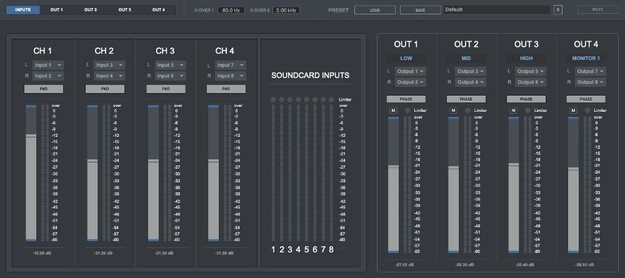
DSP Manager 2 is loudspeaker-management software from Digital Brain Instruments of Spain. It is not a plug-in but a 64-bit standalone application, described for studios, concerts, venues, conferences and other situations that need speaker control or routing of audio sources to different listening spaces.
According to the product description, a computer, an audio interface, a MIDI controller and VST/AU plug-ins can be combined to manage 2-way and 3-way loudspeaker systems. The idea is to let software take the place of a hardware crossover unit.
Its listed functions include 4 stereo inputs and 4 stereo outputs, a built-in brickwall limiter, 4th-order Linkwitz-Riley and 3rd-order Butterworth crossovers, a 5-band parametric EQ and output delay compensation. Up to four plug-ins can be placed on each output.
Version 2 adds an improved audio engine, a new 4th-order Linkwitz-Riley crossover filter, a new delay compensation system, built-in recording and a MIDI assign system, along with support for the latest macOS and Windows, including Apple Silicon.
Key features
2-way and 3-way crossover
Audio is split into high and low, or high, mid and low, and each band is sent to its own output. 4th-order Linkwitz-Riley and 3rd-order Butterworth slopes are offered. It may suit anyone who wants to drive a multi-way speaker from a computer.
Matrix mode
Audio sources can be routed to different loudspeaker systems. It may help when several areas of a venue, or monitor and audience feeds, have to be kept separate.
5-band parametric EQ
The feature list includes a 5-band parametric EQ, which could be used for shaping speaker or room response.
Output delay compensation
Delay can be corrected per output, which may help when speakers sit at different distances and arrival times need to be aligned. Version 2 introduces a new compensation system.
Built-in brickwall limiter and output plug-ins
A brickwall limiter sits on the output side, and up to four plug-ins can be loaded on each output, so a processing chain can be built outside the DAW.
Recording, MIDI and preset manager
Version 2 adds built-in recording and MIDI assignment, and a preset manager is included, so settings for different venues or uses could be stored and recalled.
Specifications
| Item | Details |
|---|---|
| Type | Loudspeaker management software (standalone) |
| I/O | 4 stereo inputs / 4 stereo outputs |
| Crossovers | 4th-order Linkwitz-Riley / 3rd-order Butterworth, 2-way and 3-way |
| EQ | 5-band parametric |
| Output plug-ins | Up to 4 per output (VST/AU) |
| macOS | OS 10.11.6 or later; Apple Silicon OS 11 or later (4 GB RAM recommended) |
| Windows | Windows 8 or later (4 GB RAM recommended) |
| Screen resolution | 1900×1080 (recommended) |
What is included and system requirements
- DSP Manager 2 application (standalone, Mac / Windows)
- Built-in recording, MIDI assign and preset manager
- Support for loading VST/AU plug-ins on the outputs
How to use it
- Download the zip from the Plugin Boutique user account and extract it.
- On macOS, open the .dmg and right-click the app icon, then choose Open.
- On Windows, double-click the standalone application icon in the extracted folder.
- Select the audio interface and decide how many inputs and outputs to use.
- Choose a 2-way or 3-way crossover to match the speaker setup.
- Adjust the crossover frequency, EQ, delay and limiter on each output.
- Load VST/AU plug-ins on the outputs if needed and save the settings as a preset.
Where it may come in handy
Studio monitoring
It may suit anyone who wants to try band-split 2-way or 3-way speakers driven from a computer and audio interface, with per-output delay and EQ to shape how the system is heard.
Small venues and events
Within four stereo inputs and outputs, it could route sources to several speaker systems. Matrix mode is intended for that.
Control from a MIDI controller
With MIDI assign, settings may be moved from a hardware controller, which could be useful for quick adjustments on site.
Who it may suit
- Users who want to manage speaker crossovers from a computer
- Users who need to route sound to several speaker systems
- Users who want EQ, delay and a limiter on the output side
Good to know before you buy
- It is a standalone application, not a DAW plug-in.
- The number of inputs and outputs on the audio interface limits how many channels can be used.
- Because it drives speakers, check output levels and limiter settings before connecting.
Price
$54 (Plugin Boutique, checked 2026-10-27). Prices can vary by region and promotion, so check the official page before buying.
See DSP Manager 2 on the product page
More of the same kind
Other introduction articles of the same kind.
- Blue Cat Audio Fader Hub
- Auphonic Auphonic
- Waves SuperRack Performer
- Adobe Adobe Audition
- VB-Audio VB-CABLE
- Waves Waves SuperRack SoundGrid
We have introduced 8 other products from Digital Brain Instruments.
- Digital Brain Instruments Podcaster
- Digital Brain Instruments Voxpat Pro
- Digital Brain Instruments Oscar
- Digital Brain Instruments Digital Brain Instruments Spacelab
- Digital Brain Instruments Multiplex Vocoder 3
See the full list in Product database: Streaming and recording software and others.
Sources: pluginboutique.com (checked 2026-10-27)










Comments