
Disclosure: This page may contain affiliate links. Prices were checked on the date shown and may change.
An introduction to Digital Brain Instruments Oscar, based on information from the maker and distributors: what it does, how to use it and who it may suit. It is not scored.
Oscar is a standalone anti-aliased tone and noise generator with adjustable wave shape and noise type.
— Digital Brain Instruments official site
What is Oscar?
Oscar is a standalone 64-bit tone and noise generator from Digital Brain Instruments. It has anti-aliased oscillators with adjustable wave shape and a noise generator with selectable noise type, and it is intended for testing, analysis and other tone-related work.
The Plugin Boutique description mentions uses such as testing, analysing, Chladni patterns and binaural beats. It is better thought of as a signal source for producing exact frequencies than as a synthesizer for writing songs.
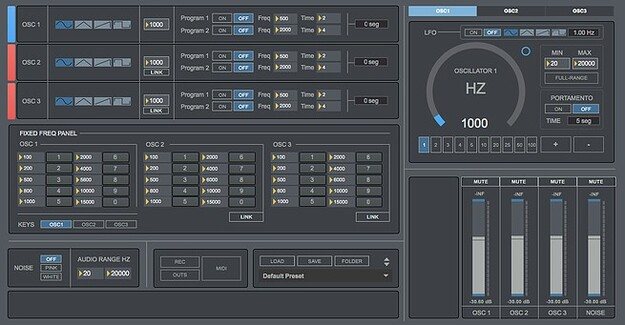
There are three oscillators covering 0 Hz to 20 kHz, with sine, triangle, raw and square wave shapes. Each oscillator has an LFO, and the program also provides automatic frequency-change programs and a panel of up to ten fixed frequencies that can be set in one click.
Outputs can be routed to up to six soundcard outputs, and sessions can be recorded as WAV or AIFF at up to 192 kHz / 32 bit, depending on the soundcard. A preset manager, MIDI matrix and keyboard shortcuts are included. It supports Windows 8 or later and macOS on Intel and Apple Silicon.
Key features
Three oscillators
Three oscillators cover 0 Hz to 20 kHz. Wave shapes are sine, triangular, raw and square, and the oscillators can be linked together.
LFO and frequency programs
Each oscillator has an LFO with a selectable shape. Automatic frequency-change programs run a preset movement, which is useful when a sweep is needed without manual control.
Fixed-frequency panel
Up to ten frequencies can be stored and switched with one click. Panels can be linked, and portamento between selected frequencies is available.
Noise generator
Pink and white noise are available, and a specific audio range can be set. It can serve as a signal source when band-limited noise is needed, for example when checking a room or speakers.
Output routing
Oscillators and noise can be routed to up to six soundcard outputs. The description also mentions routing output to a DAW or audio editor.
Recording and presets
Recording is available in WAV or AIFF at up to 192 kHz / 32 bit, depending on the soundcard. The whole session can be stored and recalled as a preset.
MIDI and shortcuts
A MIDI matrix allows control from a MIDI device, and keyboard shortcuts are available. Frequencies can also be raised or lowered with keys.
Specifications
| Item | Details |
|---|---|
| Type | Standalone (64-bit) |
| Oscillators | 3 (0 Hz to 20 kHz) |
| Wave shapes | Sine, triangular, raw, square |
| Noise | Pink, white |
| Fixed frequencies | Up to 10 |
| Outputs | Up to 6 soundcard outputs |
| Recording | WAV/AIFF, up to 192 kHz / 32 bit (depends on soundcard) |
| OS | Windows 8 or later (64-bit) / macOS 10.11.6 or later (Intel) / macOS 11 or later (Apple Silicon) |
| RAM | 2 GB minimum |
What is included and system requirements
- Oscar standalone application
- Preset manager
- Supported systems: Windows 8 or later (64-bit), macOS 10.11.6 or later (Intel), macOS 11 or later (Apple Silicon), 2 GB RAM minimum
How to use it
- Extract the downloaded ZIP file.
- Open the standalone application icon inside.
- Choose the output soundcard and output channels.
- Set the wave shape and frequency of each oscillator.
- Enable the LFO or a frequency-change program if needed.
- Store frequently used values in the fixed-frequency panel.
- If noise is needed, choose the type (pink or white) and range.
- Record the output, or route it to a DAW or audio editor.
Where it may come in handy
Checking equipment and speakers
Sine waves or noise at fixed frequencies can be played to check connections and the playback range of a system.
Signal source for analysis
Because fixed frequencies can be switched quickly, it may serve as a signal source for measurements.
Binaural beats and similar material
The description mentions binaural beats, which can be made by setting two oscillators to slightly different frequencies.
Sound-design material
Simple tones moving with the LFO or frequency programs can be recorded and used as raw material for effects.
Who it may suit
- People who need test tones or noise from a computer
- People who want to record tones at exactly specified frequencies
- People who want to make binaural-beat material
Good to know before you buy
- It is a standalone application and works as a signal generator rather than a keyboard synthesizer.
- The maximum recording quality (192 kHz / 32 bit) depends on the soundcard.
- Supported systems: Windows 8 or later (64-bit), macOS 10.11.6 or later (Intel), macOS 11 or later (Apple Silicon), 2 GB RAM minimum.
Price
Please check the official page for the price.
More of the same kind
Other introduction articles of the same kind.
- Adobe Adobe Audition
- Shark LabsBogdan Sharkov Clownfish Voice Changer
- VOICEVOX VOICEVOX
- Stagecraft Software Universal Plug
- Parakeet Paravo
- AHSAH-Software VOICEPEAK
We have introduced 8 other products from Digital Brain Instruments.
- Digital Brain Instruments DSP Manager 2
- Digital Brain Instruments Multiplex Vocoder 3
- Digital Brain Instruments Digital Brain Instruments Batch Pro 2
- Digital Brain Instruments Voxpat Pro
- Digital Brain Instruments Digital Brain Instruments Spacelab
See the full list in Product database: Streaming and recording software and others.
Sources: pluginboutique.com (checked 2026-10-27)










Comments