
Disclosure: This page may contain affiliate links. Prices were checked on the date shown and may change.
An introduction to Digital Brain Instruments Digital Brain Instruments cMixer, based on information from the maker and distributors: what it does, how to use it and who it may suit. It is not scored.
cMixer is a standalone software conceived for events broadcasting purposes, including online radios, talk shows, dialogue recordings, speeches, conferences, meetings, podcasting and for small live concerts.
— Digital Brain Instruments official site
What is Digital Brain Instruments cMixer?
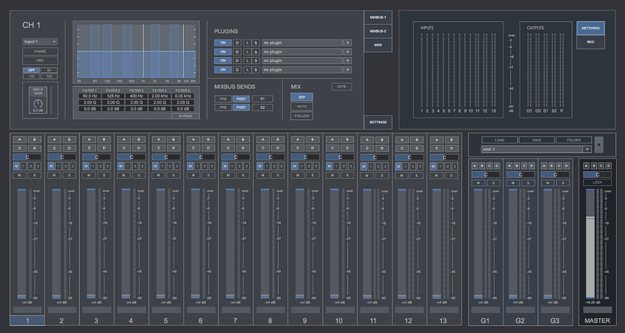
cMixer is a standalone digital mixer for broadcast and event use. Intended uses include online radio, talk shows, dialogue recording, speeches, conferences, meetings, podcasting and small live concerts.
With a computer and an audio interface it can stand in for a hardware mixer, according to the description. Your favorite plugins can be used inside it, so audio handling stays within one computer.
It has 10 mono input channels and 3 stereo input channels. Each input offers phase invert, a -20 dB pad, a high-pass filter, input gain (+/-15 dB), a 5-band parametric EQ, four VST/AU slots, pan, mute and solo.
For multi-microphone sessions it provides Automix, Follow and Gate modes, available on the mono input channels. Outputs are two stereo outputs plus an external recording output.
Key features
Automix
The engine controls the output gains of several microphones automatically to reduce feedback, comb filtering and background noise, which may cut manual work in panel-style recordings.
Follow mode
This follows the main speaker automatically and mutes the other channels, which suits cases where the host's voice has priority.
Auto gate
Channels switch on and off automatically depending on output level, reducing noise and feedback from microphones not in use.
Side-chain gain control
While music plays on a stereo channel, its gain is lowered automatically whenever someone speaks into a microphone.
5-band EQ and four plugins
Each input has a 5-band parametric EQ and four VST/AU plugin slots, and the three group channels have the same.
Recording, MIDI and presets
Recording to WAV and AIFF is supported, and multitrack mode records only selected inputs. MIDI device control and a preset manager are included.
Specifications
| Item | Details |
|---|---|
| Type | Broadcast digital mixer (standalone) |
| Inputs | 10 mono + 3 stereo |
| Groups | 3 |
| Mix bus sends | 2 stereo (pre/post) |
| Outputs | 2 stereo + 2 mix bus outputs + 1 external recording output |
| Sample rate / bits | Up to 192 kHz / 24-bit (depends on the sound card) |
| Recording | WAV / AIFF |
| OS | Windows 7 or later (64-bit), 2 GB RAM, 1920×1080 or larger screen |
What is included and system requirements
- cMixer standalone application (Windows)
- Supported OS: Windows 7 or later (64-bit)
- Minimum 2 GB RAM and a 1920×1080 screen
- A free trial is listed on the store page
How to use it
- Install cMixer on Windows.
- Connect your audio interface and choose its driver.
- Assign microphones to input channels.
- Set the EQ and plugins on each channel.
- With several microphones, try the Automix or other modes.
- Set outputs and recording, then do a test recording before the real session.
Where it may come in handy
Online radio and podcasts
It may suit combining the audio of shows with several speakers.
Meeting and event streaming
It may help in streams where several microphones need automatic balancing.
Small live shows
It may fit live shows mixed with minimal equipment.
Who it may suit
- People streaming shows or events with several microphones
- Those who want to avoid a hardware mixer
- Groups recording internet radio or podcasts
Good to know before you buy
- Only Windows is listed as supported.
- The number of physical inputs and outputs depends on your sound card.
- A screen resolution of 1920×1080 or more is required.
Price
Please check the official page for the price.
See Digital Brain Instruments cMixer on the product page
More of the same kind
Other introduction articles of the same kind.
- Sonarworks SoundID Reference for Multichannel
- Sonnox ListenHub
- VB-Audio Voicemeeter Banana
- Adobe Adobe Audition
- Stagecraft Software Universal Plug
- Zynaptiq TIME FACTORY II
We have introduced 8 other products from Digital Brain Instruments.
- Digital Brain Instruments DSP Manager 2
- Digital Brain Instruments Voxpat Pro
- Digital Brain Instruments Multiplex Vocoder 3
- Digital Brain Instruments Digital Brain Instruments Spacelab
- Digital Brain Instruments Digital Brain Instruments Batch Pro 2
See the full list in Product database: Streaming and recording software and others.
Sources: pluginboutique.com (checked 2026-10-27)










Comments