
Disclosure: This page may contain affiliate links. Prices were checked on the date shown and may change.
An introduction to Waves GTR Solo, based on information from the maker and distributors: what it does, how to use it and who it may suit. It is not scored.
GTR Solo is a “greatest hits” version of Waves’ acclaimed GTR3 suite of amps and effects, with the same meticulous modeling and detail.
— Waves official site
What is GTR Solo?
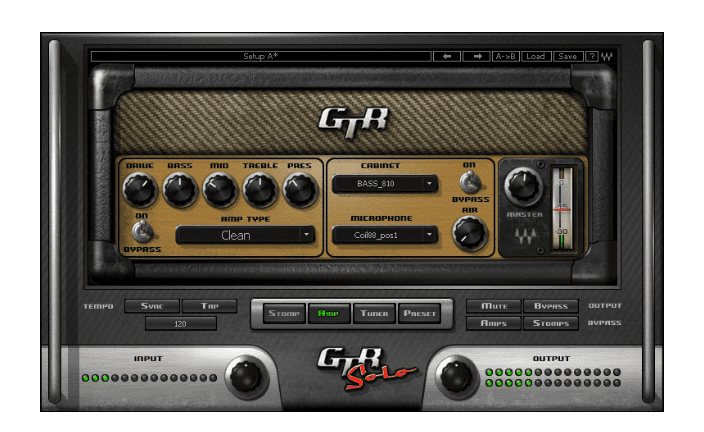
GTR Solo is a smaller, lower-priced selection drawn from Waves' GTR3 guitar amp simulator. The maker describes it as a condensed version of GTR3. Amps, cabinets, compact effects and microphones can all be set up on the computer.
The amps are two clean, three overdrive and four high-gain models, including two custom amps made with Paul Reed Smith (PRS). There are nine guitar cabinets and one bass cabinet, and twelve miking options using three mic types.
The effects are about a dozen stompbox pedals, including chorus, overdrive, distortion, delay and two reverbs. Up to four pedals can be placed before or after the amp and rearranged by drag and drop. The ToolRack format is designed with live use in mind.
A tuner for guitar and bass is included, along with 68 factory presets. The page from the Japanese distributor Media Integration says the sound quality matches GTR3, the higher version. It can also run as a standalone application.
Key features
Nine amps, including PRS custom models
The lineup is two clean, three overdrive and four high-gain amps, including two custom models made with PRS. It offers a range from clean to heavy distortion in one product.
Cabinets and miking
Nine guitar cabinets and one bass cabinet can be combined with three mic types for twelve miking options. It lets you experiment with mic choices as in a real recording.
Up to four pedal effects
Choose from about a dozen effects, including chorus, overdrive, distortion, delay and two reverbs, and place up to four before or after the amp. Reordering them lets you hear how the order changes the sound.
ToolRack and live-friendly handling
The ToolRack arrangement lets you line up several processes. It supports multipoint touch screens and is described as ideal for real-time live performance.
Tuner for guitar and bass
The tuner supports alternate and user-defined tunings. Players using drop tunings can set them up quickly.
68 factory presets
Sixty-eight factory presets are included. They serve as a starting point when building a sound from scratch feels difficult.
Runs standalone
It can run as a standalone application without a DAW, which saves launching a DAW for quick practice.
Specifications
| Item | Details |
|---|---|
| Maker | Waves |
| Type | Guitar and bass amp simulator |
| Amps | 2 clean, 3 overdrive, 4 high-gain (including 2 PRS custom amps) |
| Cabinets | 9 guitar, 1 bass |
| Miking | 12 options with 3 mic types |
| Effects | About a dozen stompboxes (up to 4 inserted) |
| Presets | 68 |
| Formats | Windows: VST / AAX; Mac: VST / AU / AAX (per Plugin Boutique) |
| OS | Windows 10 or later; macOS Monterey 12 to Sequoia 15 (per Plugin Boutique). The V17 page at Media Integration lists macOS Ventura 13 to Tahoe 26 |
What is included and system requirements
- The GTR Solo plugin (installed via Waves Central)
- 9 guitar amps, 10 cabinets, about a dozen stompboxes, a tuner and 68 presets
- Windows: Windows 10 or later (VST / AAX)
- Mac: macOS 12 to 15 (VST / AU / AAX, per Plugin Boutique)
How to use it
- Create a Waves account and register the purchased license under Register New Products.
- Download and start Waves Central and log in.
- On the Install Products tab, select GTR Solo and click Install & Activate.
- Open your DAW and insert GTR Solo on a guitar track.
- Choose an amp and combine a cabinet with a miking option.
- Insert up to four pedal effects before or after the amp as needed.
- Recall a preset you like and fine-tune it.
- To practice without a DAW, start it in standalone mode.
Where it may come in handy
Basic guitar tone at home
Amps, cabinets and mics are handled in one place, so it may be a candidate for people new to amp simulators.
Trying pedal order
With up to four pedals before or after the amp, you can compare how the position of a distortion pedal changes the sound.
Practice in standalone mode
Because it runs standalone, it may suit quick practice without launching a DAW.
A way into GTR3
The Japanese distributor says the sound quality matches GTR3. You could start with Solo and consider GTR3 if you want a wider selection.
Who it may suit
- Those who want to try an amp simulator in a smaller package
- Players who prefer a limited choice of amps
- Anyone who also wants a standalone practice tool
- Users who already manage Waves plugins in Waves Central
Good to know before you buy
- Waves plugins are activated through Waves Central.
- Waves holds frequent sales and prices change substantially.
- Supported OS versions differ by Waves release (such as V17), so check the latest information before buying.
How it differs from similar products
We do not pick a winner; the official figures are placed side by side.
Waves GTR3
GTR3 is listed with 30 guitar amps, 7 bass amps, 16 guitar and 6 bass cabinets and 25 stompboxes. GTR Solo has 9 amps, 10 cabinets and about a dozen effects. Stacking two amps in series or parallel is listed as a GTR3 feature.
Price
Please check the official page for the price.
See GTR Solo on the product page
More of the same kind
We have introduced 28 guitar amp simulators. Here are some of the others.
- Bogren Digital Ampknob BDH 5169
- Bogren Digital IRDX Core
- Kuassa Amplifikation Creme
- Kuassa Amplifikation Caliburn
- Blue Cat Audio Blue Cat's Axiom 2
- Kuassa Amplifikation Rectifor
We have introduced 215 other products from Waves.
For a side-by-side comparison scored on the same criteria, see our comparison of guitar amp simulators.
See the full list in Product database: Effects.
Sources: pluginboutique.com minet.jp (checked 2026-10-27)










Comments