
Disclosure: This page may contain affiliate links. Prices were checked on the date shown and may change.
An introduction to Waves PuigChild Compressor, based on information from the maker and distributors: what it does, how to use it and who it may suit. It is not scored.
PuigChild brings you this classic sound, modeled to the last sonic detail under the close supervision of Grammy®-winning producer/engineer Jack Joseph Puig, from his own favorite units.
— Waves official site
What is PuigChild Compressor?
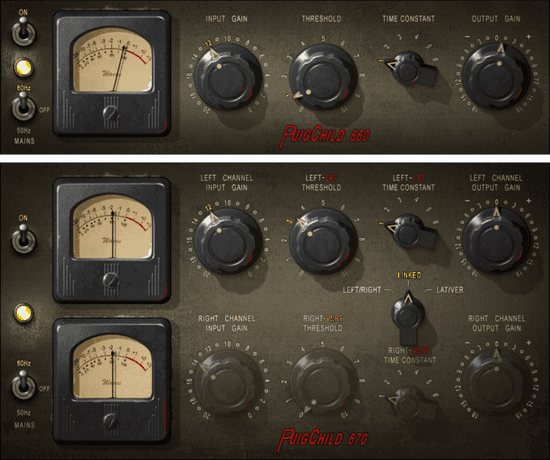
PuigChild Compressor is a Waves plug-in modeled on the Fairchild 660 and 670 tube compressors from the 1950s. It is described as modeled under the supervision of producer/engineer Jack Joseph Puig, from his own units.
The product page describes an open, warm sound with a fast attack, and lists two kinds of use: shaping transients and gluing a mix on the stereo bus. Pushed harder, it is said to give the classic pumping drum sound.
It offers four processing modes: mono, dual mono, stereo and M/S, with six selectable attack/release choices. Besides the modeled harmonic distortion, you can add the original 50/60 Hz hum and noise floor for analog character.
The circuit is described as low-noise modeling with custom multi-stage transformers per channel, and a variable-mu tube topology that reacts to the input load. Vocals, transient-heavy instruments and bus processing are the main uses given.
Key features
Modeled on Fairchild tube compressors
Based on the Fairchild 660 / 670 variable-mu tube design. The page says the circuit reacts to input load, so you may want to explore how the tone changes with how hard you drive it.
Four processing modes
Choose from mono, dual mono, stereo and M/S. Stereo for the bus, or M/S when you want to treat center and sides separately, for example.
Six attack/release choices
The timing is picked from six selectable choices rather than set continuously, which may suit finding a workable setting on a source quickly.
Optional hum and noise floor
Adds 50/60 Hz hum and a noise floor to approach the behavior of the original unit. If you do not want it, you can leave it out.
Low-noise transformer modeling
Described as low-noise modeling with custom multi-stage transformers per channel, including the modeled total harmonic distortion.
From vocals to buses
Vocals, transient-heavy instruments and bus gluing are the uses listed on the product page.
Specifications
| Item | Details |
|---|---|
| Formats (Mac) | VST / AU / AAX |
| Formats (Windows) | VST / AAX |
| OS (Mac) | macOS Monterey 12 to Sequoia 15 |
| OS (Windows) | Windows 10 or later |
| License | Registration and activation through a Waves account |
What is included and system requirements
- Mac: macOS Monterey 12 / Ventura 13 / Sonoma 14 / Sequoia 15 (VST, AU, AAX)
- Windows: Windows 10 or later (VST, AAX)
- Fairchild-style compressor developed with Jack Joseph Puig
How to use it
- Create a Waves account (or log in if you already have one).
- In 'Register New Products', enter the serial number shown in your Plugin Boutique account.
- Download and install Waves Central, then log in.
- On the 'Install Products' tab, tick the product and click 'Install & Activate'.
- Open your DAW and insert the plug-in on a track or bus.
- Launch PuigChild Compressor, pick a processing mode (mono / dual mono / stereo / M/S), and step through the six attack/release choices.
Where it may come in handy
Evening out vocal dynamics
You might try the mode and timing choices when you want to even out level variations in a voice.
Gluing the stereo bus
You could insert it on the whole mix to hear how the tracks sit together.
Adding drive to drums
Using it harder to get a pumping feel is one of the uses mentioned on the product page.
Who it may suit
- People who want to try a Fairchild-style tube compressor
- People who want another compressor option for vocals or buses
- People interested in analog behavior including hum and noise
Good to know before you buy
- A Waves account and license activation are required (for purchases through Plugin Boutique, the serial number is registered to a Waves account).
- Supported systems are listed as macOS Monterey 12 through Sequoia 15 on Mac and Windows 10 or later on Windows.
How it differs from similar products
We do not pick a winner; the official figures are placed side by side.
Waves Kramer PIE Compressor
Both are Waves plug-ins modeled on classic studio compressors. PuigChild is based on the Fairchild 660 / 670 (tube, four modes, six attack/release choices); Kramer PIE is based on the Pye compressor (PWM design, with Threshold, Ratio and Decay as the main controls).
Price
Please check the official page for the price.
See PuigChild Compressor on the product page
More of the same kind
We have introduced 85 compressors. Here are some of the others.
- Solid State Logic SSL Native Bus Compressor 2
- W. A. Production Presser by Aiden Kenway
- Universal Audio Capitol Mastering Compressor
- BLEASS BLEASS Multiband Compressor
- Solid State Logic SSL Native X-ValveComp
- Black Rooster Audio KH-COMP1
We have introduced 215 other products from Waves.
- Waves Linear Phase Multiband Compressor
- Waves Waves H-Comp Hybrid Compressor
- Waves V-Comp
- Waves OneKnob Pressure
- Waves SSL G-Master Buss Compressor
For a side-by-side comparison scored on the same criteria, see our comparison of compressors.
See the full list in Product database: Effects.
Sources: pluginboutique.com (checked 2026-10-27)










Comments