
Disclosure: This page may contain affiliate links. Prices were checked on the date shown and may change.
An introduction to Waves AudioTrack, based on information from the maker and distributors: what it does, how to use it and who it may suit. It is not scored.
there’s no need to put together a basic channel strip from multiple plugins—AudioTrack has already done the work for you.
— Waves official site
What is AudioTrack?
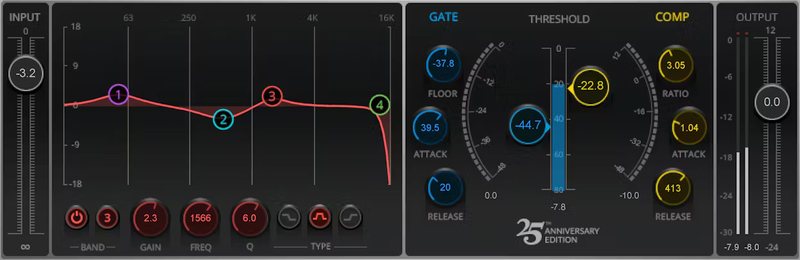
AudioTrack is a channel-strip plugin from Waves. It combines a four-band parametric EQ, a gate, and a compressor/expander in one window, so the basic processing for a track sits in a single plugin.
Building a basic channel strip in a DAW usually means opening several separate EQ and dynamics plugins. AudioTrack replaces that with one insert: a gate to reduce noise, compression to control peaks, and upward expansion to emphasize percussive attacks, all on the same screen.
Its low CPU use is listed as a feature. Placing one instance on every channel of a song template means EQ and dynamics are ready as soon as a project starts, which may cut down on setup work.
It is also described as suitable for podcasting, narration, and voiceover, and ships with 48 presets for guitar, voice, drums, keyboards, and more. The interface can be switched between a modern dark skin and a legacy light skin.
Key features
Four-band parametric EQ
Each of the four bands can be set to a bell, high-shelf, or low-shelf response. The low and high bands also offer a choice of filter responses, so cutting unwanted ranges and shaping tone can both be done in one window.
Gate for noise
A built-in gate attenuates the signal when it falls quiet, which may help with low-level room or equipment noise from a recording. It can be adjusted alongside the EQ and compressor.
Compression and upward expansion
Besides a compressor that tames peaks or adds power, there is upward expansion that emphasizes percussive peaks. Both approaches can be tried on the same track.
Touch-friendly multipoint interface
The interface is designed for multipoint touch input. On a touch-capable display, several parameters can be adjusted by hand.
Modern and legacy looks
You can choose either the modern dark interface or the legacy light interface, depending on the room lighting and personal preference.
Input/output faders and metering
Input and output faders let you set gain staging to avoid clipping, and the extensive metering shows the state of the audio visually.
48 presets
48 presets are included for guitar, voice, drums, keyboards, and other sources, which may be a convenient starting point on first use.
Specifications
| Item | Details |
|---|---|
| Type | Channel strip (EQ + dynamics) |
| Processing | 4-band parametric EQ / gate / compressor / expander |
| Presets | 48 |
| macOS | Monterey 12, Ventura 13, Sonoma 14, Sequoia 15 |
| Windows | Windows 10 or later |
| Formats (Mac) | VST / AU / AAX |
| Formats (Windows) | VST / AAX |
| Activation | Register and install via Waves Central |
What is included and system requirements
- AudioTrack license
- 48 presets
- Mac: VST / AU / AAX; Windows: VST / AAX
- Download and activation through Waves Central
How to use it
- After purchase, create a Waves account or log in to an existing one.
- Use "Register New Products" to enter the serial number shown in your store account.
- Download and install the Waves Central app.
- Log in to Waves Central and tick AudioTrack on the "Install Products" tab.
- Click "Install & Activate" to install and authorize it.
- Open your DAW and insert AudioTrack on a track.
- Start with a preset close to the source, such as voice or guitar, then adjust the EQ bands.
- Add the gate and compressor settings gradually and check the input and output levels.
Where it may come in handy
Home-recorded vocals and guitar
It may suit cases where you want EQ and dynamics for a recorded track in one plugin. Low-end cleanup and compression sit on one screen, which could keep the plugin count down.
Podcasts and narration
A workflow of gating noise, shaping the voice range with EQ, and steadying volume with the compressor may be possible. The product page lists podcasting, narration, and voiceover as uses.
Placed on every track of a template
Because it is described as light on CPU, putting an instance on every channel of a template is one possible use. EQ and dynamics could be ready to adjust as soon as a project starts.
Shaping drums and percussion
Upward expansion is described as emphasizing percussive peaks. Trying how the attack comes through on a drum track may be one use.
Who it may suit
- People who want basic processing in one plugin instead of opening EQ and dynamics separately
- Those polishing podcast or narration voice
- Users who want a light channel strip on every track from the start
- Beginners trying Waves plugins for the first time
Good to know before you buy
- A Waves account and activation through Waves Central are required.
- Supported systems are listed as macOS Monterey 12 through Sequoia 15 and Windows 10 or later.
- Formats are VST / AU / AAX on Mac and VST / AAX on Windows.
Price
Please check the official page for the price.
See AudioTrack on the product page
More of the same kind
We have introduced 51 channel strips. Here are some of the others.
- McDSP 6050 Ultimate Channel Strip Native v7
- McDSP Channel G Native v7
- Softube Softube American Class A
- Harrison FasTrack
- Harrison Audio Bass Flow
- McDSP Channel G Compact
We have introduced 215 other products from Waves.
- Waves Kramer HLS Channel
- Waves Eddie Kramer Vocal Channel
- Waves Abbey Road REDD Consoles
- Waves Abbey Road EMI TG12345 Channel
- Waves CLA MixHub
See the full list in Product database: Effects.
Sources: pluginboutique.com (checked 2026-10-27)










Comments