
Disclosure: This page may contain affiliate links. Prices were checked on the date shown and may change.
An introduction to Waves IDX Intelligent Dynamics, based on information from the maker and distributors: what it does, how to use it and who it may suit. It is not scored.
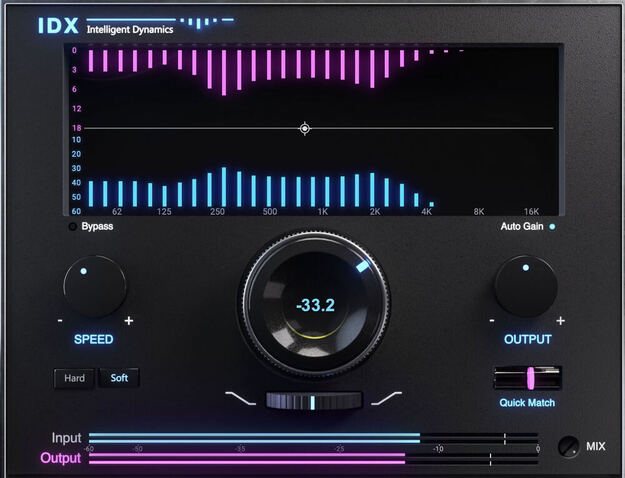
IDX Intelligent Dynamics is a smart frequency-dependent compressor that optimizes your tracks' energy for greater punch and focus.
— Waves official site
What is IDX Intelligent Dynamics?
IDX Intelligent Dynamics is a frequency-dependent compressor from Waves. It is presented as a tool that works from one main knob to optimize the energy of a track.
It automatically finds the busiest frequency areas, meaning those that consume energy without contributing to the tone of an instrument or vocal, and compresses them. Unlike a traditional compressor that reduces the level above a threshold uniformly, IDX is described as using progressive attenuation.
As a result, the ranges that define the track's character gain a relative advantage, according to the listing. It can be placed at the start of a plugin chain, on several tracks, and even on the master bus as a foundation for the rest of the mix.
Plugin Boutique lists VST, AU and AAX on Mac and VST and AAX on Windows, for macOS Monterey 12 to Sequoia 15 and Windows 10 or later. A zero-latency version for live sound is also mentioned.
Key features
One main knob
The amount of processing is set mainly with a single knob. It may suit moments when you want to get a general direction before fine-tuning threshold and ratio on a conventional compressor.
Automatic frequency detection
Multiple detectors look across the frequency range and find crowded areas automatically, so processing starts without you choosing which band to target.
Progressive attenuation
It is described as attenuating progressively rather than reducing everything above a threshold uniformly. This is an option when you want to shape a sound without squashing it.
Quick Match
Quick Match balances input and output levels quickly, which helps when you want to compare before and after at the same loudness.
Hard and Soft modes
The response speed can be switched between Hard and Soft, so the behaviour can be matched to how percussive the material is.
Tilt control
Tilt adjusts the tonal balance between brighter and darker. It can be used to fine-tune the result if the processing feels too bright or too dark.
Zero-latency version
A zero-latency version for live sound is also provided, so it can be used in real-time applications.
Specifications
| Item | Details |
|---|---|
| Maker | Waves |
| Type | Frequency-dependent compressor |
| Formats (Mac) | VST / AU / AAX |
| Formats (Windows) | VST / AAX |
| OS (per Plugin Boutique) | macOS Monterey 12 to Sequoia 15, Windows 10 or later |
| Controls | Main knob, Quick Match, Hard / Soft, Tilt |
| Live use | Zero-latency version available |
What is included and system requirements
- IDX Intelligent Dynamics (standard and zero-latency versions)
- Formats: Mac = VST / AU / AAX, Windows = VST / AAX
- Linked to a Waves account; installed and activated through Waves Central
How to use it
- Create a Waves account and register the purchased serial.
- Install the Waves Central desktop app, then select IDX to install and activate it.
- Insert IDX on a track or bus in your DAW.
- Raise the main knob gradually and listen for the direction of change.
- Use Quick Match to align input and output levels and compare with bypass at equal loudness.
- Switch between Hard and Soft if the response feels too fast or too slow.
- Use Tilt to correct the result if it sounds too bright or too dark.
- Try different placements, such as the start of the chain or several tracks.
Where it may come in handy
Livening up flat-sounding recordings
It might be tried on vocals or guitars that feel flat in a home recording, to hear what changes. It could serve as a first step before settling detailed settings.
Building a mix foundation
As the listing suggests, placing it at the start of the chain on several tracks may make the overall balance easier to align.
Gentle master bus adjustment
It could be applied lightly on a nearly finished mix to tidy crowded frequency ranges, using Quick Match to remove level differences while checking.
Streaming and live sound
Because a zero-latency version is included, it may be considered for real-time uses where delay must be avoided.
Who it may suit
- Users who find detailed compressor settings difficult and prefer a single main control
- People who want band-by-band tidying as a mix foundation
- Those working with recordings that sound flat
- Anyone looking for low-latency processing for live or streaming use
Good to know before you buy
- Plugin Boutique sometimes shows limited-time sale prices, so check the current price before buying.
- Licenses are managed through the Waves account; installation and activation use Waves Central.
- The effect varies by material, so always compare with bypass.
Price
Please check the official page for the price.
See IDX Intelligent Dynamics on the product page
More of the same kind
We have introduced 85 compressors. Here are some of the others.
- Kuassa EFEKTOR CP3603 Compressor
- Universal Audio Capitol Mastering Compressor
- FLUX:: Syrah
- AudioThing Things – Voice
- PSP Audioware PSP oldTimerMB
- Universal Audio 1176 Classic Limiter Collection
We have introduced 215 other products from Waves.
- Waves CLA-3A Compressor / Limiter
- Waves OneKnob Pressure
- Waves Waves H-Comp Hybrid Compressor
- Waves Linear Phase Multiband Compressor
- Waves PuigChild Compressor
For a side-by-side comparison scored on the same criteria, see our comparison of compressors.
See the full list in Product database: Effects.
Sources: pluginboutique.com (checked 2026-10-27)










Comments