
Disclosure: This page may contain affiliate links. Prices were checked on the date shown and may change.
An introduction to Acon Digital Remix, based on information from the maker and distributors: what it does, how to use it and who it may suit. It is not scored.
Remix is a plug-in that let's you separate and remix vocals, piano, bass, drums and other instruments in real time.
— Acon Digital official site
What is Remix?
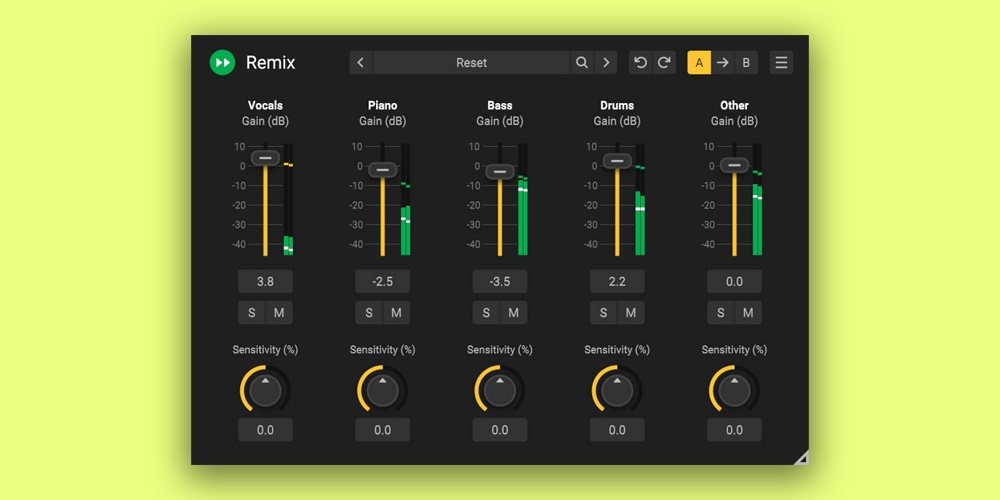
Remix is a stem separation plug-in from Acon Digital. It lets you work with an existing mix as five stems in real time: Vocals, Piano, Bass, Drums and Other.
According to the maker, it uses AI technology and runs live in your session with no offline processing. You can raise or lower each stem with faders, for example to lower the vocals for a karaoke-style version or to bring up the drums.
The detection sensitivity can be adjusted for each stem, so you can balance artifacts against spill. All parameters can be automated.
In addition to the mix output, there are separate outputs for each stem. In supported hosts you can route them to separate tracks and use insert effects on each stem.
Key features
Real-time five-stem separation
Splits a mix into Vocals, Piano, Bass, Drums and Other. Since it runs live in the DAW without waiting for an offline render, it may be easy to experiment.
Per-stem sensitivity
The detection threshold can be set for each stem, so you can balance reducing spill from other instruments against reducing artifacts.
Multiple outputs
Provides outputs for the mix and each stem (Vocals, Piano, Bass, Drums and Other). In supported hosts you can send each stem to its own track and apply effects.
Automation and level meters
All parameters are automatable, and each stem has an output level meter. You can move the drum or vocal balance along with the arrangement.
Presets and user presets
Includes a large number of factory presets, and you can save, load and categorize your own.
Resizable UI
The GUI is resizable and the UI scaling is adjustable, so you can fit it to your screen.
Specifications
| Item | Details |
|---|---|
| Type | Stem separation plug-in |
| Stems | Vocals / Piano / Bass / Drums / Other |
| Processing | Real time |
| Formats (Windows) | VST / VST3 / AAX |
| Formats (Mac) | AU / VST / VST3 / AAX |
| Sample rates | Up to 96 kHz |
| Apple Silicon | Native support |
| Trial | Free trial available (no credit card) |
What is included and system requirements
- Remix plug-in (32-bit and 64-bit versions)
- Windows: Windows 11 / 10, Intel Core i5 or AMD multi-core processor (i7 or faster recommended), 1 GB RAM (4 GB or more recommended), 1 GB free disk space
- Mac: OS X 10.13 or later, native on ARM64 and Intel, 1 GB RAM (4 GB or more recommended), 1 GB free disk space
- A host compatible with VST, VST3 or AAX (and AU on Mac)
How to use it
- Download and install the trial from Acon Digital's product page.
- Rescan plug-ins in your DAW.
- Insert Remix on the track whose stems you want to separate.
- Adjust the Vocals, Piano, Bass, Drums and Other faders to set the balance.
- Adjust the sensitivity of any stem where spill or artifacts are noticeable.
- If needed, assign each stem output to a separate track.
- Apply insert effects on those tracks.
- Save settings you like as a preset.
Where it may come in handy
Karaoke-style and practice tracks
You may lower the vocal level, or lower the drums for practice. Results depend on the source, so it is best to try it and check.
Post-production and dialogue work
The maker's page includes comments from dialogue mixers, so it may be used to balance material where dialogue and music are mixed together.
Reducing spill in live recordings
Comments on the maker's page mention using it to deal with spill in live recordings or in the studio by adjusting each stem's level.
Who it may suit
- People who want to adjust the balance of just some instruments in a finished mix
- People who want to try stem separation in real time inside the DAW
- People who want to apply different effects to each separated stem
- People looking for a one-time purchase (the maker says no subscription)
Good to know before you buy
- Whether multiple outputs are available depends on the host (the maker says 'in some hosts').
- Separation results depend on the source, so trying the free trial first is advisable.
- The same maker offers Remix:Drums, and a bundle of both is listed on the maker's page.
Price
$49 (Acon Digital official site, checked 2026-10-27). Prices can vary by region and promotion, so check the official page before buying.
Past sales
Sales we have confirmed so far. A sale with the same terms may not be held again.
| Ended | Regular | Sale | Discount | Store, date checked |
|---|---|---|---|---|
| Nov 16, 2026 | $49 | $24 | 51% off | Plugin Boutique, checked 11/16 |
More of the same kind
Other introduction articles of the same kind.
- NUGEN Audio AB Assist 2
- New Audio Technology Spatial Sound Card – Spatial Sound Card Pro
- Apogee FX Complete Bundle
- Waves Key Detector
- United Plugins FireSpacer
- iZotope Vinyl
We have introduced 8 other products from Acon Digital.
- Acon Digital Extract:Dialogue 2
- Acon Digital Remix:Drums
- Acon Digital Verberate Immersive 2
- Acon Digital DeVerberate 3
- Acon Digital DeFilter
See the full list in Product database: Effects.
Sources: acondigital.com pluginboutique.com (checked 2026-10-27)










Comments