
Disclosure: This page may contain affiliate links. Prices were checked on the date shown and may change.
An introduction to NUGEN Audio AB Assist 2, based on information from the maker and distributors: what it does, how to use it and who it may suit. It is not scored.
AB Assist is a tool for quickly comparing multiple pieces of audio.
— NUGEN Audio official site
What is AB Assist 2?
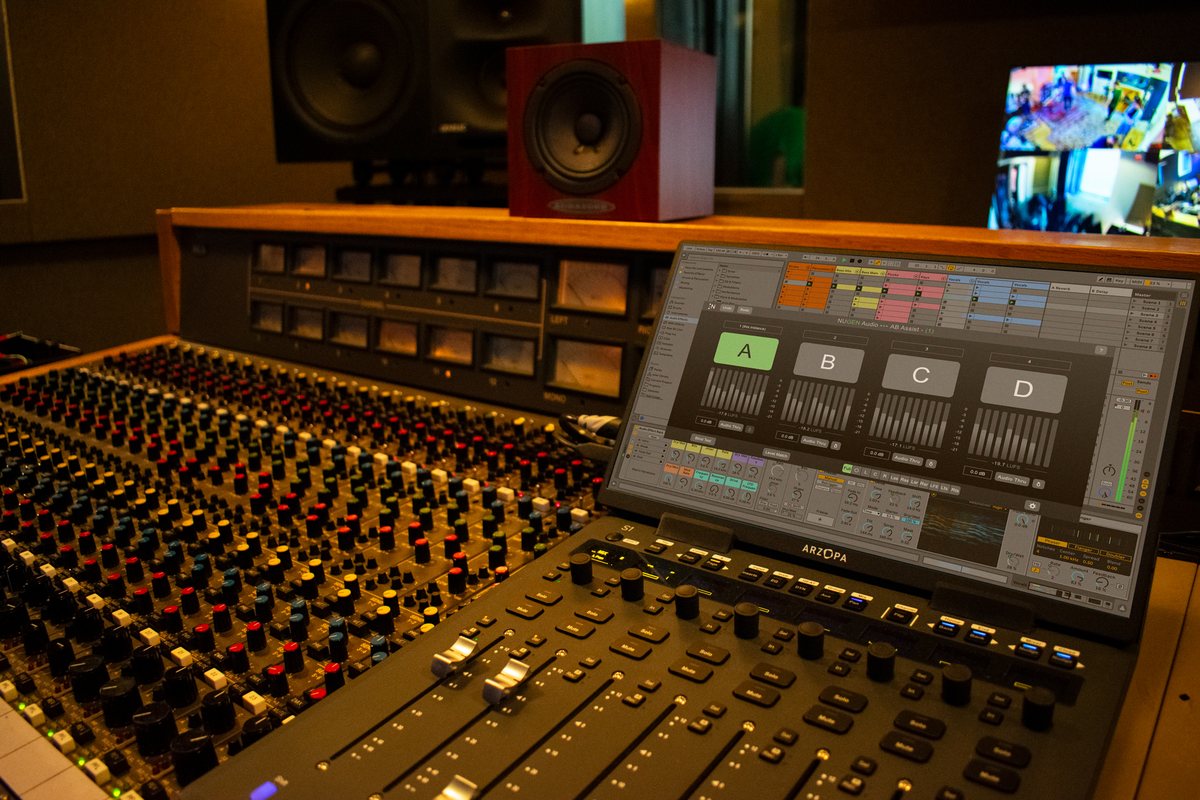
AB Assist 2 is a utility plug-in from NUGEN Audio for quickly comparing several pieces of audio. NUGEN says it can be used for different takes, mix revisions, versions of a master, plug-in options or anything else you want to compare.
In Test mode the channels are labelled randomly so you can run a blind comparison without knowing which is which. It may help when you want to reduce bias while listening.
Version 2 raises the number of sources you can compare from two to four and adds comparison of surround mixes in any channel count as well as stereo. It also adds auto level matching of short-term loudness (LUFS), a mono fold-down check and smooth fades between sources.
Multiple plug-in instances now communicate directly instead of through an external send. Owners of AB Assist 1 can upgrade to AB Assist 2 through the Offers and Upgrades area of their account.
Key features
Compare four sources
Version 2 receives and switches between four audio sources. That may help when you have several takes or mix candidates to audition in turn.
Blind test mode
Channel labels are randomised so you can compare without knowing which source is which. It may suit decisions where you want to limit bias.
Surround comparison
Besides stereo, surround mixes with any channel count can be compared, which may be relevant if you work on surround in post-production.
Auto level matching (LUFS)
The short-term loudness of the sources is matched, which may help when you want to take volume differences out of the comparison.
Mono check
You can compare the mono fold-down, which may be useful for checking whether a mix holds up in mono playback.
Smooth fades and direct communication
Fades are applied when switching sources, and instances communicate directly without an external send, which may reduce setup effort.
Specifications
| Item | Details |
|---|---|
| Plug-in formats | AAX, VST3, AU (64-bit); the Plugin Boutique listing also mentions AudioSuite |
| Supported OS | Mac OS X 10.13 (Intel) / macOS 11.0 (M1), Windows 10 |
| RAM | 512 MB |
| Sources compared | 4 |
| Main functions | Blind test, surround comparison, LUFS level matching, mono check, fades |
What is included and system requirements
- AB Assist 2 plug-in (AAX / VST3 / AU)
- A free demo is offered (per the official page)
- Also available as part of NUGEN bundles and subscription plans
How to use it
- Register your licence in a NUGEN account and run the installer.
- Insert AB Assist on each of the tracks you want to compare.
- The instances connect to each other directly.
- Switch between sources to compare them; use Test mode for a blind comparison.
- Turn on auto level matching (LUFS) if volume differences are a concern.
- Use the mono check to listen to the mono fold-down.
- For surround comparisons, set it up to match the channel count.
Where it may come in handy
Comparing mix revisions
When there are several versions of a mix, you might use Test mode to compare them without preconceptions.
Comparing plug-in settings
You could compare the same material processed with different settings, with volume matched.
Checking master versions
Different masters, for example for streaming and for CD, could be placed side by side and switched.
Checking surround mixes
NUGEN lists surround comparison as a use, which may suit post-production work.
Who it may suit
- People who audition mix or master revisions repeatedly
- Those who want to limit bias when comparing
- Anyone working with surround mixes
- Users who want to compare plug-in settings with matched volume
Good to know before you buy
- You need to insert an instance on each track you want to compare.
- Owners of AB Assist 1 can upgrade through the official Offers and Upgrades area (this differs from the new-purchase price).
- It is also offered as part of bundles and subscriptions.
- The Plugin Boutique listing also mentions AudioSuite; the official page lists AAX, VST3 and AU.
How it differs from similar products
We do not pick a winner; the official figures are placed side by side.
AB Assist1
NUGEN's version 2 notes say the number of comparable sources rises from two to four, with surround comparison, LUFS level matching, mono check and fades added.
Price
$49 (NUGEN Audio official site, checked 2026-10-27). Prices can vary by region and promotion, so check the official page before buying.
See AB Assist 2 on the product page
More of the same kind
Other introduction articles of the same kind.
- Waves InPhase
- IK Multimedia T-RackS Leslie
- Mellowmuse Mellowmuse ATA Auto Time Adjuster
- Blue Cat Audio Blue Cat's Connector
- Waves TRACT SPL Meter
- Safari Audio Time Machine V2
We have introduced 30 other products from NUGEN Audio.
- NUGEN Audio LM-Correct
- NUGEN Audio NUGEN Audio Stereoplacer Elements
- NUGEN Audio NUGEN Audio Monofilter Elements
- NUGEN Audio Monofilter
- NUGEN Audio SigMod
See the full list in Product database: Effects.
Sources: nugenaudio.com pluginboutique.com (checked 2026-10-27)










Comments