
Disclosure: This page may contain affiliate links. Prices were checked on the date shown and may change.
An introduction to MeldaProduction MAutopanMB, based on information from the maker and distributors: what it does, how to use it and who it may suit. It is not scored.
MAutopanMB can split the signal into up to 6 bands and treat each one separately.
— MeldaProduction official site
What is MAutopanMB?
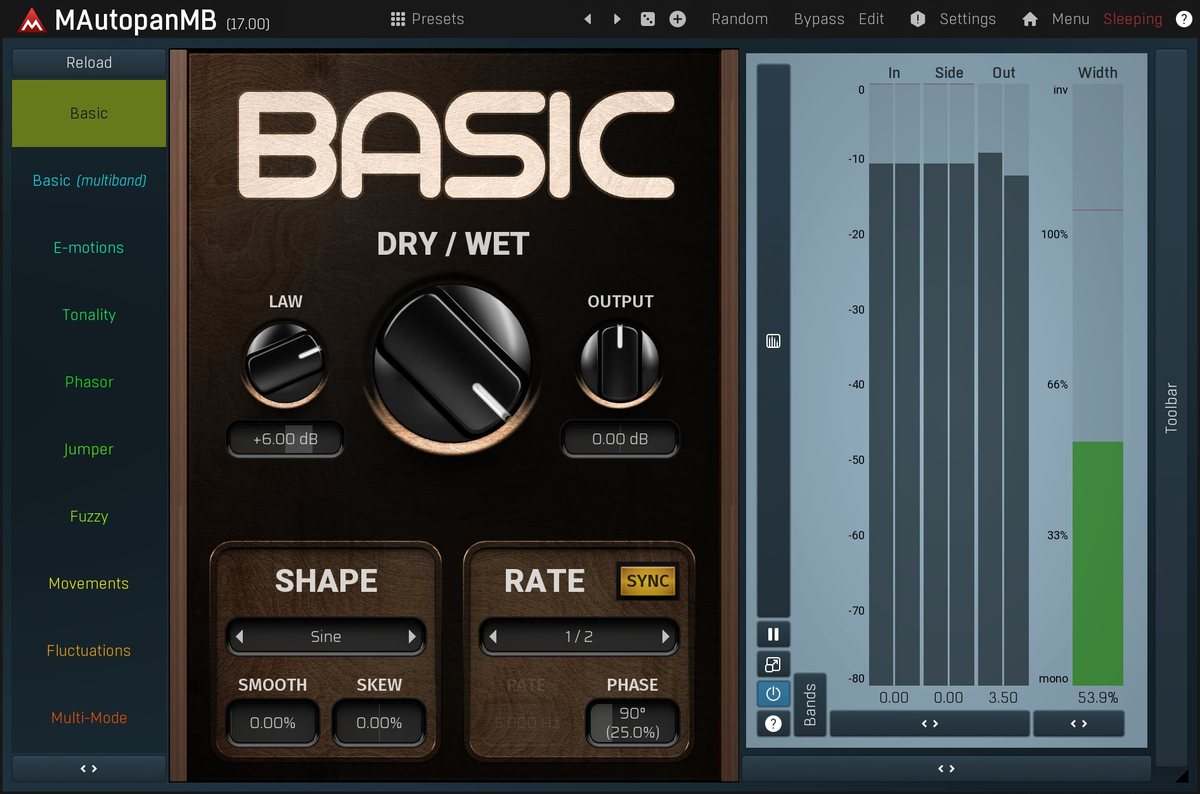
MAutopanMB is a multiband auto-panner from MeldaProduction in the Czech Republic. Its feature is that automatic left-right movement can be applied separately per frequency band, and it is meant to add spatial movement to static sounds.
Typical auto-panners move the whole signal with one waveform, while MAutopanMB can split the signal into up to six bands and move each with a different pattern. The official page mentions keyboards, guitars and other mono instruments as examples.
The oscillator shapes can be built by blending predefined shapes, drawing custom curves in the maker's envelope editor, or programming a step sequencer. Four global modulators, such as LFO, envelope and pitch detector, can modulate any parameter.
The interface can be switched between a simple view that starts with a few knobs and an advanced view that exposes every function. It runs on Windows and macOS in VST, VST3 and AAX (Windows) and VST, VST3, AU and AAX (Mac). A free trial is offered officially.
Key features
Independent panning in up to six bands
The signal can be split into up to six bands, each moved differently. For example, the low end can stay centered while the highs move widely.
Three crossover algorithms
Band splitting offers analog, linear-phase and hybrid algorithms, with input gain and peak meters for every band.
Adjustable oscillator shape
Shapes can come from mixing presets, drawn curves, a step sequencer and algorithmic processing. It may help when a plain sine movement is not enough.
Four global modulators
LFO, level follower, MIDI- or audio-triggered ADSR and pitch detection can modulate most parameters, including other modulators.
Simple and advanced interfaces
A view with a few knobs and presets and a view with all functions can be switched, so a new user can start from presets.
Randomization and surround
One button generates new settings at random, and holding Ctrl makes only slight changes. Up to eight channels of surround are supported.
Specifications
| Item | Details |
|---|---|
| Type | Multiband auto-panner |
| Bands | 1 to 6 |
| Crossovers | Analog / linear-phase / hybrid |
| Modulators | 4 global |
| Channels | Mono, stereo, up to 8-channel surround |
| Windows | Windows 8 / 10 / 11 (64-bit) |
| macOS | macOS 10.14 or later (Intel / Apple Silicon) |
| Formats (Windows) | VST, VST3, AAX |
| Formats (Mac) | VST, VST3, AU, AAX |
What is included and system requirements
- MAutopanMB plug-in (single product)
- Presets, including active presets for the simple view
- Windows 8 / 10 / 11 (64-bit) or macOS 10.14 or later
- Formats: VST, VST3, AAX (Windows); VST, VST3, AU, AAX (Mac)
- Native Apple Silicon support
How to use it
- Download the MeldaProduction installer from the official site and install it.
- Sign in to your MeldaProduction account and enable MAutopanMB in the Plugin Manager.
- Insert MAutopanMB on a track in the DAW.
- Pick a preset first and check the movement in the simple view.
- Set the number of bands and split points, then adjust the panning depth per band.
- Change the oscillator shape and speed (tempo sync is possible) to refine the movement.
- Assign modulators when extra variation is wanted.
- Switch to Edit mode for detailed adjustments.
Where it may come in handy
Mono keyboards and guitars
This is one of the uses the maker describes. It may add spatial movement to a static instrument.
Pads and synths
Different movement per band could create variation inside a wide sound.
Drum ambience
Moving only the high bands might add motion to cymbals and room air.
Sound design
Randomization and modulators could be used to look for moving sounds for film or games.
Who it may suit
- People who want to design auto-panning per frequency band
- People who want to add movement to mono instruments
- People who like building variation with modulation
- People who want to start from presets in a simple view
Good to know before you buy
- A MeldaProduction account and license activation are required.
- The official site sometimes shows time-limited discounts, so check the current price before buying.
- It has many functions, so starting from the simple view and presets is suitable.
- Supported OS: Windows 8 / 10 / 11 and macOS 10.14 or later.
How it differs from similar products
We do not pick a winner; the official figures are placed side by side.
MeldaProduction MStereoGenerator
MAutopanMB is an auto-panner that moves the signal left and right, while MStereoGenerator expands mono into stereo. Officially, the former has up to six bands and modulators, and the latter has a built-in parametric EQ and stereo scope to choose the frequencies that get expanded.
Price
Please check the official page for the price.
See MAutopanMB on the product page
More of the same kind
We have introduced 18 stereo and imaging tools. Here are some of the others.
- W. A. Production Dynawide
- W. A. Production Pumper 3
- Zynaptiq WIDE
- Waves Brauer Motion
- Klevgrand Pana
- Mastering The Mix STEREOVAULT
We have introduced 32 other products from MeldaProduction.
- MeldaProduction MAutoVolume
- MeldaProduction MBitFunMB
- MeldaProduction MMatcher
- MeldaProduction MCenter
- MeldaProduction MeldaProduction MPhaserMB
See the full list in Product database: Effects.
Sources: meldaproduction.com pluginboutique.com (checked 2026-10-27)










Comments