
Disclosure: This page may contain affiliate links. Prices were checked on the date shown and may change.
An introduction to Sound Particles Space Controller Standard, based on information from the maker and distributors: what it does, how to use it and who it may suit. It is not scored.
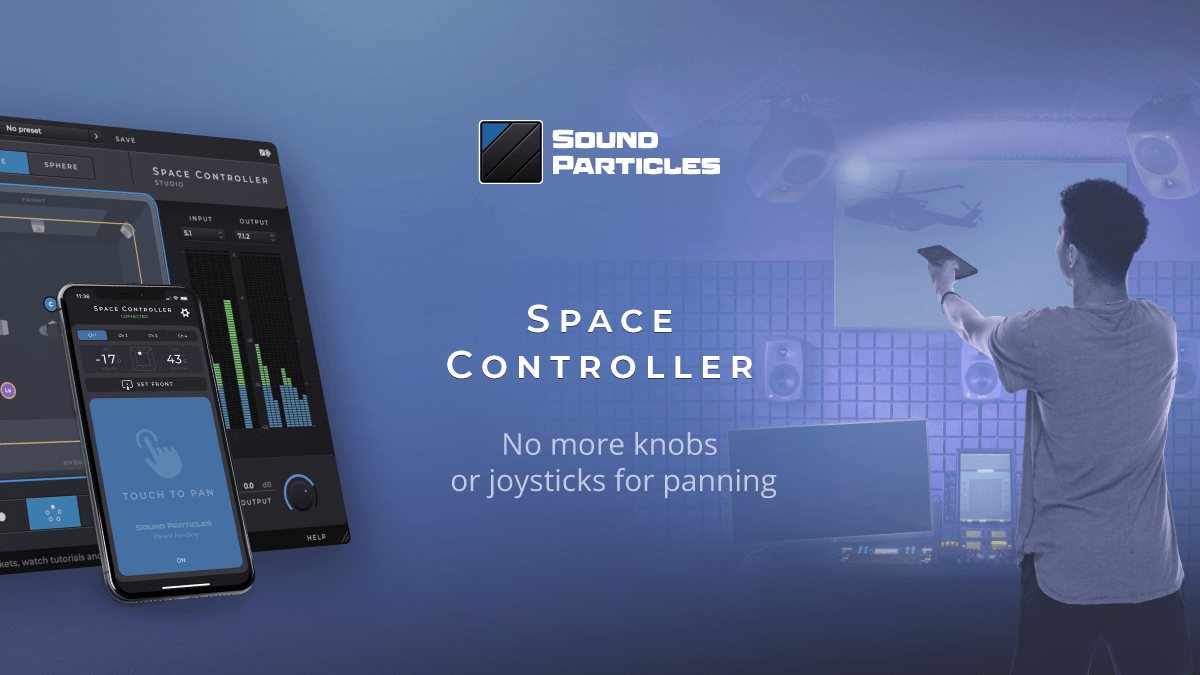
Simply connect your mobile device to a DAW, use it as a movement reader and pan the sounds to where you're pointing.
— Sound Particles official site
What is Space Controller Standard?
Space Controller from Sound Particles is a panning plug-in that uses a smartphone or tablet as a movement reader to control the position of sound inside a DAW. According to the official description, the device's motion sensors are connected to the DAW so that sound can be moved to where the device points.
Panning with knobs is workable in stereo, but the maker says that in surround and 3D audio it is harder to get the intended result even with joysticks. Space Controller aims to replace that task with moving a handheld device.
It is a pair of a plug-in and an iOS / Android app. The plug-in is inserted in the DAW, the app is launched, and the two are connected by Bluetooth or Wi-Fi. The maker also says it can be used as a regular 3D panner plug-in without the mobile device.
This Standard edition is positioned for a home studio, with Bluetooth connection and output to stereo, binaural, FOA (first-order ambisonics) and 5.1. The Studio edition above it supports both Bluetooth and Wi-Fi and nearly every format.
Key features
Move sound by pointing a device
The device's motion sensors move the sound position to where it is pointed. It may be tried when continuous movement is hard to make with a mouse or knobs.
Cube and Sphere modes
Position can be handled as coordinates in Cube mode or as angles in Sphere mode. The maker suggests Sphere for ambisonics or VR and Cube for a more traditional approach.
Four operating modes
Mono, Dual, Rotation and Symmetric modes let you move a single source, rotate the whole sound field, or adjust the width of a 5.1 recording.
Size and locks
Changing the source size changes how many speakers it reaches. Position values can be locked individually so only the other axes move.
Copy to Dolby Atmos objects
Automation can be copied and pasted to Dolby Atmos objects, a feature added in the 1.1 update.
Many formats and LFE control
Panning works in many formats such as Quad, LCR, 5.0.2, 7.1.4 and 9.1.8, with control of the LFE channel and up to 128 communication links.
Multiple tracks and devices
One device can control several tracks, or several devices can control different channels. The official page gives the example of two devices for the left and right channels.
Specifications
| Item | Details |
|---|---|
| Type | Mobile-linked spatial panner (plug-in plus app) |
| Connection (Standard) | Bluetooth |
| Outputs (Standard) | Stereo, binaural, FOA, 5.1 |
| Formats (Mac) | AAX Native, AU, VST, VST3 |
| Formats (Windows) | AAX Native, VST, VST3 |
| OS | macOS 13.3 or later / Windows 11 or later (official) |
| Hardware | 2-core CPU or higher, 4 GB RAM or more, 600 MB disk |
| Mobile app | iOS 13.0 or later, Android 6.0 or later |
What is included and system requirements
- Space Controller Standard plug-in
- Space Controller app (iOS / Android)
- macOS 13.3 or later (Intel / Apple Silicon), Windows 11 or later
- Formats: AAX Native, AU, VST, VST3 (Mac); AAX Native, VST, VST3 (Windows)
- An iPod touch can be used as a dedicated controller
How to use it
- Buy from Sound Particles, then install and authorize the plug-in.
- Install the Space Controller app on a smartphone or tablet.
- Insert Space Controller on the track to be panned in the DAW.
- Launch the app and connect it to the DAW side via Bluetooth.
- Choose the output format: stereo, binaural, FOA or 5.1.
- Select Cube or Sphere mode and an operating mode.
- Move the device and confirm that the sound moves to where it points.
- Record the movement and refine it as DAW automation.
Where it may come in handy
Surround and immersive work
It may be used to place sounds by moving a device where a joystick is hard to aim. This is the central use the maker describes.
Binaural sound design
With binaural output for headphones, it could be used to create sounds circling around the listener with hand movements.
Sound effects for picture and games
It may help to record effects moving across the screen by moving the device by hand.
Moving stereo pans
Even in ordinary stereo work it could be used to create smooth pans with hand movement.
Who it may suit
- People who want to move positions intuitively in surround or ambisonics
- People starting immersive production in a home studio
- People who want to use a phone they already own as a controller
- People who create moving sounds for film and games
Good to know before you buy
- Standard connects via Bluetooth. Wi-Fi connection and all formats such as 22.2 belong to the Studio edition.
- The official price of Studio is $399 and Standard is $99 (Sound Particles). Studio is the higher edition of the same product.
- The mobile device needs iOS 13.0 or later or Android 6.0 or later.
- A separate product, Space Controller OSC, exists for Nuendo, SPAT Revolution and L-ISA.
How it differs from similar products
We do not pick a winner; the official figures are placed side by side.
Space Controller Studio
Officially, Standard connects by Bluetooth, supports stereo, binaural, FOA and 5.1, and costs $99. Studio supports both Wi-Fi and Bluetooth and nearly all formats, and costs $399.
Price
$99 (Sound Particles official site, checked 2026-10-27). Prices can vary by region and promotion, so check the official page before buying.
See Space Controller Standard on the product page
More of the same kind
We have introduced 18 stereo and imaging tools. Here are some of the others.
- iZotope Ozone Imager
- Waves Waves PS22 Stereo Maker
- W. A. Production Pumper 3
- Zynaptiq WIDE
- Auburn Sounds Panagement 2
- Fiedler Audio Spacelab Interstellar
We have introduced 14 other products from Sound Particles.
- Sound Particles SkyDust 3D
- Sound Particles Brightness Panner 2
- Sound Particles inShaper
- Sound Particles Beat Panner
- Sound Particles Density
See the full list in Product database: Effects.
Sources: soundparticles.com pluginboutique.com (checked 2026-10-27)










Comments