
Disclosure: This page may contain affiliate links. Prices were checked on the date shown and may change.
An introduction to Waves PAZ Analyzer, based on information from the maker and distributors: what it does, how to use it and who it may suit. It is not scored.
The more you know about your audio, the better—and PAZ shows what you need to know.
— Waves official site
What is PAZ Analyzer?
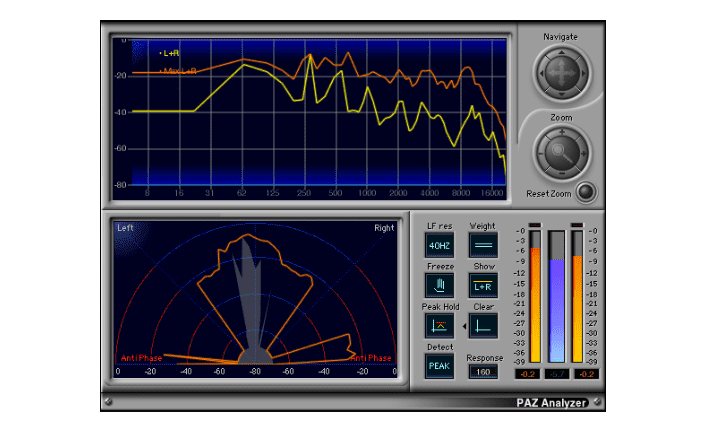
PAZ Analyzer is an audio visualisation plugin from Waves. It lets you check frequency distribution, stereo loudness spread, phase problems and peak/RMS levels together.
It is a real-time analyzer with 52 bands that follow human hearing, and a setting that looks more closely below 250 Hz brings the total to 68 bands.
It has three components, the analyzer, the stereo position display and the meters. You can show all of them at once or load them separately.
Analysis results can be saved as a text file, and the held values of the peak and RMS meters can be reset independently.
Key features
52/68-band spectrum display
Frequency levels are shown in bands close to human hearing. A 10 Hz resolution option below 250 Hz helps when you want to look closely at the low end.
Peak and RMS analysis modes
Spectrum detection can be set to Peak or RMS, and the response time can be chosen, so you can switch depending on whether you want to see fast movement or averages.
Stereo position display
It shows where energy gathers in the stereo field. Information including out-of-phase content is combined in one vector display.
Phase issue indication
It indicates audio that may be out of phase, which may give a clue to problems when summed to mono.
Weighting curves
The meters offer four weighting options: unweighted, dBA, dBB and dBC (as listed by Plugin Boutique).
Peak hold and clip indicators
Held peak values can be reset independently, and the meters in the full plugin have resettable clip indicators.
Specifications
| Item | Details |
|---|---|
| Maker | Waves |
| Type | Analyzer / meter |
| Bands | 52 (68 with finer resolution below 250 Hz) |
| Detection modes | Peak / RMS |
| Weighting | Unweighted, dBA, dBB, dBC (per Plugin Boutique) |
| Components | Analyzer, stereo position, meter |
| Formats | SoundGrid, AAX Native, AudioSuite, Audio Units, VST3 (per distributor) |
| Supported OS | Mac: macOS 13 Ventura, 14 Sonoma, 15 Sequoia, 26 Tahoe; Windows 10 and 11 (64-bit) |
What is included and system requirements
- PAZ Analyzer (analyzer, stereo position and meter components)
- System requirements: common to Waves V17 products (16 GB RAM or more, 30 GB free space or more)
- A 7-day demo is mentioned on the distributor page
How to use it
- Create a Waves account and register the purchased product.
- Install and activate it with Waves Central.
- Insert PAZ Analyzer on the track or master you want to analyze.
- Load the full plugin, or pick and load the components you need.
- Set spectrum detection to Peak or RMS and choose the response time.
- Raise the resolution below 250 Hz if you want a closer look at the low end.
- Check left-right bias or out-of-phase content with the stereo position display.
- Save the analysis as text if needed.
Where it may come in handy
Checking mix frequency balance
It may be useful for checking visually whether the level in some band stands out.
Closer look at the low end
Viewing below 250 Hz at 10 Hz steps could help when sorting out the kick and bass region.
Checking stereo width and phase
The stereo position display may be worth trying for checking left-right spread and possible out-of-phase content.
Who it may suit
- Those who want to see frequency and stereo image visually while mixing
- Users who want to look closely at the low end
- People who want to save analysis results
- Those who need loudness standard (LUFS) measurement may find another meter fits better
Good to know before you buy
- Waves products require activation through Waves Central.
- Supported macOS versions are listed differently: macOS 12 to 15 at Plugin Boutique and macOS 13 to 26 at the distributor. Please check the latest requirements before buying.
- A 7-day demo is mentioned (distributor page).
How it differs from similar products
We do not pick a winner; the official figures are placed side by side.
Waves Dorrough Stereo
PAZ Analyzer offers 52- or 68-band spectrum analysis and a stereo position display. Dorrough Stereo is a meter with three meter modes and three peak modes.
Price
Please check the official page for the price.
See PAZ Analyzer on the product page
More of the same kind
Other introduction articles of the same kind.
- Wave Arts Dialog 2
- W. A. Production DJFX
- Metric Halo MH Thump v4
- IK Multimedia MixBox
- Bogren Digital Ampknob BDM 800 Badboy
- AudioThing Megaphone
We have introduced 215 other products from Waves.
- Waves Curves Equator
- Waves JJP Bass
- Waves Nx Germano Studios New York
- Waves CLA Guitars
- Waves MaxxVolume
See the full list in Product database: Effects.
Sources: minet.jp pluginboutique.com (checked 2026-10-27)










Comments