
Disclosure: This page may contain affiliate links. Prices were checked on the date shown and may change.
An introduction to Waves CLA Guitars, based on information from the maker and distributors: what it does, how to use it and who it may suit. It is not scored.
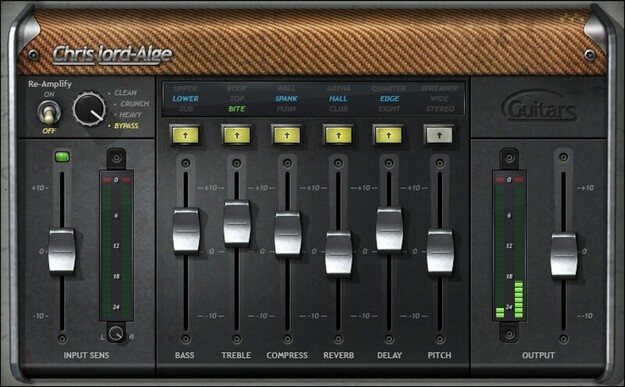
CLA Guitars' 6 effects and 3 modes (Clean, Crunch, and Heavy) deliver the sounds you've heard in hit after hit.
— Waves official site
What is CLA Guitars?
CLA Guitars is a multi-effect for guitars that Waves created together with Grammy-winning mix engineer Chris Lord-Alge. It is designed to speed up the first sound-shaping steps in rock-style productions where several guitar parts are layered.
It contains 6 effects and 3 modes: Clean, Crunch and Heavy. You pick the mode that matches the character of the guitar, from soft acoustic to driven hard rock, and then set the amount of each effect with its own fader.
Operation is kept simple: if you want more of an effect, you raise its fader. Each effect offers 3 tonal colors, and there are options for both DI (direct, without an amp) and re-amped signals.
Professional presets are included as starting points for a mix, and pitch processing is available for building stereo width. It may be worth trying on guitars panned left and right when you want to add depth.
Key features
6 effects in one plugin
The basic processing that guitars commonly need in today's productions is grouped into 6 effects. Because you do not have to open many separate plugins, it may help when you want to set the overall direction first.
3 modes
Clean, Crunch and Heavy modes are provided to handle everything from delicate acoustic to hard rock. You choose the base setting according to the genre and the amount of distortion on the guitar.
Fader-based editing
To get more of an effect you simply raise its fader. It may be useful when you want to set amounts while listening, before going into detailed parameters.
3 tonal colors per effect
Each effect has 3 optimized tonal colors. You can change the texture of the same effect to suit the song.
DI and re-amp options
There are options for guitars recorded direct (DI) and for guitars recorded through an amp or re-amped. In home recording, where the method often differs from song to song, you can match the setting to the source.
Professional presets
Presets that kickstart the mixing process are included. Instead of building from scratch, you can recall a similar one and adjust it.
Stereo imaging with pitch processing
Pitch processing can be used to create stereo width. It may be worth trying when you want more left-right thickness on doubled guitar parts.
Specifications
| Item | Details |
|---|---|
| Maker | Waves |
| Type | Multi-effect for guitars |
| Effects | 6 |
| Modes | Clean / Crunch / Heavy |
| Formats (Mac) | VST / AU / AAX |
| Formats (Windows) | VST / AAX |
| OS (Mac) | macOS Monterey 12, Ventura 13, Sonoma 14, Sequoia 15 |
| OS (Windows) | Windows 10 or later |
What is included and system requirements
- CLA Guitars plugin (6 effects, 3 modes)
- Presets
- Mac: VST / AU / AAX (macOS Monterey 12 to Sequoia 15)
- Windows: VST / AAX (Windows 10 or later)
- The license is registered to a Waves account
How to use it
- Create a Waves account, activate it with the link in the e-mail and log in.
- Open 'Register New Products' and enter the serial number shown in your Plugin Boutique account.
- Download and install Waves Central, the management app.
- Log in to Waves Central, choose CLA Guitars on the 'Install Products' tab and click 'Install & Activate'.
- Open your DAW and insert CLA Guitars on a guitar track.
- First pick the mode closest to the guitar: Clean, Crunch or Heavy.
- Raise each effect's fader little by little and set the amount while listening.
- You can also recall a preset with a similar mood and fine-tune it.
Where it may come in handy
Home-recorded rock band songs
It may suit songs with several layered electric guitars when you want to move through the first sound-shaping steps quickly. You choose a mode and move faders, so you can decide the direction before going into detailed settings.
Acoustic guitar and vocal
Because there is a Clean mode, it could also be used on undistorted guitars. It may be worth trying when you want to lightly tidy the texture of the guitar in a vocal-and-guitar arrangement.
Finishing DI-recorded guitars
If you recorded direct because an amp is hard to set up, you could use the re-amp-oriented options to explore the direction of the sound.
Doubled tracks panned left and right
Adding the pitch-based stereo width to the same phrase panned left and right may let you hear how much thickness changes.
Who it may suit
- Home-recording and music production users who want to move through guitar sound shaping quickly
- Those who want guitar effects for a rock-style mix inside one plugin
- Those who prefer clear fader-based operation over detailed parameters
- Those who like to start from presets and adjust
Good to know before you buy
- You need to register a Waves account and install and activate through Waves Central.
- Supported OS: macOS Monterey 12 to Sequoia 15 on Mac and Windows 10 or later on Windows.
- Formats: VST / AU / AAX on Mac and VST / AAX on Windows (there is no AU on Windows).
- The Plugin Boutique page shows the selling price and discounts; please check the latest price before purchase.
How it differs from similar products
We do not pick a winner; the official figures are placed side by side.
Waves Maserati GRP
Both were created by Waves together with a mix engineer. CLA Guitars shapes guitar sounds with 6 effects and the Clean / Crunch / Heavy modes, while Maserati GRP adds cohesion to group tracks with settings for backing vocals, drums, keys, strings and masters.
Price
Please check the official page for the price.
See CLA Guitars on the product page
More of the same kind
Other introduction articles of the same kind.
- LEWITT Space Replicator Free
- Sound Particles Beat Panner
- Pitch Innovations Fluid Pitch
- Wave Arts Panorama 7
- Lexicon Lexicon 224 Digital Reverb
- Klevgrand Klevgrand Gaffel
We have introduced 215 other products from Waves.
See the full list in Product database: Effects.
Sources: pluginboutique.com (checked 2026-10-27)










Comments