
Disclosure: This page may contain affiliate links. Prices were checked on the date shown and may change.
An introduction to Waves VU Meter, based on information from the maker and distributors: what it does, how to use it and who it may suit. It is not scored.
Digital meters are fine for showing peaks, but an analog VU meter’s moving needle ballistics accurately reflect audio’s average signal level.
— Waves official site
What is VU Meter?
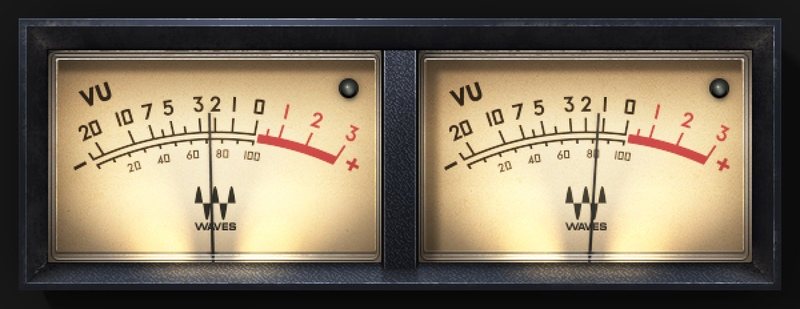
Waves VU Meter is a meter-type plug-in that recreates the movement of an analog VU meter in software. It does not process the audio; it shows the average signal level with a moving needle.
The product description says digital meters are good for showing peaks, while the ballistics of an analog VU needle reflect average level, which it describes as closer to how the ear perceives musical energy.
The stated challenge was not modelling sound but mechanical realism. Averaging out short peaks is said to give a smoother reading than the jittery response of typical DAW meters.
The stereo version offers small, medium and large meter sizes. CPU use is described as negligible, so it can be placed on many channels.
Key features
Average level shown by a needle
Short peaks are averaged out so average loudness is displayed. It may be used to look at dynamics in a way that differs from a peak meter.
Smoother readings
The product page says readings are smoother than the jittery movement of DAW meters.
Reference calibration
Headroom can be calibrated to the DAW reference level, and scales are provided for volume units and dB depending on the reference setting.
Clip indicator
An LED-style clip indicator lights at levels above -0.009 dBFS.
Light CPU use
CPU use is described as negligible, so it can be inserted on as many channels as wanted.
Selectable meter size
The stereo version offers small, medium and large sizes to suit the screen and workflow.
Specifications
| Item | Details |
|---|---|
| Type | Meter (does not process audio) |
| Clip indicator | Lights above -0.009 dBFS |
| Meter size | Small, medium, large (stereo version) |
| Mac formats | VST / AU / AAX (macOS Monterey 12 to Sequoia 15) |
| Windows formats | VST / AAX (Windows 10+) |
What is included and system requirements
- VU Meter plug-in (mono and stereo versions)
- VST / AU / AAX support (see the specifications for per-OS formats)
How to use it
- Install the plug-in following the Waves installer instructions, such as Waves Central.
- Insert it on the track or bus to be watched.
- Set the headroom calibration to match the DAW reference level.
- Choose the meter size in the stereo version.
- Play the audio and read the average level from the needle.
- Insert additional instances on other tracks to compare if needed.
Where it may come in handy
Checking mix balance
The average level of each track can be read from the needle while balancing a mix, perhaps alongside a peak meter.
Reading the master level
On the master bus, it could be used to watch the overall average level of a song.
Users used to analog meters
It may suit anyone familiar with hardware VU meters who wants the same view inside a DAW.
Who it may suit
- Users who want a different view of level than DAW meters
- Users used to analog VU meters
- Users who want a light meter on many channels
Good to know before you buy
- It is a display-only plug-in and does not alter the sound.
- Check the supported OS range listed by the manufacturer before buying.
Price
Please check the official page for the price.
See VU Meter on the product page
More of the same kind
We have introduced 14 meters and analyzers. Here are some of the others.
- Blue Cat Audio Blue Cat's Oscilloscope Multi
- MAAT 2BC multiCORR
- Blue Cat Audio Blue Cat Audio FreqAnalyst Multi
- TBProAudio dpMeter5
- Solid State Logic SSL Meter
- MAAT DRMeter MkII
We have introduced 215 other products from Waves.
- Waves Dorrough Stereo
- Waves Codex Wavetable Synth
- Waves Butch Vig Vocals
- Waves Key Detector
- Waves CLA Drums
For a side-by-side comparison scored on the same criteria, see our comparison of meters and analyzers.
See the full list in Product database: Effects.
Sources: pluginboutique.com (checked 2026-10-27)










Comments