
Disclosure: This page may contain affiliate links. Prices were checked on the date shown and may change.
An introduction to Klevgrand Klevgrand Gaffel, based on information from the maker and distributors: what it does, how to use it and who it may suit. It is not scored.
Gaffel ("Fork" in Swedish) is a simple tool that splits audio into different frequency bands.
— Klevgrand official site
What is Klevgrand Gaffel?
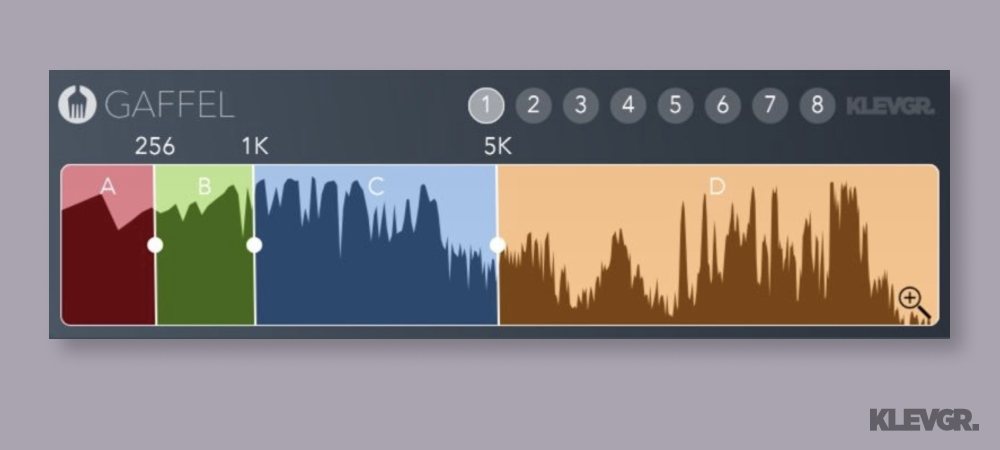
Gaffel is Klevgrand's synced band splitter. The name means 'fork' in Swedish. It splits audio into frequency bands so that plugins you already own can be used as multiband effects.
The setup is to duplicate the signal onto up to four channels, put Gaffel on each, leave one band active on each channel, and add any effect only on the band you want. Even plugins without a multiband mode can then process bands differently.
Crossover frequencies are synchronized across Gaffel instances set to the same group. Moving one updates the others in that group, which keeps them easy to manage wherever they sit in the DAW. Up to eight groups are available.
The filters use the Linkwitz-Riley algorithm; Klevgrand states that the sum of all bands has a flat amplitude response and a smoothly changing phase response. The window is resizable and the plugin supports AU, VST and AAX.
Key features
Three crossovers, four bands
Three crossover frequencies split the sound into four bands. Each band can be toggled with a click, so a channel can pass only the band you want.
Frequency sync within a group
Instances in the same group share their crossover frequencies, so one adjustment keeps all channels aligned.
Eight groups
Synchronization only happens inside a group, and eight groups are available. That could let vocals and drums use different split points.
Linkwitz-Riley filters
This classic crossover design is described by Klevgrand as giving a flat amplitude sum across the bands, so splitting and recombining changes the sound little.
Fine tuning and resizing
Holding the option key while dragging allows finer frequency adjustments, and the window can be resized.
Multiband with any plugin
Gaffel itself adds no effect; its role is splitting. It works with whichever compressor, saturator or other plugin you choose.
Specifications
| Item | Details |
|---|---|
| Type | Band splitter (effect) |
| Split | Three crossovers / four bands |
| Groups | 8 |
| Filter | Linkwitz-Riley |
| Formats | AU, VST (VST-3), AAX |
| OS | macOS 10.10 or later (optimized for M1), Windows 7 SP1 or later (64-bit host) |
| Demo | Free demo; the same as the full version but with occasional audio dropouts |
What is included and system requirements
- Gaffel plugin (AU, VST, AAX)
- Supported OS: macOS 10.10 or later, Windows 7 SP1 or later
- A 64-bit AU, VST or AAX host is required
- Klevgrand Helper handles license activation and updates
How to use it
- Activate the license with your Klevgrand account and install the plugin.
- In your DAW, duplicate the signal of the track to up to four channels.
- Insert Gaffel on each channel and choose the same group.
- On each channel, keep one band active and switch the others off.
- Move one crossover and confirm the change appears in the other instances.
- Insert the effects you like on each band channel.
Where it may come in handy
Band-specific vocal processing
Splitting a vocal into low, mid and high and giving each a different compressor or saturator may be possible.
Drum bus adjustments
You could try adding saturation to just the low band using plugins you already own.
Band-based mix-bus processing
When split points should match across several channels, group sync may help.
Who it may suit
- People who want to use plugins without a multiband mode band by band
- Those who like to build band-based processing in the DAW
- Anyone who wants matching split points across channels
Good to know before you buy
- Gaffel only splits bands; it does not process the sound itself.
- The channel duplication has to be set up in the DAW.
- The demo is full-featured but has occasional audio dropouts.
Price
$59.99 (Klevgrand official site, checked 2026-10-27). Prices can vary by region and promotion, so check the official page before buying.
See Klevgrand Gaffel on the product page
More of the same kind
Other introduction articles of the same kind.
- UJAM Finisher BOOST
- United Plugins FireSpacer
- Slate Digital Rotary SD-147
- Positive Grid BIAS X
- Waves LoAir
- Lese Frahm
We have introduced 26 other products from Klevgrand.
See the full list in Product database: Effects.
Sources: klevgrand.com pluginboutique.com (checked 2026-10-27)










Comments