
Disclosure: This page may contain affiliate links. Prices were checked on the date shown and may change.
An introduction to Waves InPhase LT, based on information from the maker and distributors: what it does, how to use it and who it may suit. It is not scored.
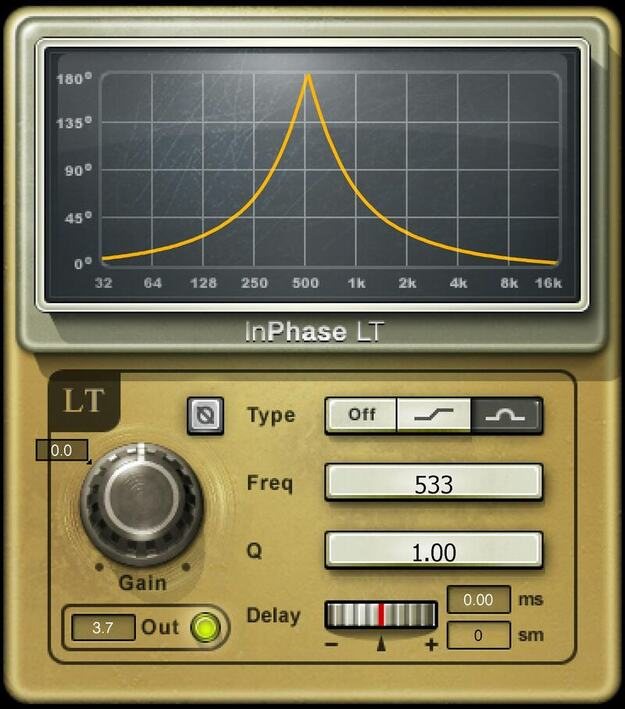
Use the shelf and bell allpass filters to alter the amount of phase shift at various frequencies—even introduce creative effects, like classic through-zero flanging.
— Waves official site
What is InPhase LT?
InPhase LT is a lighter version of Waves' InPhase phase-correction plug-in, carrying over part of its feature set. When two tracks do not line up in timing or phase, it is inserted on one of them and the delay and phase are adjusted until they match.
The store description gives examples such as a DI bass with a miked bass amp, or overhead mics with a snare. These are pairs where misalignment tends to occur, and one plug-in handles the adjustment.
For moving phase, there are two kinds of allpass filter: shelf and bell, with variable Q on the bell. Because phase can be changed differently at different frequencies, it can be used for creative effects as well as correction, such as through-zero flanging made by automating the delay on a copied track.
A track's timing can be shifted by plus or minus 20 ms (plus 20 ms only in the live component). A phase-flip button handles simple problems such as a miswired XLR cable. Mono, stereo and live components are included.
Key features
Timing shift of plus or minus 20 ms
A track's timing can be moved by plus or minus 20 ms to line it up with another. The live component is limited to plus 20 ms.
Two allpass filter shapes
Shelf or bell can be chosen, with variable Q on the bell. The amount of phase shift can differ by frequency, which may help when only some bands are misaligned.
Dual filters
Two filters allow separate adjustment of phase change, which may help when you want to shape the phase response in detail.
Phase flip button
One button flips phase. It is the quickest check for simple problems such as a miswired XLR cable.
Flanging effects
Automating the delay on a copied track can create through-zero flanging, which gives the plug-in uses beyond correction.
Mono, stereo and live components
Mono, stereo and live components are included, so the right one can be chosen for the track or the setting.
Specifications
| Item | Details |
|---|---|
| Maker | Waves |
| Type | Phase-correction plug-in (lighter version of InPhase) |
| Timing shift | Plus or minus 20 ms (plus 20 ms only in live) |
| Filters | Allpass, shelf or bell (variable Q) |
| Components | Mono, stereo and live |
| Mac OS | macOS Monterey 12, Ventura 13, Sonoma 14, Sequoia 15 |
| Windows OS | Windows 10 or later |
| Mac formats | VST / AU / AAX |
| Windows formats | VST / AAX |
What is included and system requirements
- InPhase LT (mono, stereo and live components)
- The license is registered through Waves Central (a Waves account is required)
- Mac: VST / AU / AAX; Windows: VST / AAX
How to use it
- Create a Waves account and register the serial number shown after purchase.
- Install and activate through Waves Central.
- Insert InPhase LT on one of the two tracks whose timing or phase you want to match.
- Press the phase flip button first and check whether the sound changes.
- Move the delay to bring the timing of the two tracks closer.
- If needed, use the shelf or bell allpass filter to adjust phase at specific frequencies.
- Play both tracks together and look for a setting where the low end sounds more consolidated.
- To try flanging, copy the track and automate the delay.
Where it may come in handy
DI and miked bass
It may be used to line up a DI recording with a miked bass amp.
Snare and overheads
It may be worth trying to even out the timing difference between a snare mic and overheads.
Checking for wiring errors
The phase flip button may help confirm a polarity flip caused by a miswired cable.
Flanging effect
Moving the delay on a copied track may be used to create a through-zero flanging effect.
Who it may suit
- People who want to try phase adjustment simply
- People who record DI and amp for bass
- People who want to align two microphones such as snare and overheads
- People who want to try flanging built from phase
Good to know before you buy
- If you want the sidechain input and correlation meter, the full InPhase is the option to look at.
- Timing shift is plus or minus 20 ms (plus 20 ms only in the live component).
- Waves Central and a free Waves account are needed for license management.
- Plugin Boutique sometimes shows time-limited discounts. Check the price at the time of purchase.
How it differs from similar products
We do not pick a winner; the official figures are placed side by side.
Waves InPhase
InPhase LT centres on the shelf or bell allpass filters and a plus or minus 20 ms timing shift. InPhase adds a sidechain input, a correlation meter, a phase-curve display and draggable waveforms.
Price
Please check the official page for the price.
See InPhase LT on the product page
More of the same kind
Other introduction articles of the same kind.
- Soundtoys Devil-Loc Deluxe
- NUGEN Audio AB Assist 2
- Sonarworks Apollo Monitor Correction Add-on
- BLEASS BLEASS Spectral Resonator
- Klevgrand REAMP
- NUGEN Audio MasterCheck
We have introduced 215 other products from Waves.
- Waves Maserati DRM
- Waves Greg Wells PianoCentric
- Waves SoundShifter
- Waves MV2
- Waves Abbey Road King's Microphones
See the full list in Product database: Effects.
Sources: pluginboutique.com (checked 2026-10-27)










Comments