
Disclosure: This page may contain affiliate links. Prices were checked on the date shown and may change.
An introduction to Baby Audio TAIP, based on information from the maker and distributors: what it does, how to use it and who it may suit. It is not scored.
Tape recordings have a musical quality that digital mixes often lack. TAIP brings this quality into your DAW.
— Baby Audio official site
What is TAIP?
TAIP is a tape saturation plug-in from Baby Audio. The official text says it models the sound and behavior of a 1970s tape machine using machine learning.
Where a conventional circuit emulation estimates the effect of components, TAIP learns the difference between dry and processed audio. The maker states that the training data were in-house sine sweeps and white noise, and no third-party audio was used.
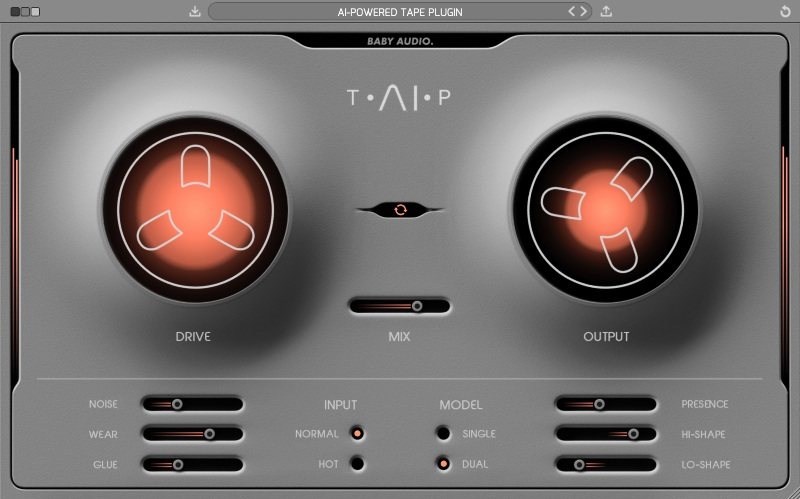
Controls such as drive, mix, wear, glue and noise allow settings from gentle warmth to heavy distortion. Mix and wear together can create a tape-flanging effect.
It ships with 135 presets made by several engineers, supports VST, VST3, AU and AAX on Windows and macOS, and needs an internet connection for authorization.
Key features
Drive
The drive knob sets coloring from a touch of warmth to heavy distortion. The maker notes that tape machines were designed to color the sound as little as possible, while TAIP lets users add as much as they need.
Mix and wear for tape flanging
Mixing in parallel and combining it with the wow and flutter of wear gives a tape-flanging effect, useful when a modulation-style effect is wanted.
Single / Dual model
Single is a regular tape emulation; Dual chains two under the hood, each taking half of the drive. The maker says this adds slightly more weight.
Lo-Shape / Hi-Shape
These sliders set how much the low or high end is saturated relative to the rest, which may help when warming a drum bus without distorting the lows.
Glue, noise, wear and presence
Glue adds or exaggerates tape-like compression, noise sets tape noise, wear combines wow, flutter and a frequency change, and presence sets how much high-end attenuation remains.
Input select and auto gain
Input switches between normal and hot levels without changing output volume, and auto gain keeps the output level consistent as drive is raised.
Presets and display options
Besides 135 presets, the background can be black, gray or white, and the window is fully resizable.
Specifications
| Item | Details |
|---|---|
| Type | Machine-learning tape saturator |
| Formats | VST / VST3 / AU / AAX (64-bit) |
| OS (official) | macOS 10.11 or later (native Apple Silicon); Windows 10 or later |
| Presets | 135 |
| Authorization | Internet connection required (Plugin Boutique) |
| License | One-time purchase (a subscribe-to-own plan is also offered) |
What is included and system requirements
- Plug-in (VST, VST3, AU, AAX)
- 135 presets
- A free trial is available on the official site
How to use it
- Insert the plug-in on a track or bus in the DAW.
- Pick a preset to set the general direction.
- Adjust drive for the amount of coloring.
- Use Lo-Shape and Hi-Shape to balance the range if needed.
- Add texture with glue, noise and wear.
- Match volume with output or auto gain and compare with bypass.
Where it may come in handy
Warming drum or bass buses
Modest drive with some glue may help bind a bus together.
Creating lo-fi textures
Wear, noise and wow can push a sound toward an old-tape texture.
Light coloring on vocals and instruments
Lowering the mix and blending in parallel may keep the original while adding color.
Who it may suit
- Users who want an easy tape saturation plug-in
- Those who prefer a compact set of controls
- Producers who also want lo-fi textures
Good to know before you buy
- Descriptions follow the official text; they are not listening impressions.
- An internet connection is required for authorization.
- Besides a one-time purchase, the official site lists a subscribe-to-own option.
Price
Please check the official page for the price.
More of the same kind
We have introduced 82 saturation and distortion effects. Here are some of the others.
- D16 Group Redoptor 2
- Universal Audio Studer A800 Multichannel Tape Recorder
- Klevgrand Klevgrand LUXE
- Waves MDMX Distortion Modules
- Antelope Audio ZHEGA
- Safari Audio Rabbit Tape V2
We have introduced 11 other products from Baby Audio.
- Baby Audio Comeback Kid
- Baby Audio BA-1
- Baby Audio Baby Audio Parallel Aggressor
- Baby Audio IHNY-2
- Baby Audio Transit 2
For a side-by-side comparison scored on the same criteria, see our comparison of saturation and distortion effects.
See the full list in Product database: Effects.
Sources: babyaud.io pluginboutique.com (checked 2026-10-27)










Comments