
Disclosure: This page may contain affiliate links. Prices were checked on the date shown and may change.
An introduction to Antelope Audio ZHEGA, based on information from the maker and distributors: what it does, how to use it and who it may suit. It is not scored.
ZHEGA is a distortion and saturation plugin featuring five analog-inspired circuit modes, designed to deliver a wide range of harmonic textures—from subtle warmth to extreme fuzz.
— Antelope Audio official site
What is ZHEGA?
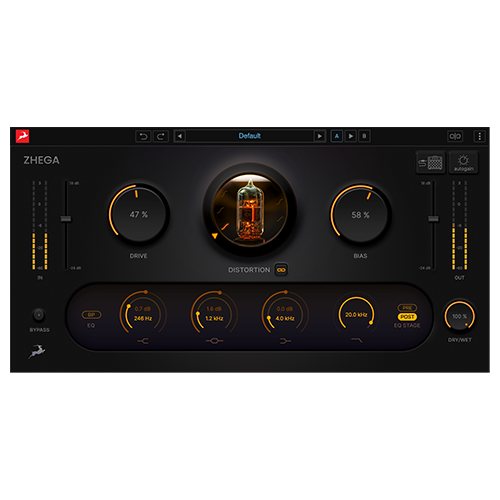
ZHEGA is a distortion and saturation plug-in from Antelope Audio. The maker says it offers five analog-inspired circuit modes for harmonic textures from subtle warmth to extreme fuzz, combining analog-style coloration with precise digital control.
Drive and BIAS are the central controls. Drive sets how hard the signal enters the saturation stage, and BIAS changes waveform symmetry to shift the harmonic balance. The maker says they allow the distortion behavior to be shaped without relying on EQ.
Two independent four-band equalizers can be placed before and after the saturation. One can shape the signal before it is distorted and the other can finish the result. AutoGain compensates for level changes as Drive is raised.
For DI guitar or bass, IR-based cabinet simulation can be added with one click, and the dry/wet control enables parallel processing. The native version runs in DAWs on macOS and Windows and is also part of Antelope Cosmos, a plug-in collection of more than 75 titles.
Key features
Five distortion modes
Five circuit modes inspired by tube distortion range from tape-like warmth to high-gain aggression, each with its own dynamic response and harmonic character.
Drive and BIAS
Drive sets input intensity and BIAS adjusts waveform asymmetry, which shifts the harmonic balance and changes the character.
Pre/post four-band EQ
Independent four-band EQs sit before and after the saturation, so the band being distorted can be narrowed and the output tone finished.
AutoGain
Level changes from raising Drive are compensated, which reduces gain re-staging and helps focus on tone.
One-click cabinet
Built-in IR-based cabinet emulation adds speaker character to DI guitar or bass without extra plug-ins.
Dry/Wet
Clean and processed signals are blended with phase accuracy, useful for adding harmonics while keeping transients and dynamics.
Specifications
| Item | Details |
|---|---|
| Type | Distortion and saturation |
| Modes | Five circuit modes |
| Main controls | Drive, BIAS, AutoGain, Dry/Wet |
| Equalizers | Two 4-band (pre and post) |
| Cabinet | IR-based simulation |
| Delivery | Native (in DAWs on macOS and Windows), also included in Antelope Cosmos |
What is included and system requirements
- ZHEGA native plug-in (runs in DAWs on macOS and Windows, no extra hardware needed)
- Included in Antelope Cosmos, a subscription collection of 75+ native plug-ins, with a 14-day free trial offered
- See System Requirements on the official site for details
How to use it
- Start a Cosmos free trial on the official site, or purchase ZHEGA.
- Create an Antelope account and download the installer.
- After installing, rescan plug-ins in your DAW.
- Insert ZHEGA on a track or bus.
- Choose the closest of the five modes.
- Raise Drive and adjust BIAS for harmonic balance.
- Shape the band with the pre and post EQs and check AutoGain.
- For DI sources, enable the cabinet and set the dry/wet blend.
Where it may come in handy
DI guitar and bass
It may suit adding distortion and a cabinet together to DI-recorded guitar or bass.
Harmonics on the mix bus
A light touch on a bus could add harmonics and presence.
Thickening drums
Used in parallel, it may add weight while keeping the attack.
Sound design
The extreme fuzz modes may suit heavily transforming material for effects.
Who it may suit
- People who want broad tube-style distortion in one plug-in
- Those who want a cabinet with DI guitar or bass
- Users who want separate EQ before and after distortion
- Current or prospective Antelope Cosmos users
Good to know before you buy
- The Plugin Boutique page mentions three tube bias modes, which differs from the five circuit modes on the official page; this text follows the official page.
- A review summary on Plugin Boutique mentions no built-in presets, so check this before purchase.
- The official price is shown in euros and the Plugin Boutique price in dollars.
How it differs from similar products
We do not pick a winner; the official figures are placed side by side.
Reel-To-Reel
ZHEGA is a distortion and saturation plug-in with five circuit modes, while Reel-To-Reel is a tape saturation plug-in with four tape types and controls for bias, hiss and wow and flutter. Reel-To-Reel also runs in real time on Synergy Core devices.
Price
Please check the official page for the price.
More of the same kind
We have introduced 82 saturation and distortion effects. Here are some of the others.
- United Plugins Cyberdrive Core
- AudioThing Things – Fold
- W. A. Production HEAT 2
- Three-Body Technology Sapphire Drive
- D16 Group Redoptor 2
- Native Instruments Driver
We have introduced 54 other products from Antelope Audio.
- Antelope Audio Reel-To-Reel
- Antelope Audio Orion Studio Synergy Core
- Antelope Audio Gyratec IX
- Antelope Audio InTune Chorus
- Antelope Audio UK-69
For a side-by-side comparison scored on the same criteria, see our comparison of saturation and distortion effects.
See the full list in Product database: Effects.
Sources: en.antelopeaudio.com pluginboutique.com (checked 2026-10-27)










Comments