
Disclosure: This page may contain affiliate links. Prices were checked on the date shown and may change.
An introduction to Waves MDMX Distortion Modules, based on information from the maker and distributors: what it does, how to use it and who it may suit. It is not scored.
Your Toolkit for Classic and Modern Distortion
— Waves official site
What is MDMX Distortion Modules?
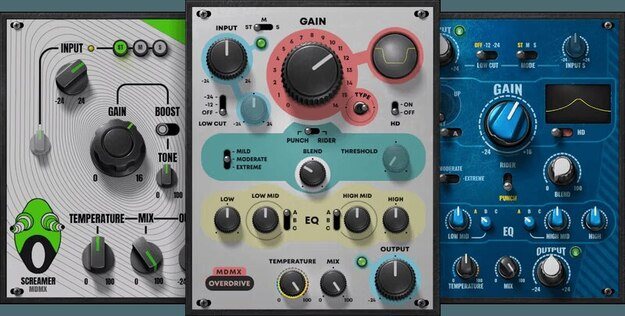
MDMX Distortion Modules is a distortion plug-in from Waves. It is inspired by well-known guitar stompboxes but is described as suitable for any instrument.
It offers three distortion tones: screamer, overdrive and fuzz. The page lists uses such as adding power to drums, industrial bass, a tight edge on vocals and roughing up synths.
The Temperature control adjusts overall warmth and color. Parallel processing layers the distortion with the dry sound, and in stereo you can process the mid or side signal separately.
112 presets from artists and 23 factory presets are included. HD mode uses oversampling to reduce potential aliasing.
Key features
Three distortion modules
Choose screamer, overdrive or fuzz to find the character that fits the source.
Temperature
Adjusts overall warmth and color, which can be tried when shaping the distortion's texture.
Parallel processing
Layers distortion with the dry sound, which may help keep the core of low frequencies.
Mid/side mode
Distort only mid or side, each with its own input level control.
MIDI Learn
Almost all parameters support MIDI Learn for hardware control.
HD mode and presets
Oversampling reduces aliasing, and 135 presets provide starting points.
Specifications
| Item | Details |
|---|---|
| Formats (Mac) | VST / AU / AAX |
| Formats (Windows) | VST / AAX |
| Mac OS | macOS 12 to 15 |
| Windows | Windows 10 or newer |
| Presets | 112 artist + 23 factory |
What is included and system requirements
- MDMX Distortion Modules plug-in
- 112 artist presets and 23 factory presets
How to use it
- Create a Waves account and register the product.
- Install Waves Central.
- Install the product in Waves Central.
- Open it in your DAW.
- Pick one of the three distortions.
- Set the color with Temperature.
- Blend with the dry signal in parallel.
- Use M/S mode if needed.
Where it may come in handy
Drums
It may be tried to add power with the dry sound kept in parallel.
Bass and synths
It may be used to add a rough texture.
Vocals and guitar
It may add edge to vocals or produce fuzz-style guitar tones.
Who it may suit
- People who want stompbox-style distortion
- People who want M/S processing as well
- Existing Waves users
Good to know before you buy
- Activation through Waves Central is required.
- Prices vary during promotions, so check the current price before buying.
Price
Please check the official page for the price.
See MDMX Distortion Modules on the product page
More of the same kind
We have introduced 82 saturation and distortion effects. Here are some of the others.
- Arturia Filter MS-20
- Stagecraft Software Overdrive 5
- D16 Group Devastor 2
- Kuassa Efektor DS3603 Distortion
- United Plugins Cyberdrive
- W. A. Production Screamo
We have introduced 215 other products from Waves.
- Waves Kramer Master Tape
- Waves Abbey Road Saturator
- Waves Manny Marroquin Distortion
- Waves OneKnob Driver
- Waves Berzerk Distortion
For a side-by-side comparison scored on the same criteria, see our comparison of saturation and distortion effects.
See the full list in Product database: Effects.
Sources: pluginboutique.com (checked 2026-10-27)










Comments