
Disclosure: This page may contain affiliate links. Prices were checked on the date shown and may change.
An introduction to Baby Audio Transit 2, based on information from the maker and distributors: what it does, how to use it and who it may suit. It is not scored.
Use 6 different motion modes to control 28 effect modules and create endless forms of movement to energize your tracks.
— Baby Audio official site
What is Transit 2?
Transit 2 is the second generation of Baby Audio's motion multi-effect, developed in collaboration with producer Andrew Huang. It is built to add movement to mixes and tracks, and designing transitions between song sections remains one of its main uses.
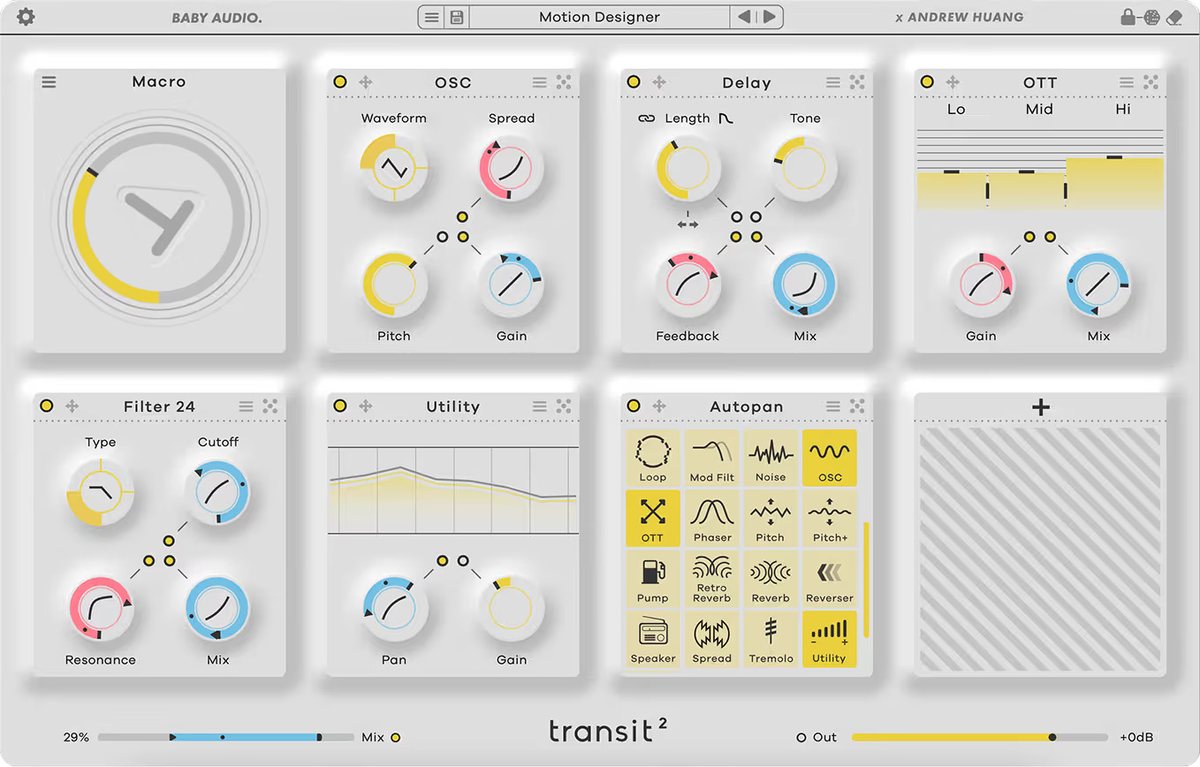
Six motion modes (Macro, LFO, Follower, Sidechain, Gate and Sequencer) control the movement of the whole effect chain. The first version centered on the macro knob and the sequencer; version 2 adds four modes: LFO, Follower, Sidechain and Gate.
There are 28 effect modules, covering modulation, degradation, vintage-style effects, reverb, delay, several filter types, and even a synth oscillator and noise generator for sweeps. Modules can be added and rearranged freely in the chain, and each parameter can stay static or follow the motion.
It is offered in VST, VST3, AU and AAX formats for Windows and macOS. The preset count is listed differently on the maker's page and the retailer's page, so this article does not give a number.
Key features
Macro mode with one knob
The T knob can be linked to each effect parameter with its own behavior, so one control moves several effects at once. A single automation lane can drive a sweep, which may help when building transitions.
LFO mode
A synced or free-running LFO creates rhythmic movement in the effects. It suits cases where a track needs steady motion throughout.
Follower and Sidechain modes
Follower makes the chain move with the track's dynamics, while Sidechain uses another input to control it. This extends the familiar kick-ducking idea to a whole effect chain.
Gate and Sequencer modes
Gate triggers effect motion instantly, for example in live use. Sequencer launches DAW-synced transitions with a click, and its loop option lets it work like an LFO tool.
28 effect modules
Version 2 adds ten modules: Warp, Loop, Reverser, Speaker, EQ, Analog Chorus, Shifter +, Mod Filter, Retroverb and Compressor. A slope control gives each knob its own ramp curve.
Randomization and presets
The randomizer lets you set ranges and lock parameters so only part of the plugin is randomized. This may help when you do not yet have a sound in mind.
Specifications
| Item | Details |
|---|---|
| Type | Motion multi-effect |
| Formats | VST, VST3, AU, AAX |
| OS | Windows 7 and later; macOS 10.7 and later (native Apple Silicon) |
| Effect modules | 28 |
| Motion modes | 6 |
What is included and system requirements
- Plugin (VST, VST3, AU, AAX)
- Factory presets
- Free-gift offer with Plugin Boutique purchases (varies by period)
How to use it
- Load Transit 2 as an insert on a track or bus in your DAW.
- Choose a preset and start by moving the T knob in Macro mode to hear the change.
- Add modules to the effect chain and reorder them.
- Link the parameters you want to move to the motion, and adjust their curves with the slope control.
- Switch to the mode that suits the job, such as LFO, Follower or Sidechain.
- For transitions, assign the knob to DAW automation and move it across a section change.
- If you use the Sequencer, sync it to the DAW tempo and try the loop on and off.
Where it may come in handy
Section transitions
It may suit building transitions into a chorus by moving filters and reverb together. A single knob's automation could cover the whole move.
Adding motion to loops
LFO or Sequencer modes may help reduce the static feel of synth or drum loops.
Effects that react to the kick
With Sidechain mode, you could make effects move with the kick input, which may give a result different from ordinary ducking.
Live performance
The maker lists Gate mode for triggering effect motion instantly in live use. It may be worth trying if you play live sets.
Who it may suit
- People who want to spend less time on transitions between sections
- Producers who want to add motion to loop-based material
- Anyone who prefers several effects in a single plugin
- Performers who want to control effects live
Good to know before you buy
- Owners of the first Transit can get an upgrade price from the maker.
- The maker's site also lists a monthly Sub to Own purchase option.
- Prices vary by store and period.
How it differs from similar products
We do not pick a winner; the official figures are placed side by side.
Transit
According to the retailer's listing, version 2 adds four motion modes for a total of six, and ten effects for a total of 28.
Price
$129 (Baby Audio official site, checked 2026-10-27). Prices can vary by region and promotion, so check the official page before buying.
See Transit 2 on the product page
More of the same kind
Other introduction articles of the same kind.
- Crickets Audio Strata
- IK Multimedia AmpliTube SVX 2
- Boz Digital Labs Pan Knob
- Blue Cat Audio Re-Head
- NUGEN Audio Stereoplacer
- Universal Audio UAD Sound City Studios Plug-In
We have introduced 11 other products from Baby Audio.
- Baby Audio Super VHS
- Baby Audio Baby Audio Parallel Aggressor
- Baby Audio Smooth Operator Pro
- Baby Audio Comeback Kid
- Baby Audio Grainferno
See the full list in Product database: Effects.
Sources: babyaudio.com pluginboutique.com (checked 2026-10-27)










Comments