
Disclosure: This page may contain affiliate links. Prices were checked on the date shown and may change.
An introduction to Slate Digital Virtual Tape Machines, based on information from the maker and distributors: what it does, how to use it and who it may suit. It is not scored.
Bring instant warmth, depth, and musical magic of analog tape straight into your track.
— Slate Digital official site
What is Virtual Tape Machines?
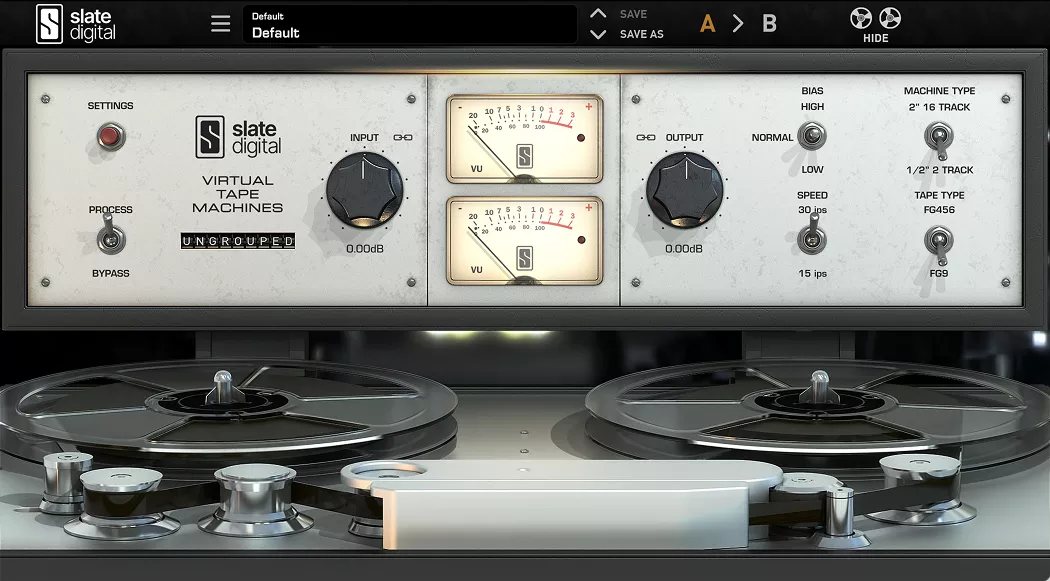
Virtual Tape Machines (VTM) from Slate Digital is a tape-machine emulation. It models two well-known tape machines and lets you choose tape type, speed, bias and more to add an analog tape character to a sound.
The two machines are a 2-inch 16-track multitrack machine and a 1/2-inch stereo mastering deck. The official page suggests the multitrack for gluing drums, guitars and vocals, and the mastering deck for a more polished finish.
Tape speed can be set to 15 or 30 ips. 15 ips is described as rounder and thicker with some harmonic saturation, and 30 ips as tighter in the bass with a cleaner finish. A Bass Alignment control adjusts the low end, and Wow & Flutter reproduces the timing and pitch inconsistencies of tape playback.
Formats are AU, VST, VST3 and AAX on Mac and VST, VST3 and AAX on Windows. A free iLok account is required, and the plug-in is also listed as part of Slate Digital subscriptions.
Key features
Two tape machines
A 2-inch 16-track machine and a 1/2-inch stereo mastering deck are available. You can choose between using it on individual tracks or across a whole mix.
Tape formulations
Two tape formulations are offered, with different headroom and tonal tendencies. You can switch between them on the same material.
15 and 30 ips
Switching the tape speed changes how the low end behaves, so you can lean thicker or tighter depending on the material.
Bass Alignment
This adjusts the internal low-end lift and can clean up muddiness. It is useful when reviewing low-end balance.
Wow & Flutter
This adds the small pitch and timing inconsistencies of tape playback. A light touch may soften an overly precise digital feel.
Bias and extra controls
Controls such as bias and tape type are included for fine-tuning the amount and character of saturation.
Specifications
| Item | Details |
|---|---|
| Maker | Slate Digital |
| Type | Tape emulation |
| Machines modeled | 2-inch 16-track / 1/2-inch stereo mastering deck |
| Tape speeds | 15 ips / 30 ips |
| Formats (Mac) | AU / VST / VST3 / AAX |
| Formats (Windows) | VST / VST3 / AAX |
| License | iLok (free account) |
| RAM | 4 GB |
What is included and system requirements
- Plug-in
- Mac: AU, VST, VST3, AAX
- Windows: VST, VST3, AAX
- macOS 10.15 or later on Mac and Windows 10 or later on Windows, per the official page
How to use it
- Prepare a free iLok account and activate the license.
- Insert the plug-in on a track or bus in your DAW.
- Choose the multitrack machine or the mastering deck.
- Select the tape type and speed.
- Adjust the input level and set the amount of saturation by ear.
- Use Bass Alignment to balance the low end.
- Add a little Wow & Flutter if wanted.
- When using it on several tracks, try the grouping feature too.
Where it may come in handy
Adding cohesion to drums and guitars
The multitrack model may add natural cohesion to drums and guitars.
Adding body to vocals
A light touch on vocals may thicken a thin-sounding voice.
Finishing a mix
The mastering deck on a stereo mix may help set the final texture.
Analog-style workflow
It may suit anyone who wants a tape-style feel while mixing.
Who it may suit
- People who want a tape character in their mixes
- Those who want to use tape across many tracks
- Slate Digital subscribers
Good to know before you buy
- A free iLok account is required.
- Slate Digital notes that older operating systems are not actively tested.
- It is also included in Slate Digital subscriptions per the official page.
Price
$149 (Slate Digital official site, checked 2026-10-27). Prices can vary by region and promotion, so check the official page before buying.
See Virtual Tape Machines on the product page
More of the same kind
We have introduced 82 saturation and distortion effects. Here are some of the others.
- W. A. Production Satyrus
- Native Instruments Driver
- United Plugins Plamen
- Eventide CrushStation
- D16 Group Redoptor 2
- Antelope Audio Reel-To-Reel
We have introduced 21 other products from Slate Digital.
- Slate Digital Stellar Echo SD-201
- Slate Digital Rotary SD-147
- Slate Digital Virtual Tube Collection
- Slate Digital SD-3A
- Slate Digital Chorus D Bundle
For a side-by-side comparison scored on the same criteria, see our comparison of saturation and distortion effects.
See the full list in Product database: Effects.
Sources: slatedigital.com pluginboutique.com (checked 2026-10-27)










Comments