
Disclosure: This page may contain affiliate links. Prices were checked on the date shown and may change.
An introduction to Waves eMo Generator, based on information from the maker and distributors: what it does, how to use it and who it may suit. It is not scored.
A test tone generator may not be glamorous… but it sure is useful. When used with a spectrum analyzer, pink noise reveals filter curves, differences among EQ designs, and distortion components.
— Waves official site
What is eMo Generator?
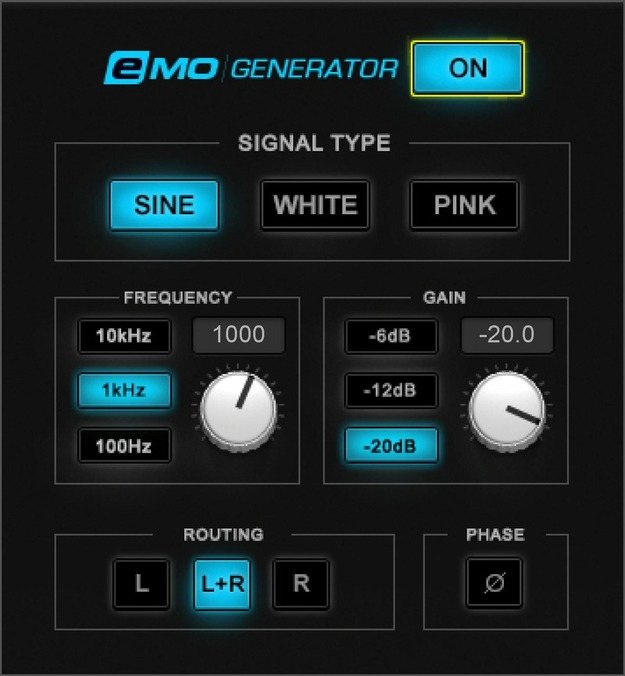
eMo Generator is a test tone generator from Waves. It is a utility that outputs sine waves and pink noise, for checking how a system behaves or for use as raw material in sound design.
The store description says that pink noise combined with a spectrum analyzer reveals filter curves, differences among EQ designs and distortion components. It names the analyzers in Waves plug-ins such as the F6, GEQ and H-EQ as examples.
The other use is sound design. Examples include gating a sine wave with a sidechained kick to make low 'hum drum' kick sounds, or adding gated pink noise to an acoustic snare.
Other listed uses are mixing in pink noise to imagine how a mix sounds in a car, using sine waves to find room resonances or ring out a PA system, and checking mono and stereo phase integrity. It is also included with the Waves eMotion LV1 live mixer.
Key features
Sine waves and pink noise
It outputs sine waves and pink noise as test signals. Used alongside an analyzer, it may help when you want to see how a filter or EQ behaves.
Checking responses with an analyzer
Pink noise viewed on a spectrum analyzer shows filter curves and differences among EQ designs, and sine waves can be used to examine distortion components.
Hum drum kicks
A sine wave gated by a sidechained kick is given as a way to make hum-drum style kick sounds, which may suit those experimenting with low-end sources.
Noise reinforcement for snares
Adding gated pink noise to an acoustic snare is listed as a use. How much to blend is decided by ear.
Car-listening emulation
Mixing in pink noise to emulate listening to a mix while driving is one of the suggested uses.
Room, PA and phase checks
Sine waves can help find room resonances and ring out a PA system, and mono and stereo phase integrity can be checked.
Specifications
| Item | Details |
|---|---|
| Maker | Waves |
| Type | Test tone generator |
| Mac | macOS Monterey 12, Ventura 13, Sonoma 14, Sequoia 15 |
| Mac formats | VST / AU / AAX |
| Windows | Windows 10 or later |
| Windows formats | VST / AAX |
What is included and system requirements
- eMo Generator plug-in (Mac: VST / AU / AAX, Windows: VST / AAX)
- License registered through Waves Central (a Waves account is required)
- Also included with the Waves eMotion LV1 live mixer
How to use it
- Create a Waves account and register the serial number shown after purchase.
- Download Waves Central, log in, select the product and install it.
- Insert eMo Generator on a new track or bus in your DAW.
- Choose the signal to output, sine wave or pink noise.
- To use an analyzer, place it after the plug-in you want to measure and watch the display.
- Raise the level gradually from low, taking care not to damage speakers or headphones.
- For gating, send the kick track to the sidechain.
- When finished, mute or switch off the track so the test tone does not end up in the final bounce.
Where it may come in handy
Checking EQ and filter responses
Running pink noise through an analyzer may help you see what curve your EQ draws.
Mix checks
You might mix in pink noise to imagine a car-listening situation, or check mono and stereo phase.
Finding room resonances
Sweeping a sine wave may help you find the frequencies that ring in a room.
Drum sound design
A sine wave following the kick, or noise added to the snare, can be tried as drum layers.
Who it may suit
- Users who want to see EQ and filter responses visually
- Those checking a recording room or its resonances
- Users who want to add low or noise layers to drums
- People who use test tones for live or PA checks
Good to know before you buy
- Test signals can be loud, so take care with speakers and headphones.
- Licenses are managed through Waves Central and a Waves account is required.
Price
Please check the official page for the price.
See eMo Generator on the product page
More of the same kind
Other introduction articles of the same kind.
- Kuassa Amplifikation VVV
- UJAM UFX LOFI
- UJAM Finisher DYNAMO
- Serato Serato Pitch 'n Time Pro
- NUGEN Audio Monofilter
- Krotos Dehumaniser Simple Monsters
We have introduced 215 other products from Waves.
- Waves Clarity Vx DeReverb Pro
- Waves S1 Stereo Imager
- Waves Clarity Vx DeReverb
- Waves Curves Equator
- Waves Abbey Road King's Microphones
See the full list in Product database: Effects.
Sources: pluginboutique.com (checked 2026-10-27)










Comments