
Disclosure: This page may contain affiliate links. Prices were checked on the date shown and may change.
An introduction to United Plugins Plamen, based on information from the maker and distributors: what it does, how to use it and who it may suit. It is not scored.
This flexible multi-band saturator can add a different kind and amount of saturation to each band.
— United Plugins official site
What is Plamen?
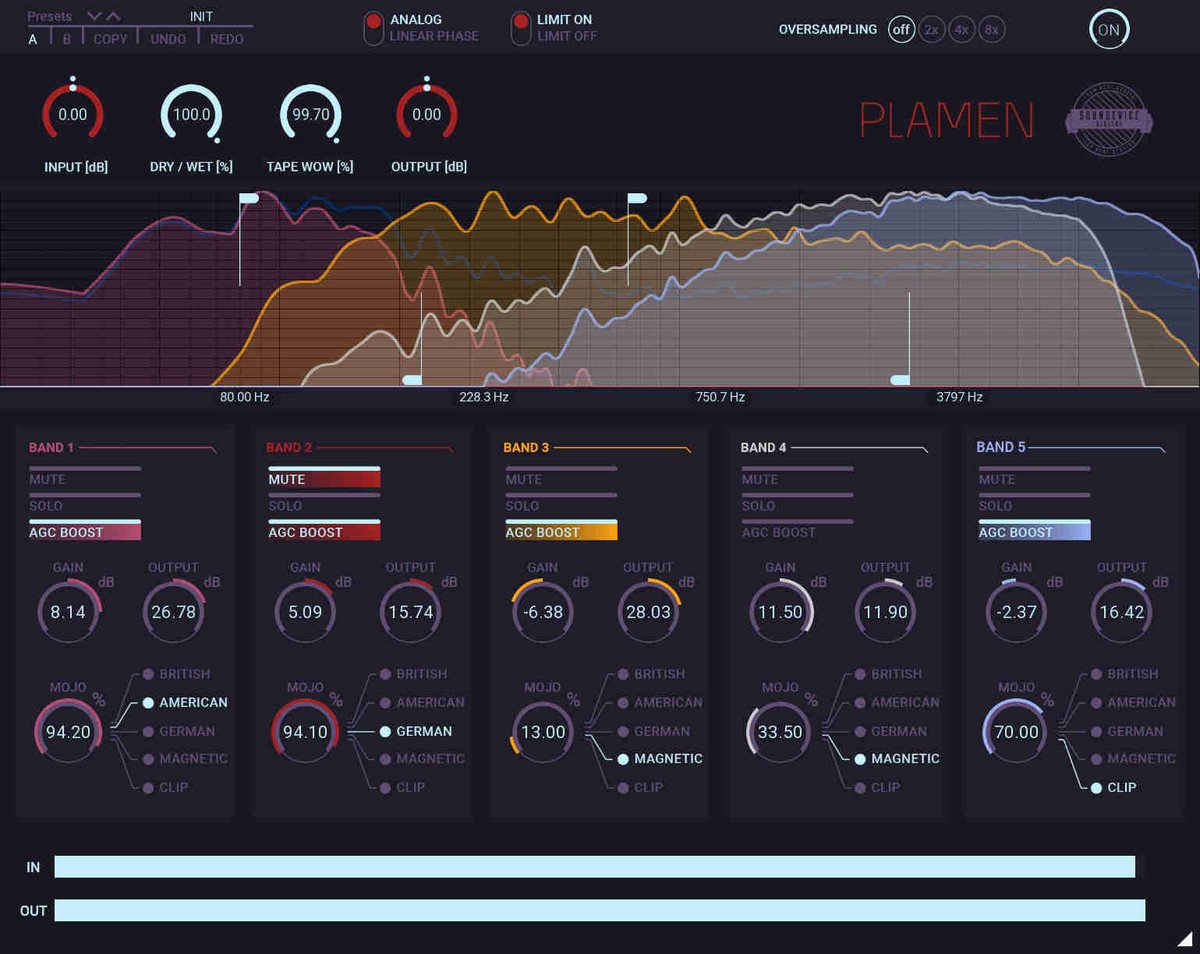
Plamen is a five-band multiband saturator developed by Soundevice Digital and sold by United Plugins. Its core idea is to set the type and amount of saturation separately for each band.
Each of the five bands can use one of five saturation types: three classic analog preamp types, tape (Magnetic) and clipping. A Mojo control sets how much of the colored signal is added in parallel.
There are four crossover points, switchable between linear phase and analog 6 dB/octave modes. Each band can be soloed or muted, and there is an overall dry/wet control.
It is described as suitable for vocals and single instruments as well as the master. The name is the Czech word for flame.
Key features
Separate saturation in five bands
You can aim for weight in the lows, presence in the mids and sparkle in the highs. This is a different approach from applying one saturation evenly over the whole spectrum.
Five saturation types
Choose from three analog preamp types, tape-style Magnetic and clipping for each band. You can try different textures on different bands of the same source.
Mojo and AGC Boost
Mojo sets how much colored signal is added in parallel. If a band needs more drive, AGC Boost adds 10 dB to its input.
Flexible crossover
Four crossover points let you decide where lows, low-mids and so on begin. Switching between linear phase and analog 6 dB/octave lets you choose how phase is handled.
Oversampling and Tape Wow
2x, 4x and 8x oversampling help reduce aliasing. Tape Wow adds the slow pitch variation heard on vintage tape recorders.
License-file activation
No iLok dongle or internet connection is needed; activation uses a license file. The official page says you may use it on all your own computers. A 15-day free trial is available.
Specifications
| Item | Details |
|---|---|
| Type | Five-band multiband saturator |
| Saturation types | Three analog preamps, Magnetic (tape), clipping |
| Crossover | Four points (linear phase / analog 6 dB/oct) |
| Oversampling | 2x, 4x, 8x |
| Internal processing | 64-bit, any sample rate |
| Formats (Windows) | VST2, VST3, AAX |
| Formats (Mac) | VST2, VST3, AAX, AU |
| Supported OS (retailer listing) | Windows 8 to 11 (64-bit), macOS 10.10 to Ventura (64-bit) |
What is included and system requirements
- Plamen plug-in for Windows and Mac
- Formats: VST2, VST3, AAX, plus AU on Mac
- License-file activation (no iLok)
- Free updates, according to the official page
How to use it
- After purchase, receive the license file and run the installer.
- Rescan plug-ins in your DAW and insert Plamen on the target track.
- Move the four crossover points to suit the source.
- Choose a saturation type for each band and adjust the input gain.
- Set the parallel color with Mojo and match each band's output level.
- Use solo and mute to compare how each band behaves.
- Finish with the overall Dry/Wet and oversampling settings.
Where it may come in handy
Vocal texture
You may be able to add warmth to the lows and a little brightness to the highs, band by band.
Organizing drums and bass
Using different saturation types for low and mid bands may let you adjust punch and weight separately.
Coloring the master
A light amount of Mojo across the mix may help unify its overall texture.
Sound design
Trying extreme settings per band may help create distinctive harmonic textures.
Who it may suit
- People who want different saturation per frequency band
- Those who find a single saturation stage blurs the sound
- Users who want one tool from vocals to the master
- Anyone who prefers activation without iLok
Good to know before you buy
- The listed price differs between the official site and the retailer, so check the current price before buying.
- The retailer lists macOS 10.10 to Ventura and Windows 8 to 11; check the official page for newer OS versions.
- A 15-day free trial is available.
How it differs from similar products
We do not pick a winner; the official figures are placed side by side.
Eventide CrushStation
Plamen is a multiband design where each of five bands has its own saturation type. CrushStation combines one distortion stage with octave mix, EQ, compression and a gate.
Price
Please check the official page for the price.
See Plamen on the product page
More of the same kind
We have introduced 82 saturation and distortion effects. Here are some of the others.
- Baby Audio TAIP
- Solid State Logic SSL Native X-Saturator
- MeldaProduction MWaveFolderMB
- Three-Body Technology Nylon
- W. A. Production Heat by 22Bullets
- Relab Development Color Drive
We have introduced 34 other products from United Plugins.
- United Plugins Cyberdrive Core
- United Plugins Front DAW
- United Plugins WideFire
- United Plugins Cyberdrive
- United Plugins DarkFire
For a side-by-side comparison scored on the same criteria, see our comparison of saturation and distortion effects.
See the full list in Product database: Effects.
Sources: unitedplugins.com pluginboutique.com (checked 2026-10-27)










Comments