
Disclosure: This page may contain affiliate links. Prices were checked on the date shown and may change.
An introduction to Waves Cobalt Saphira, based on information from the maker and distributors: what it does, how to use it and who it may suit. It is not scored.
Dial in even harmonics to add clarity and warmth, odd harmonics to add a rough edge, or both.
— Waves official site
What is Cobalt Saphira?
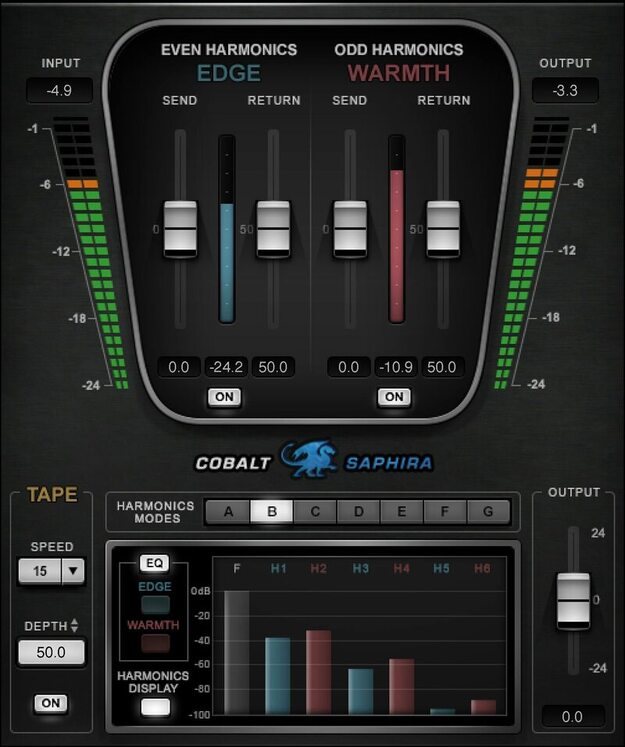
Cobalt Saphira is a harmonic enhancer from Waves. It lets you add odd and even harmonics separately at frequencies you specify.
Even harmonics are described as adding clarity and warmth, and odd harmonics as adding a rough edge. The two can also be combined.
An optional tape processing model can add depth and liveliness. It is intended for tracks, buses and full mixes.
Seven modes change the odd/even balance, and over 50 presets are provided for the master bus, groups and individual instruments.
Key features
Odd and even harmonics separately
Unlike a typical exciter, odd and even harmonics are added separately. This may let you shape brightness and roughness to suit your goal.
Choose where harmonics are generated
You pick the frequencies at which harmonics are synthesized, which suits adding texture to a specific range.
Seven modes
Switching modes changes the ratio of odd to even harmonics. You can set the direction with a mode and then refine the details.
Tape processing model
Adding tape processing is said to augment depth and liveliness. It is optional.
Defining drums
Adding both odd and even harmonics to drums is suggested to give them edge and clarity.
Over 50 presets
Presets for the master bus, groups and instruments offer a starting point when you are unsure how to set it up.
Specifications
| Item | Details |
|---|---|
| Type | Harmonic enhancer |
| Modes | 7 |
| Presets | Over 50 |
| Formats (Mac) | VST, AU, AAX |
| Formats (Windows) | VST, AAX |
| Supported OS (Mac) | macOS Monterey 12, Ventura 13, Sonoma 14, Sequoia 15 |
| Supported OS (Windows) | Windows 10 or later |
What is included and system requirements
- Cobalt Saphira plug-in
- Over 50 presets
- Formats: VST, AU, AAX on Mac; VST, AAX on Windows
- The license is registered to a Waves account
How to use it
- After purchase, create a Waves account and register the product serial number.
- Download and install Waves Central.
- Install Cobalt Saphira through Waves Central.
- Rescan plug-ins in your DAW.
- Insert it on a track or bus and pick a nearby preset.
- Set the odd/even balance with a mode and choose the harmonic frequency.
- Add tape processing if desired and compare at matched levels.
Where it may come in handy
Adding texture to the mix bus
A little even harmonic content may adjust the overall warmth.
Defining drums
Using both odd and even harmonics may bring out the outline of snare or kick.
Vocal clarity
Adding even harmonics at a chosen frequency may adjust the clarity of a vocal.
Edge on synths or guitars
Odd harmonics may add roughness and edge.
Who it may suit
- People who want to choose the type of harmonics for texture
- Those who want finer control than a typical exciter
- Users who also want a tape-style option
Good to know before you buy
- Waves' own site could not be reached, so this follows the Plugin Boutique product page.
- The license is registered to a Waves account and installed through Waves Central.
- Mac support covers macOS 12 to 15; Windows support covers Windows 10 or later.
Price
Please check the official page for the price.
See Cobalt Saphira on the product page
More of the same kind
Other introduction articles of the same kind.
- Softube Fix Phaser
- Positive Grid BIAS X
- BEATSURFING CHEat code
- Boz Digital Labs Panther Stereo Manipulation
- Thenatan Audio TRIO
- LANDR LANDR FX Bass
We have introduced 215 other products from Waves.
See the full list in Product database: Effects.
Sources: pluginboutique.com (checked 2026-10-27)










Comments