
Disclosure: This page may contain affiliate links. Prices were checked on the date shown and may change.
An introduction to Antelope Audio InTune Performer, based on information from the maker and distributors: what it does, how to use it and who it may suit. It is not scored.
Fast, transparent pitch correction for natural or stylized vocal results.
— Antelope Audio official site
What is InTune Performer?
InTune Performer is a real-time vocal pitch-correction plugin from Antelope Audio. It runs natively in a DAW on macOS or Windows.
Antelope describes it as a streamlined processor with quick setup and intuitive controls. Scale-based tuning and an adjustable correction amount reduce the need to edit notes one by one in a piano roll.
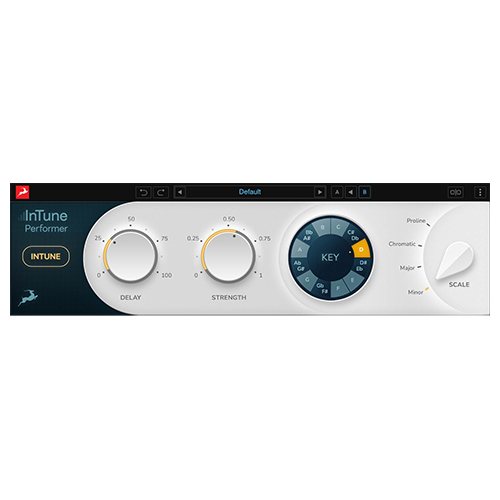
The workflow is short: insert it on a vocal track, choose a scale and set how strong and how fast the correction is. The same controls cover subtle, hard-to-notice correction and more obvious effects.
Antelope also lists it as part of Antelope Cosmos, a collection of more than 75 native plugins.
Key features
Scale-based real-time correction
Chromatic, major and minor modes are available. The voice is pulled toward the key during playback, without editing notes.
Strength control
Sets how much correction is applied, from 0 to 100 percent, from light assistance to fully locked pitch.
Delay control
Adjusts the time between the start and completion of correction. Fully clockwise is the most subtle, which helps avoid robotic jumps.
Proline mode
Plugin Boutique's description lists a Proline mode in which correction follows a master melody from a sidechain track.
Designed to keep voice character
The stated goal was correcting pitch without distorting the character of the voice, though extreme settings can make correction audible.
Simple controls for a single voice
It is built for a single voice with a short list of controls, which may make it quick to start with.
Specifications
| Item | Details |
|---|---|
| Type | Vocal pitch correction |
| Operation | Native plugin in a DAW (macOS, Windows) |
| Scales | Chromatic, major, minor |
| Main controls | Strength (0 to 100 percent), Delay, key, scale |
| Trial | 14 days (per Antelope's site) |
| Collection | Antelope Cosmos (more than 75 native plugins) |
What is included and system requirements
- Native plugin
- Supported on macOS and Windows
How to use it
- Get the trial or the product from Antelope's site or Plugin Boutique.
- Run the installer and authorize the plugin.
- Insert InTune Performer on the vocal track in your DAW.
- Choose the key and the scale (chromatic, major or minor).
- Set the amount of correction with Strength.
- Use Delay to adjust how quickly correction is applied and check naturalness.
- To follow a guide melody, try Proline mode.
Where it may come in handy
Home-recorded vocal covers
It may suit quickly and naturally tidying a finished vocal.
Rap and pop vocal sounds
Stronger settings may suit a clearly audible tuning effect.
Monitoring while recording or streaming
Because it runs in real time, it may suit situations where you want to hear the result as you work.
Who it may suit
- People who want fast pitch correction without note editing
- Those who want scale-based correction
- Users of Antelope's plugin collection
Good to know before you buy
- It is described as a processor for a single voice.
- The Proline mode description comes from Plugin Boutique's page.
- Prices may vary by store and period, so check before buying.
How it differs from similar products
We do not pick a winner; the official figures are placed side by side.
AIR Vocal Tuner
On AIR's site, Vocal Tuner is an automatic pitch corrector with key, scale and retune time controls. InTune Performer offers chromatic, major and minor modes with Strength and Delay knobs.
Price
Please check the official page for the price.
See InTune Performer on the product page
More of the same kind
We have introduced 10 pitch correction tools. Here are some of the others.
- Universal Audio Topline Vocal Tune
- Waves Waves Tune LT
- Synchro Arts RePitch 2
- Tuned Plugins VocalTune
- Slate Digital Slate Digital MetaTune
- GVST GSnap
We have introduced 54 other products from Antelope Audio.
- Antelope Audio The Judge
- Antelope Audio VEQ-STU 900
- Antelope Audio ZHEGA
- Antelope Audio Antelope Audio VP Brainiac II
- Antelope Audio Gyratec IX
For a side-by-side comparison scored on the same criteria, see our comparison of pitch correction tools.
See the full list in Product database: Effects.
Sources: antelopeaudio.com pluginboutique.com (checked 2026-10-27)










Comments