
Disclosure: This page may contain affiliate links. Prices were checked on the date shown and may change.
An introduction to Antelope Audio V12 Chorus, based on information from the maker and distributors: what it does, how to use it and who it may suit. It is not scored.
This powerful processor is equipped with a Voicing generator, capable of producing up to 12 different voicings based on the source material.
— Antelope Audio official site
What is V12 Chorus?
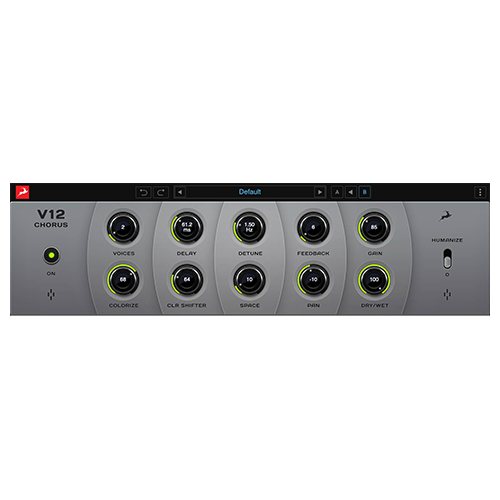
V12 Chorus is a multi-voice stereo chorus from Antelope Audio. The company says it combines proven modulation principles with processing aimed at a new generation of music makers. It runs natively in your DAW, and in real time on Synergy Core interfaces.
At its core is a Voicing generator that creates up to 12 voicings from the source. The timing between voicings, their tuning and the number of repeats each have separate controls.
For tone shaping there is a proprietary frequency filter called Colorize, fine-tuned with the Color Shifter. The Space function, according to the company, can change the placement of the delayed voicings in relation to the filters.
The Humanize engine adds randomization that disrupts the relationships between parameters. The company says it can add subtle human-like feel or aggressive chaos for sound design. Presets are included.
Key features
Voicing generator with up to 12 voices
It creates up to 12 voicings from the source, with separate control over spacing, tuning and repeats. This may allow results from light width to dense layering.
Colorize filter
A proprietary frequency filter shapes the tone so the chorus sits in the mix, with fine-tuning via Color Shifter. It may help when you need the effect to sit well.
Space placement
The company says Space can change the position of delayed voicings relative to the filters, which may help when you want to build a left-right layout.
Humanize engine
Randomization disrupts relationships between parameters, from subtle human-like drift to aggressive chaos. It may also suit sound design.
Native and real-time use
It runs as a native plugin in your DAW, and on Synergy Core interfaces it can be used while recording with near-zero latency. Mixing via the AFX2DAW plugin is supported.
Presets included
Presets are included and can serve as starting points.
Specifications
| Item | Details |
|---|---|
| Type | Multi-voice stereo chorus |
| Voices | Up to 12 |
| Main functions | Voicing, Colorize (Color Shifter), Space, Humanize |
| Versions | Native plugin, Synergy Core real-time |
| Environment | DAW on macOS or Windows |
| Related | Antelope Cosmos (membership covering 75+ native plugins) |
What is included and system requirements
- V12 Chorus native plugin
- Synergy Core real-time version (on compatible interfaces)
- Presets
- The company states that Antelope Cosmos membership unlocks 75+ native plugins
How to use it
- Create an Antelope Audio account and obtain the license.
- Install the native plugin and rescan plugins in your DAW.
- Insert V12 Chorus on the track you want to process.
- Choose a preset and start with fewer voices to hear the movement.
- Adjust voice spacing and tuning gradually to set thickness.
- Use Colorize and Color Shifter to fit the tone into the mix.
- Set placement with Space and add Humanize if you want drift.
- Check the overall balance in context.
Where it may come in handy
Widening guitar or synth
Layering multiple voices could add stereo width and thickness.
Sound design
With stronger Humanize settings it could help create dark, rough textures.
Monitoring while tracking
On Synergy Core interfaces, you may be able to play while hearing the chorus.
Background vocal textures
With few voices, a light amount on background vocals may work.
Who it may suit
- People looking for a chorus with up to 12 voices
- Those who want to do sound design with randomized movement
- Users of Antelope Audio Synergy Core devices
Good to know before you buy
- The price could not be confirmed on the official page, so none is shown.
Price
Please check the official page for the price.
See V12 Chorus on the product page
More of the same kind
We have introduced 46 modulation effects. Here are some of the others.
- MeldaProduction MeldaProduction MFlangerMB
- Arturia Chorus JUN-6
- Minimal Audio Poly Flanger
- D16 Group Antresol
- Eventide Eventide Instant Phaser Mk II
- Kuassa Efektor TR3604 Tremolo
We have introduced 54 other products from Antelope Audio.
- Antelope Audio UK-69
- Antelope Audio Antelope Audio Springer
- Antelope Audio VEQ-432C
- Antelope Audio VEQ-STU 900
- Antelope Audio MG4+
See the full list in Product database: Effects.
Sources: en.antelopeaudio.com pluginboutique.com (checked 2026-10-27)










Comments