
Disclosure: This page may contain affiliate links. Prices were checked on the date shown and may change.
An introduction to Wave Arts Panorama 7, based on information from the maker and distributors: what it does, how to use it and who it may suit. It is not scored.
The definitive 3D spatializer
— Wave Arts official site
What is Panorama 7?
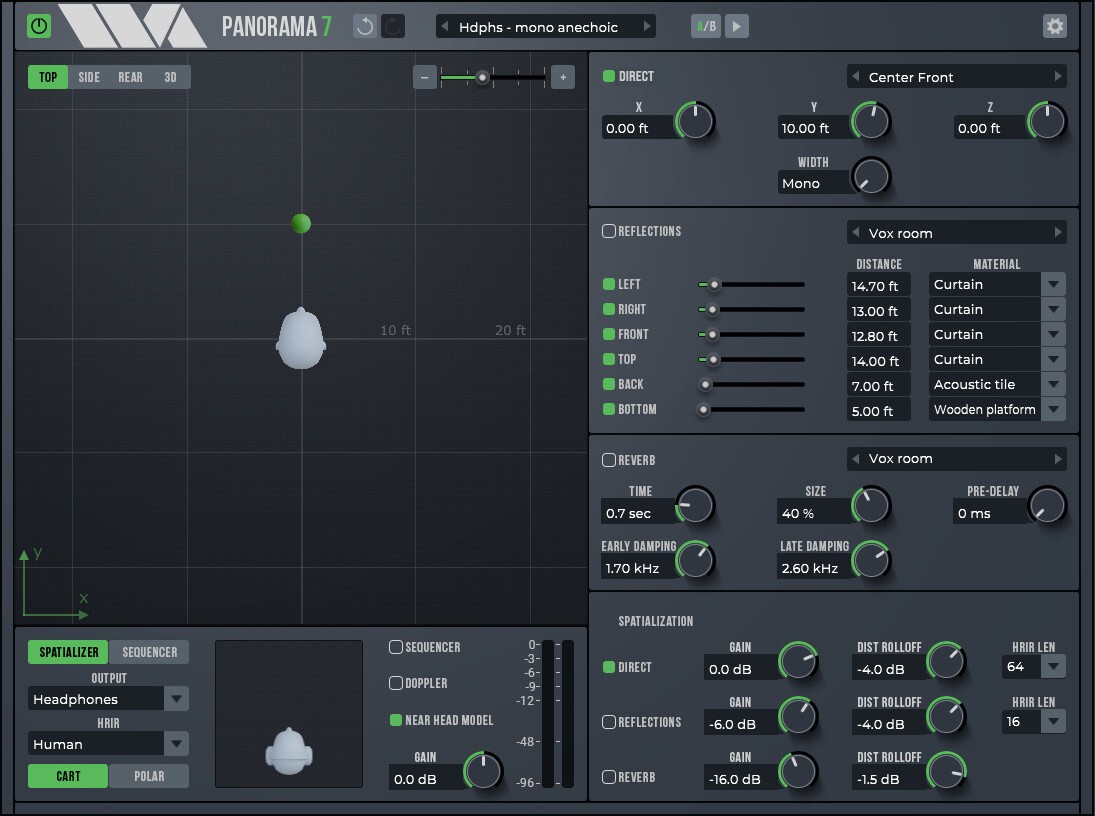
Wave Arts Panorama 7 is a 3D spatializer plug-in. Using HRTF-based binaural synthesis and acoustic environment modelling, the maker says it creates lifelike auditory experiences over both headphones and loudspeakers.
Uses include 3D audio production, where you insert it on each track and pan sounds around a virtual space, stereo panning effects, auto-pan, stereo widening and virtual stereo or surround monitoring. It is said to work best for headphone mixes such as podcasts.
The big new feature of Panorama 7 is the position sequencer, which moves a sound along trajectory waypoints for trajectory automation and beat-synced auto-pan. The interface has a new dark theme and larger panning views with side and rear options.
Key features
Position sequencer
Move a sound along trajectory waypoints for trajectory automation and beat-synced auto-pan.
Larger virtual area
The panning range grew from plus or minus 10 feet in Panorama 6 to plus or minus 100 feet.
Near Head Model
Applies extra head shadowing from a spherical head model to improve accuracy for positions close to the head.
Stereo Pan and Stereo Passthru HRIRs
Implements traditional stereo panning and proper binaural-to-loudspeaker conversion.
Binaural 3D panning
Places sounds in three-dimensional space using HRTFs.
Virtual monitoring
Simulates stereo and surround playback over headphones.
Specifications
| Item | Details |
|---|---|
| Formats | Mac: AU, VST3, AAX (macOS 10.13 or later; AAX needs Pro Tools 11 or later). Windows: VST2, VST3, AAX (AAX needs Pro Tools 10.3.5 or later, or 11 or later, depending on the product) |
| Main features | Position sequencer, Larger virtual area, Near Head Model, Stereo Pan and Stereo Passthru HRIRs |
What is included and system requirements
- Panorama 7
- Formats: AU, VST3, AAX (Mac), VST2, VST3, AAX (Windows)
How to use it
- Insert Panorama on each track in the mix.
- Set where you want each sound in the display, which has top, side and rear views.
- Build a trajectory with the position sequencer if you want movement.
- Choose a binaural HRTF for headphones or a stereo HRIR for loudspeakers.
- Adjust distance and position by ear.
Where it may come in handy
Headphone mixes
The maker's page says it works best for headphone mixes such as podcasts.
Auto-pan and movement
The sequencer moves sounds in time with the beat.
Stereo widening
It can make a stereo mix sound wide over loudspeakers.
Who it may suit
- People who want to move sounds in 3D
- People who want virtual monitoring on headphones
Good to know before you buy
- This article is based on the Wave Arts product page. Check the maker or retailer pages for the latest specifications and prices.
Price
Please check the official page for the price.
See Panorama 7 on the product page
More of the same kind
Other introduction articles of the same kind.
- Native Instruments Tape Wobble
- Dreamtonics Vocoflex
- Thenatan Audio TRIO
- Sound Particles Beat Panner
- MAAT LINSurround
- Blue Cat Audio Blue Cat's Connector
We have introduced 8 other products from Wave Arts.
- Wave Arts Dialog 2
- Wave Arts MultiDynamics 7
- Wave Arts Convology XT
- Wave Arts FinalPlug 7
- Wave Arts MasterVerb 7
See the full list in Product database: Effects.
Sources: wavearts.com (checked 2026-11-09)









Comments