
Disclosure: This page may contain affiliate links. Prices were checked on the date shown and may change.
An introduction to Wave Arts TrackPlug 7, based on information from the maker and distributors: what it does, how to use it and who it may suit. It is not scored.
All-in-one channel strip plug-in
— Wave Arts official site
What is TrackPlug 7?
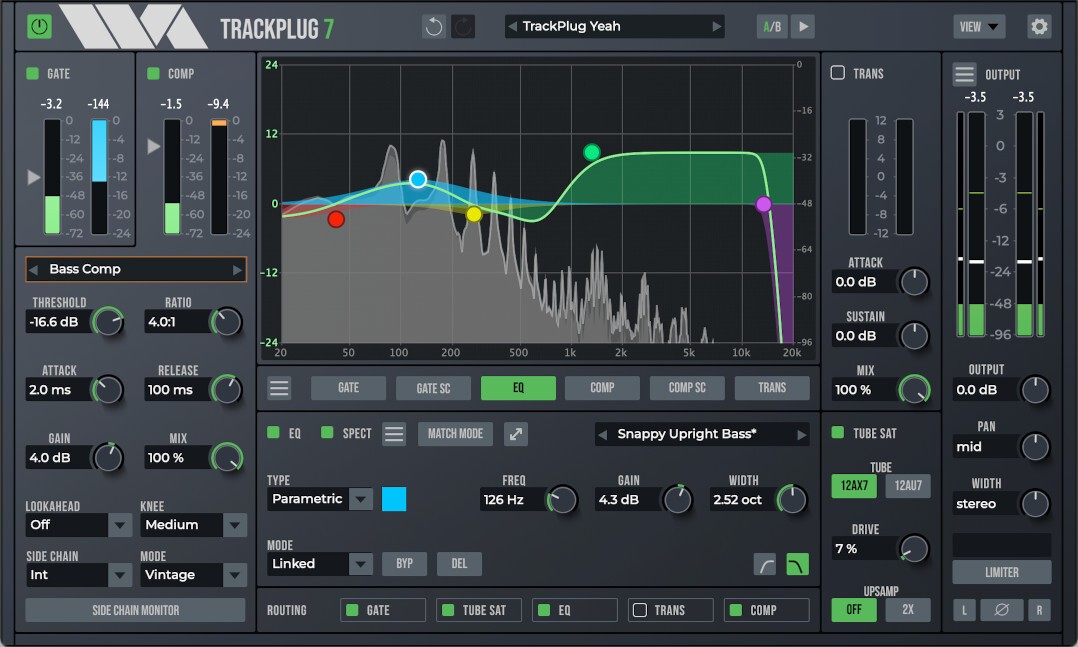
Wave Arts TrackPlug 7 is an all-in-one channel strip plug-in. It integrates a gate, compressor, 10-band equalizer, transient shaper, tube saturator and peak limiter, and the maker says most modules provide extensive visual feedback.
The gate/expander and compressor have side-chain EQ and a scrolling time view. The 10-band EQ offers parametric, shelf, analogue shelf and notch filters, with stereo-linked or mid-side processing per band, and an EQ Match mode automates matching the EQ between tracks.
The processing chain can be customised by rearranging modules. There is also a low-latency lookahead peak limiter, metering including K-meters, and output gain, pan, width and polarity controls. Discounted upgrades are offered to TrackPlug 5 and 6 owners.
Key features
Gate and compressor
With side-chain EQ and a scrolling time view.
10-band EQ
Parametric, shelf, analogue shelf and notch filters, with mid-side per band.
EQ Match
Automates EQ matching between tracks.
Transient processor
Shapes the attack and sustain portions of sounds.
Tube saturation
Adds warmth and harmonic richness.
Rearrangeable modules
Customise the processing chain order.
Specifications
| Item | Details |
|---|---|
| Formats | Mac: AU, VST3, AAX (macOS 10.13 or later; AAX needs Pro Tools 11 or later). Windows: VST2, VST3, AAX (AAX needs Pro Tools 10.3.5 or later, or 11 or later, depending on the product) |
| Main features | Gate and compressor, 10-band EQ, EQ Match, Transient processor |
What is included and system requirements
- TrackPlug 7
- Formats: AU, VST3, AAX (Mac), VST2, VST3, AAX (Windows)
How to use it
- Insert TrackPlug 7 on a track.
- Choose the modules and their order.
- Set dynamics with the gate and compressor.
- Shape tone with the EQ, using EQ Match if needed.
- Check the output with the limiter and meters.
Where it may come in handy
One-plug track processing
Gate, compression, EQ, saturation and limiting together.
Matching tracks
Using EQ Match to match tone between tracks.
Mix bus
It can also be used as a channel strip on buses.
Who it may suit
- People who want track processing in one plug-in
- People looking for a channel strip
Good to know before you buy
- This article is based on the Wave Arts product page. Check the maker or retailer pages for the latest specifications and prices.
Price
Please check the official page for the price.
See TrackPlug 7 on the product page
More of the same kind
We have introduced 51 channel strips. Here are some of the others.
- AudioThing Space Strip
- Metric Halo ChannelStrip v4
- McDSP Channel G Native v7
- Waves CLA MixHub
- IK Multimedia White Channel
- Waves SSL G-Channel
We have introduced 8 other products from Wave Arts.
- Wave Arts MasterVerb 7
- Wave Arts FinalPlug 7
- Wave Arts Convology XT
- Wave Arts MultiDynamics 7
- Wave Arts Tube Saturator 2
See the full list in Product database: Effects.
Sources: wavearts.com (checked 2026-11-09)









Comments