
Softube’s bus compressor Bus Processor is 60% off at Plugin Boutique: $59 instead of $149 (USD). The product page says the offer runs until November 1.
Disclosure: This article contains affiliate links. If you buy through them, SoundBounty may earn a commission at no extra cost to you. Prices are as of the date we checked them and can change.
The deal
| Product | Regular price | Sale price | Discount | Ends |
|---|---|---|---|---|
| Bus Processor | $149 | $59 | 60% off | Nov 1 |
Prices are in US dollars as shown on Plugin Boutique, checked on October 24, 2026. The discount and end date come from the Plugin Boutique product page. Taxes, fees and availability can vary by country, so check the checkout page.
Where to buy
- Bus Processor: View at Plugin Boutique
What is Bus Processor?
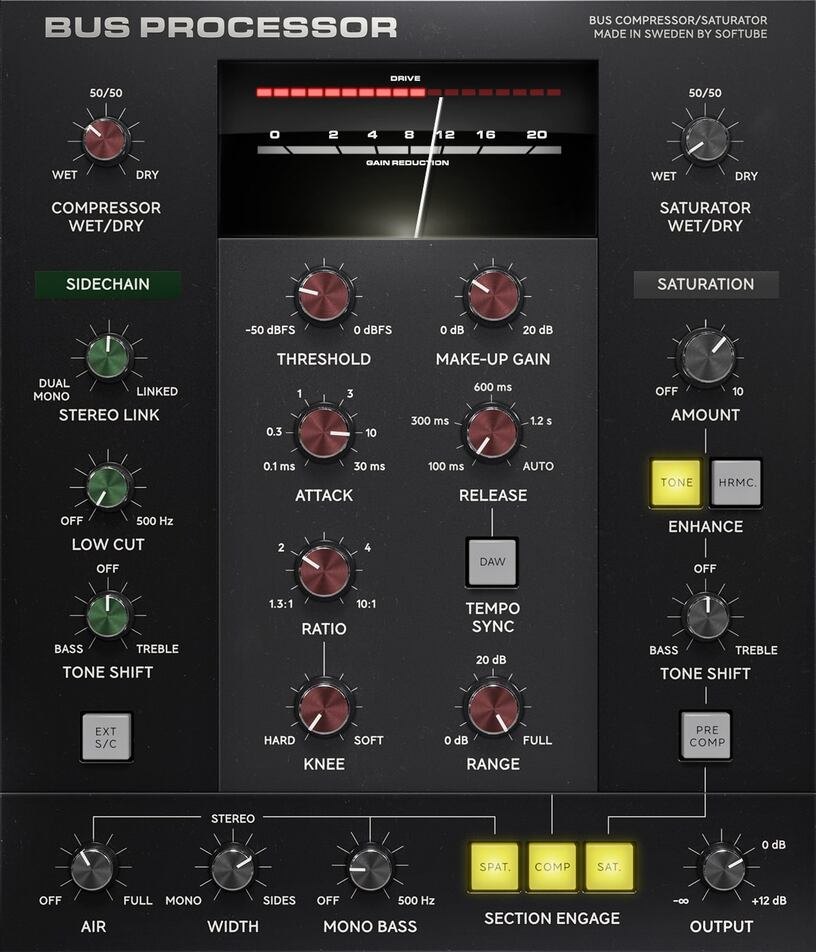
Bus Processor is a bus compressor from Softube. It is a plug-in for putting on a “bus” that groups several tracks, to bring a mix together (per the manufacturer).
It supports AU, VST, VST3 and AAX. It is also included in bundles such as the Flow Mixing Suite (per the manufacturer).
Features
A bus compressor with a modern algorithm
The core is a compression stage modeled on the bus compressors of large 1980s consoles (per the manufacturer). You can set the gain-reduction behavior finely, from a clean, transparent sound to a musical coloration.
Saturation before or after the compression
It has a saturation stage with an emphasis filter that can be placed before or after the compression. A dedicated sidechain for the saturation can be used separately from the compression (per the manufacturer).
Sidechain and spatialization
There is an advanced sidechain that works for both compression and saturation. Finishing features include an air filter for openness, a function that adds stereo width and a filter that makes the low end mono.
Finishing polish even with few settings
Softube says that even modest settings add polish to the finished sound. It says the plug-in can be used on any bus, from a stem (instrument group) bus to the master bus.
Console 1 support
Inside Console 1, the compression stage can be used as the compressor section and the saturation as the output drive section (per the manufacturer). It can also be used as an ordinary plug-in.
Included in other products
It is also included in the Flow Mixing Suite, Flow Mastering Suite and Flow Complete Suite (per the manufacturer).
Official video
Specifications and system requirements
- Operating systems: macOS Sonoma 14, Sequoia 15 and Tahoe 26; Windows 10 (64-bit) and Windows 11
- Plug-in formats: AU, VST, VST3, AAX (a compatible DAW is required)
- A Softube account and an iLok account are required
- An internet connection is needed to download the installer and manage licenses
After you buy: installation and activation
This is the flow for Softube products bought at Plugin Boutique (a Softube account plus Softube Central plus iLok). Steps and screen names can change when the manufacturer updates its software.
You need first: a free iLok account (a user ID) and iLok License Manager (install it beforehand).
- Press “Download” in your Plugin Boutique account to go to Softube’s login screen. Create an account and activate it from the confirmation email.
- On softube.com, go to “MY ACCOUNT” → “REGISTER LICENSE” and register the license code from your Plugin Boutique account (Softube’s site calls it a serial number).
- Download and install “Softube Central”, open it and press “INSTALL” (this installs the components for iLok licensing).
- Sign in to Softube Central, and the product you bought appears. Install it.
- Open your DAW and use it.
Before you buy
- The end date is the one shown on Plugin Boutique. Offers can change, so confirm on the product page before you buy.
- Check the supported operating systems, plug-in formats (VST3, AU, AAX and so on) and the licensing method on the product page before buying.
Where to buy
- Bus Processor: View at Plugin Boutique









Comments