
Tokyo Dawn Records’ TDR Nova is a free parallel dynamic EQ (an EQ that works only when the sound gets loud, with the processed sound mixed with the original), with dynamics processing on each band. It can also be used as a multiband compressor or a wideband compressor, and it includes a spectrum analyzer.
An EQ (equalizer) adjusts the amount of low and high frequencies in a sound. You use it to clear up a muddy voice or reduce sounds that hurt the ears.
In this article we compare TDR Nova with 15 EQ plug-ins and rate how well it serves its purpose on three criteria. The basis is official manufacturer information.
Disclosure: This article contains affiliate links. If you buy through them, SoundBounty may earn a commission at no extra cost to you. Prices and sale information are as of the date we checked them and can change.
Score 3.5 / 5 (average of the 15 products compared: 3.1)
- Price
- Free
- Specs last checked
- 2026/09/25
- Handling problem bands
- Dynamic
- Speed
- Analyzer
- Stereo processing
- M/S + L/R
- Price (store, date)
- Not listed
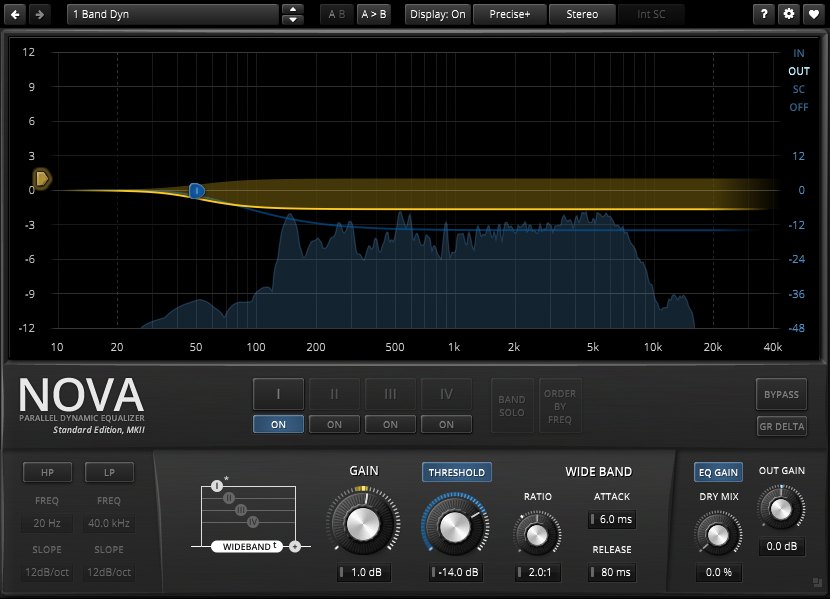
Image: from the Tokyo Dawn Labs official website (product image)
Summary
Among the 15 EQ plug-ins, TDR Nova is rank A. The ranks run S, A, B and C, and A is second from the top. Averaging the scores for each criterion (out of 5, with the one criterion that matters most for the purpose counted double) gives 3.5.
Strengths
- Handling problem bands (4 points): it has features that target problem sounds, so it is easy to fix them precisely.
- Stereo processing (4 points): you can adjust the center vocal and the backing track spread to the sides separately.
Things to keep in mind
- Speed (2 points): you have to decide the settings by ear.
Who it suits: people who want to try a dynamic EQ for free.
Main features of TDR Nova
A dynamic EQ you can use for free
TDR Nova looks like an ordinary parametric EQ, but it is a “parallel dynamic EQ” with full dynamics (a function that changes how the effect acts according to the level) on each of its four bands. You can reduce a particular band only when the sound gets loud, for free. Of the 15 EQs we compared, only TDR Nova offers dynamic EQ for free.
Many roles in one plug-in
The official page says it can be used as an ordinary EQ, a dynamic EQ, a compressor for a particular band, a compressor split by band (multiband) and a compressor for the whole sound. One plug-in covers uses such as raising the density of a whole song, tightening up the cohesion of drums and reducing the “s” sounds of a vocal.
Adjust by dragging or with knobs
You can use both dragging points on the graph and old-style knob operation. Besides the four dynamic bands there are high-pass and low-pass filters. The processing modes include Sum/Diff (Mid/Side), which separates the center from the sides, and Left/Right, which processes left and right separately. With an analyzer, band solo listening and level matching, even beginners can use it while checking how the sound changes.
A paid version with more features (GE) also exists
The paid TDR Nova GE (Gentleman’s Edition) has more bands and finer dynamics functions. You can learn how to use it with the free version first and consider the upgraded version if it becomes insufficient.
Where it is useful
- Reducing a harsh sound only when the singer belts, without spending money
- Using it in place of a de-esser to reduce the “s” sounds of a vocal
- Lightly compressing only a certain band of drums or the whole mix to bring it together
Rating by criterion
Handling problem bands: 4 / 5
We check whether you can target and fix only the sounds that bother you, such as boominess or harshness.
It is a dynamic EQ with dynamics processing on each band (free version).
Speed: 2 / 5
We check whether it has features that get you to a good setting quickly, such as automatic settings and a function that matches a reference sound.
It has a spectrum analyzer. It has no automatic settings.
If “speed” matters most to you, smart:EQ 4 (5 points) is a better fit.
Stereo processing: 4 / 5
We check whether you can adjust the center sound (such as the vocal) and the sound spread to the sides separately.
The update history on the official page lists the Sum/Diff (M/S) processing mode, which separates the center from the sides, and the Left/Right mode, which processes left and right separately.
How we score (EQ plug-ins)
| Criterion | Basis | 5 pt | 4 pt | 3 pt | 2 pt | 1 pt |
|---|---|---|---|---|---|---|
| Handling problem bands | The power to target and reduce boomy or harsh sounds | Dynamic EQ, plus processing that reacts only to specific frequencies inside a band | Dynamic EQ (works only when the sound gets loud), or separate processing of the attack and the sustained sound | A static EQ with many bands, or with a choice of processing quality such as linear phase | A static EQ with few bands | — |
| Speed | Features that help you decide settings quickly | AI balances the sound automatically and can also reduce overlap between tracks | Automatic EQ settings or EQ match, plus other aids | One aid, such as EQ match | Analyzer (a visual display of the sound) only | No aids listed |
| Stereo processing | Whether the center and the sides can be processed separately | Supports M/S, separate left/right and surround | Supports M/S plus either separate left/right or surround | M/S only | — | Not mentioned on the official page |
Each criterion is scored from 1 to 5 on how well the product serves one goal: balancing the sound of vocals and backing tracks in a mix. Scores follow the conditions in the table above, and the rank is based on an average in which "Handling problem bands" counts double. The basis is official manufacturer information. Sound quality and CPU load are not measured, so they are not scored; reviews from trade magazines are introduced in the articles for reference. Price is not part of the score. Features that cannot be confirmed from the manufacturer's or a retailer's description are scored as if absent. The "OBS (streaming)" column in the table shows whether the official page lists the VST2 format that the streaming software OBS Studio can use (○). OBS does not support the VST3 format. It is not part of the score.
TDR Nova screens and images
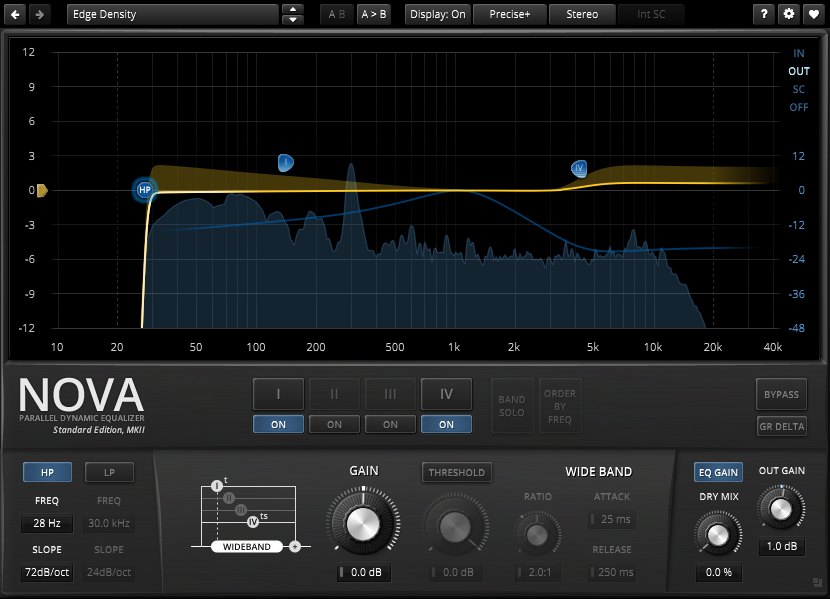
Image: from the Tokyo Dawn Labs official website (product image)
TDR Nova system requirements and getting started
| Operating system | Windows 7 or later / Mac (Mac OS X 10.9 or later, native Apple silicon support) |
|---|---|
| Plug-in formats | VST2, VST3, AU, AAX |
| Free version | Free (a paid version with more features, “Nova GE”, also exists) |
| OBS (streaming) | Works as it is (VST2 is listed) |
Checked on the manufacturer’s official pages on September 27, 2026. How to use plug-ins in the OBS streaming software is explained in How to use VST3 plug-ins in OBS.
Compared with other EQ plug-ins
Click a heading to sort. On a phone, the table scrolls sideways.
| Product | RankAvg. score | Handling problem bands | Speed | Stereo processing | Free | OBS (streaming) | Price (store, date) |
|---|---|---|---|---|---|---|---|
| FabFilterPro-Q 4 | S 4.5 | Dynamic + spectral | EQ match + aids | M/S + surround | — | ○ | $199 [PB, checked Oct 26] |
| soniblesmart:EQ 4 | A 4.0 | Dynamic | AI auto-correction | M/S | — | ○ | $129 [PB, checked Oct 26] |
| MeldaProductionMEqualizer | B 2.8 | 6 bands | Analyzer | M/S, L/R, surround | Free | ○ | Not listed |
| MeldaProductionMAutoEqualizer | A 3.8 | Linear phase | Auto EQ + match | M/S, L/R, surround | — | ○ | $165 [PB, checked Oct 26] |
| EventideSplitEQ | A 3.5 | Attack/sustain split | Analyzer | L/R + M/S | — | ○ | $149 [PB, checked Oct 26] |
| Slate DigitalInfinity EQ 2 | A 3.5 | Dynamic | Analyzer | M/S + L/R | — | ○ | $149 [PB, checked Oct 26] |
| Tokyo Dawn RecordsTDR Nova | A 3.5 | Dynamic | Analyzer | M/S + L/R | Free | ○ | Not listed |
| Universal AudioPultec Passive EQ Collection | C 1.5 | Few bands | Not listed | Not listed | — | × (VST3 only) | $39 (sale; regular $149) [PB, checked Oct 26] |
| WavesF6 | B 3.0 | Dynamic | Not listed | M/S | — | △ (via Waves StudioRack) | $39.99 (sale; regular $149) [PB, checked Oct 26] |
| Plugin Alliancebx_digital V3 | A 3.8 | Dynamic | Auto-Solo | M/S + L/R | — | ○ | Not listed |
| Tokyo Dawn RecordsSlickEQ | C 2.3 | 3 bands | Auto gain | M/S | Free | ○ | Not listed |
| DMG AudioEQuilibrium | A 3.5 | 32 bands + linear phase | Analyzer + Autolisten | M/S, L/R, surround | — | ○ | Not listed |
| SoundtheoryGullfoss | B 2.8 | Auto peak/valley balancing | Auto EQ + sidechain | Not listed | — | ○ | $199 [Official, checked Oct 26] |
| SonnoxOxford EQ | C 1.5 | 5 bands | Not listed | Not listed | — | × (VST3 only) | $279.99 [Official, checked Oct 26] |
| SonnoxOxford Dynamic EQ | C 2.5 | Dynamic | Not listed | Not listed | — | × (VST3 only) | $279.99 [Official, checked Oct 26] |
Features checked on each manufacturer's official website on September 25, 2026. Check the store page behind the buy button for the price.
Read next
- smart:EQ 4: features and rating (rank A)
- MAutoEqualizer: features and rating (rank A)
- Pro-Q 4: features and rating (rank S)
- MEqualizer: features and rating (rank B)
For free options
Pages about free products in this category:

Comments