
Disclosure: This page may contain affiliate links. Prices were checked on the date shown and may change.
An introduction to Waves JJP Vocals, based on information from the maker and distributors: what it does, how to use it and who it may suit. It is not scored.
Instead of the usual effects, this unorthodox plugin lets you shape vocals in terms of Magic, Space, Attack, Attitude, and Presence.
— Waves official site
What is JJP Vocals?
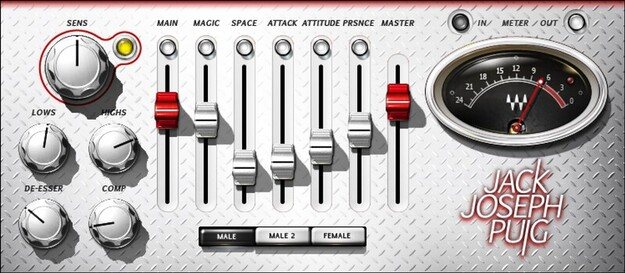
JJP Vocals is a vocal multi-effect that Waves created with producer and engineer Jack Joseph Puig. Instead of the usual EQ and compressor controls, it shapes a voice with five sliders: Magic, Space, Attack, Attitude and Presence.
Behind the sliders, the product description says, parallel chains combine compression, vocal-oriented equalization, delay and other effects. The idea is to reduce individual decisions such as which delay to use or where to place an EQ.
The approach centers on how a vocal feels. Puig's comment quoted on the page describes tailoring the result to each singer. Besides music vocals, the page lists podcasts, voiceover and audiobooks as possible uses.
Voice options (two male, one female) serve as starting points. Further adjustments are available for the de-esser, low and high EQ and compression, along with a control for the blend of dry and processed sound.
Key features
Five sliders
Magic, Space, Attack, Attitude and Presence set the direction of the voice. You move them by the impression of the result rather than tracking EQ or compressor numbers.
Five parallel processors
The page says five parallel processors layer effects with the vocal track. Several processes run from one window, which may save you from adding extra tracks.
Voice options as starting points
Two male voices and one female voice can be chosen. You could pick the one closest to your recording and refine it with the sliders.
Attack and Presence
Attack is described as boosting initial consonants and Presence as improving articulation and clarity. They may be worth trying on rap vocals or where intelligibility matters.
Space and Attitude
Space adds a slapback-style ambience and Attitude adds authority and power to the vocal, according to the page. Both can be added or removed to suit the song.
Extra fine adjustments
The de-esser, low and high EQ and compression can be tweaked further, so details can be refined when the sliders alone are not enough.
Beyond music vocals
The page lists podcasts, voiceover and audiobooks as uses, so it may also be a candidate for streaming or narration voices.
Specifications
| Item | Details |
|---|---|
| Type | Vocal multi-effect |
| Mac | macOS Monterey 12 / Ventura 13 / Sonoma 14 / Sequoia 15; VST, AU, AAX |
| Windows | Windows 10 or later; VST, AAX |
| Main controls | Magic / Space / Attack / Attitude / Presence; three voice options (2 male, 1 female) |
| Extra adjustments | De-esser, low and high EQ, compression, dry/wet balance |
What is included and system requirements
- The plugin (Waves license)
- Mac: VST / AU / AAX
- Windows: VST / AAX
- The serial number is registered to a Waves account and installed with Waves Central
How to use it
- Prepare a Waves account and register the serial number after purchase.
- Install the plugin with Waves Central.
- Insert it on the vocal track in your DAW.
- Choose the voice option closest to the recorded voice.
- Move Presence and check how clear the words are.
- Adjust Attack to set how the initial consonants stand out.
- Add Space and Attitude to suit the song.
- Decide the amount of Magic and, if needed, fine-tune the de-esser, EQ and dry/wet blend.
Where it may come in handy
Rough mixes of vocal songs
When you are unsure which EQ or compressor to choose, the five sliders could set the direction first, with details refined later.
Bringing out the start of words in rap or talk
The page lists Attack as a way to adjust the onset of consonants. It may be worth trying on songs where the words need to be clear.
Voice sound for narration and streaming
Podcasts and voiceover are listed as uses, so it may be a candidate when you want to add body or space to a voice.
Who it may suit
- People who prefer to move a voice by impression rather than individual EQ and compressor settings
- People who want to shape home-recorded vocals in a short time
- People working on rap, talk or narration where words matter
- People who want parallel vocal processing in one plugin
Good to know before you buy
- The Waves license requires registration to a Waves account and installation through Waves Central.
- Supported systems are listed as macOS 12 to 15 on Mac and Windows 10 or later on Windows.
- Windows formats are VST and AAX.
- Please check the store page for the current price.
How it differs from similar products
We do not pick a winner; the official figures are placed side by side.
Eddie Kramer Vocal ChannelWaves
JJP Vocals is operated with five sliders (Magic, Space, Attack, Attitude, Presence) and three voice options. Eddie Kramer Vocal Channel uses two chains, Vocals 1 and 2, with controls for dynamics, bass, treble, reverb and delay. Both are Waves vocal plugins with different control layouts.
Price
Please check the official page for the price.
See JJP Vocals on the product page
More of the same kind
We have introduced 35 vocal processors. Here are some of the others.
- Polyverse Music Polyverse Manipulator
- Resonant Cavity Voloco Producer
- BLEASS BLEASS Vox
- Klevgrand Altitude
- Tuned Plugins Vocal Chain
- W. A. Production VocalShaper
We have introduced 215 other products from Waves.
- Waves Sync Vx
- Waves Manny Marroquin Triple D
- Waves OVox Vocal ReSynthesis
- Waves Greg Wells VoiceCentric
- Waves Butch Vig Vocals
For a side-by-side comparison scored on the same criteria, see our comparison of vocal processors.
See the full list in Product database: Effects.
Sources: pluginboutique.com (checked 2026-10-27)










Comments