
Disclosure: This page may contain affiliate links. Prices were checked on the date shown and may change.
An introduction to Blue Cat Audio Re-Head, based on information from the maker and distributors: what it does, how to use it and who it may suit. It is not scored.
Re-Head uses a head response model to recreate the effect of your head and skull on the audio coming in from your speakers.
— Blue Cat Audio official site
What is Re-Head?
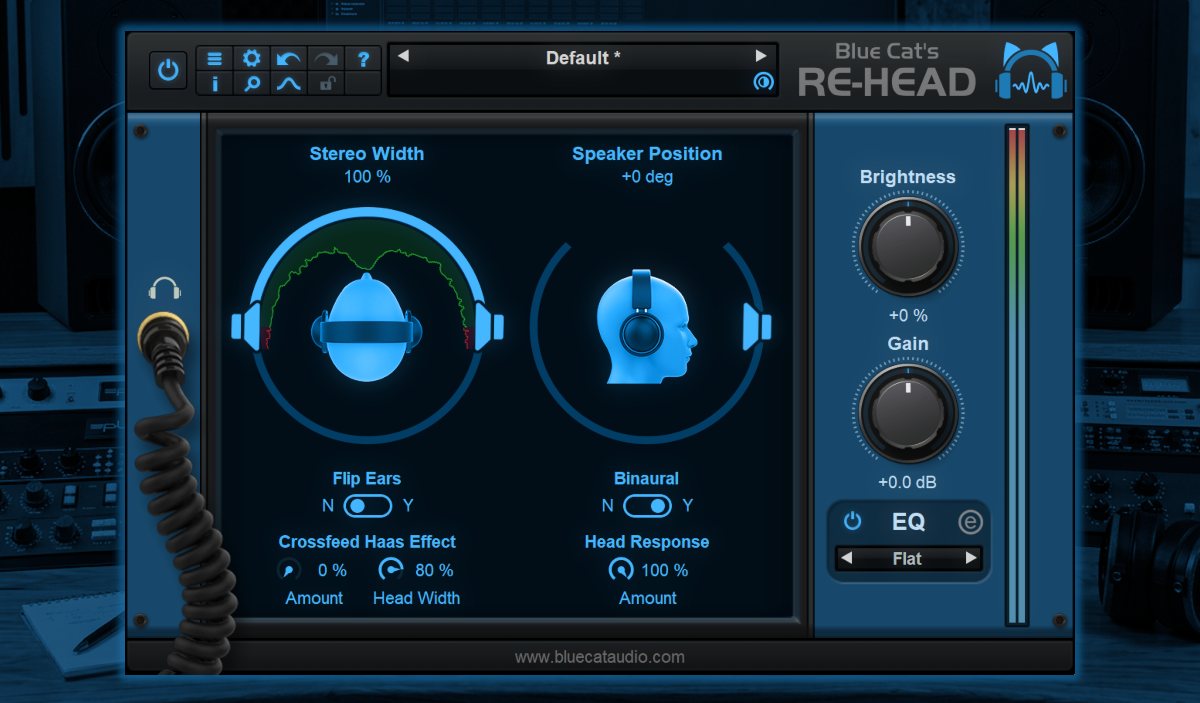
Blue Cat's Re-Head is a head-response plug-in aimed at reducing the unnatural feel of listening on headphones. When you listen to speakers, the sound is altered by your head and ears before it reaches you; headphones skip that step. Re-Head models that effect so a headphone mix can sit closer to how it would come across on speakers.
The maker presents it as a countermeasure for common headphone-work problems such as an unnatural sound and listening fatigue. The situations it has in mind include working away from the studio, working late at night, and monitoring while tracking. It is also described as useful for sounds such as distorted guitars, which tend to feel pushed right into the ears on headphones.
At the centre is a head-response model with adjustable virtual speaker position and angle, brightness, and an amount control for the correction. On the stereo side, there is a Haas-effect adjustment using inter-aural time delay (ITD) to ease the hard-panned feel typical of headphones. The head response can be switched off so the other functions can be used on their own, even on speakers.
The plug-in also includes a stereo field visualizer based on StereoScope Pro algorithms, an EQ with a spectrum analyzer, and an impulse response (IR) loader. The IR loader is described for imitating a mixing room of your choice or compensating the frequency response of your actual headphones. The maker is clear that Re-Head does not replace studio monitors; it is meant to make the switch from speakers to headphones less dramatic.
Key features
Head-response model
This models how your head and ears change the sound of loudspeakers. It is the base for making headphone monitoring feel closer to speakers, and the amount of correction is set with a single knob.
Virtual speaker position, angle and brightness
You can change the position of the virtual speakers and the angle between them, and adjust the brightness of the signal. That lets you explore perceived distance and balance to suit your headphones.
Haas effect for stereo width
Inter-aural time delay (ITD) is used to ease the extreme stereo spread common on headphones. It may help when hard-panned sounds feel stuck to one ear.
Stereo field visualizer
A stereo field display based on StereoScope Pro algorithms is built in, so you can check the left-right spread visually while adjusting the processing.
EQ and spectrum analyzer
An equalizer and a spectrum analyzer are built in, for shaping the headphone response and checking the change visually.
IR loader
Load an impulse response to imitate a mixing room, or to compensate the frequency response of your actual headphones. The maker also points to free equalization profiles for headphones that can be used here.
Independent features and channel flip
The head response can be turned off to use the other functions alone, and left and right channels can be swapped. You can use the stereo tools or displays even when working on speakers.
Specifications
| Item | Details |
|---|---|
| Type | Head-response simulator for headphones (effect) |
| Formats | VST / VST3 / AAX / Audio Unit |
| Latency | 0.5 ms (listed as reduced from 3.2 ms in version 1.4) |
| Latest version | 1.41 (2026/08/26) |
| Sample rates | Any |
| Mac | Intel or Apple Silicon, Mac OS 10.9 or newer, 64-bit VST / AU / AAX host |
| Windows | SSE2-enabled processor, Windows Vista / 7 / 8 / 10 / 11 |
| Demo limits | 5 instances per session; the effect is bypassed for half a second every minute |
What is included and system requirements
- The plug-in itself (VST / VST3 / AAX / Audio Unit)
- Built-in preset management
- Supported systems: Mac with Intel or Apple Silicon on Mac OS 10.9 or newer; Windows Vista or newer (per Plugin Boutique)
- Also included in the All Plugins Pack and Axe Pack bundles (per the maker)
How to use it
- Insert Re-Head at the end of the monitoring track (or master bus) in your DAW.
- Turn the Head Response on and begin with the correction amount around the middle.
- Move the virtual speaker position and angle to find where the sense of distance feels natural.
- Adjust the brightness to match how your headphones present the high end.
- If the stereo spread feels too wide, adjust the Haas effect (ITD) amount.
- If you have a correction profile for your headphones, load it in the IR loader.
- Switch the plug-in on and off to compare impressions against speakers.
- Before exporting, check that the monitoring-only Re-Head is not left on the master.
Where it may come in handy
Headphone work away from the studio or at night
It may be useful for sketching a mix when speakers are not an option. The maker presents it as an aid for work where headphones can sound unnatural.
Monitoring while tracking guitars and similar sources
Distorted guitars are described as feeling pushed into the ears on headphones. Placing Re-Head on the monitor path may soften that impression.
Comparing a mix for checking
When checking a speaker-made mix on headphones, you could switch the plug-in on and off to compare impressions.
Adjusting the character of your headphones
The IR loader and EQ could be used to compensate the frequency response of the headphones you own.
Who it may suit
- Home recordists and producers who spend long hours on headphones
- People who mix where speakers cannot be played, such as at night
- Anyone who wants more comfortable monitoring while recording guitars or vocals
- Users who want to try compensating their headphones with an IR
Good to know before you buy
- The maker states that Re-Head does not replace studio monitors.
- The demo allows 5 instances per session and the effect is bypassed for half a second every minute.
- Before exporting, make sure monitoring-only processing is not left on the master.
- The version history lists latency reduced from 3.2 ms to 0.5 ms in version 1.4 (the Plugin Boutique page states no latency).
Price
$49 (Blue Cat Audio official site, checked 2026-10-27). Prices can vary by region and promotion, so check the official page before buying.
See Re-Head on the product page
More of the same kind
Other introduction articles of the same kind.
- Kuassa Efektor Whammo
- NUGEN Audio NUGEN Audio Monofilter Elements
- MeldaProduction MMicSim
- Sound Radix Auto-Align Post 2
- Native Instruments Molekular
- Waves CLA Guitars
We have introduced 21 other products from Blue Cat Audio.
- Blue Cat Audio AcouFiend
- Blue Cat Audio Blue Cat's StereoScope Pro
- Blue Cat Audio Blue Cat's DP Meter Pro
- Blue Cat Audio Blue Cat's Chorus
- Blue Cat Audio Plug'n Script
See the full list in Product database: Effects.
Sources: bluecataudio.com pluginboutique.com (checked 2026-10-27)










Comments