
Disclosure: This page may contain affiliate links. Prices were checked on the date shown and may change.
An introduction to Baby Audio Smooth Operator Pro, based on information from the maker and distributors: what it does, how to use it and who it may suit. It is not scored.
Smooth Operator Pro is a state-of-the-art spectral balancing tool that helps you easily remove harshness, mud and masking from any track.
— Baby Audio official site
What is Smooth Operator Pro?
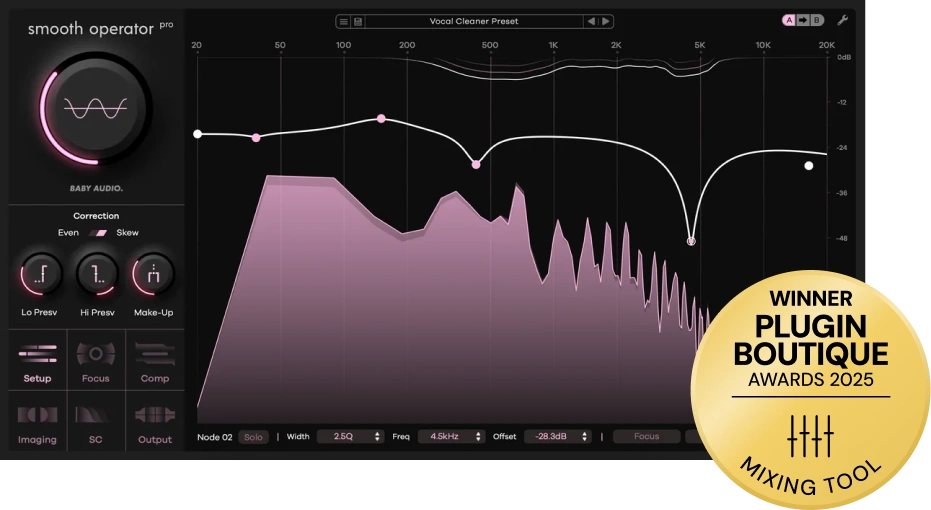
Smooth Operator Pro is a spectral balancer from Baby Audio. The maker describes it as a tool for removing harshness, mud and masking from tracks.
You set a target curve with the EQ nodes, then turn the big threshold knob until the plug-in begins rebalancing the audio. Deeper settings are available for finer control.
The Pro version lets you freely add and remove nodes and set an individual dynamic profile for each node. The maker's examples include targeting the left side at 7,500 Hz, the sides at 150 Hz, and a vocal at 2.5 kHz with a softer profile.
It ships with 184 presets said to be created by well-known engineers. Sidechain mode uses the spectral content of another track to rebalance the current one.
Key features
Target curve and threshold
Set a target curve with the EQ nodes and move the threshold to start the processing. This gives a fast route for a first pass.
Resonance suppression 2.0
Global settings can be overridden for any frequency node, giving different processing profiles at different points within one instance.
Add and remove nodes, per-node profiles
Nodes can be added or removed freely, each with its own dynamic profile, and all dynamic and imaging parameters are controllable.
Two correction algorithms
Two correction algorithms, Even and Skew, are provided and can be compared by ear.
Sidechain mode
The spectral content of another track is used to rebalance the current one. For example, using the lead vocal as the input on a guitar track tames the guitar where the vocal has the most energy.
184 presets
184 presets created by well-known engineers are included as starting points.
Specifications
| Item | Details |
|---|---|
| Type | Spectral balancer (dynamic resonance suppression) |
| Formats | VST, VST3, AU, AAX (64-bit) |
| Mac | Mac OS 10.11 and up (native Apple Silicon M1/M2/M3 support) |
| Windows | Windows 10 and newer |
| Supported DAWs | Ableton Live, Pro Tools, Logic Pro, FL Studio, Cubase, Studio One, Bitwig, Reaper, Reason and others |
| Presets | 184 |
What is included and system requirements
- The plug-in (VST, VST3, AU, AAX)
- 184 factory presets
- Upgrade pricing for owners of the original Smooth Operator ($29)
- A free trial is offered on the maker's page
How to use it
- Download and install after purchase.
- Insert it on the track you want to adjust.
- Set the target curve with the EQ nodes.
- Turn the threshold knob to find where balancing begins.
- For a problem band, override the global settings on that node.
- Compare the Even and Skew algorithms.
- If tracks overlap, try sidechain mode.
Where it may come in handy
Smoothing a vocal
The maker gives taming a vocal around 2.5 kHz with a softer profile as an example.
Cleaning up bass
Addressing the sides at 150 Hz is given as an example for cleaning up the bass.
Harsh cymbals
The maker shows fixing a harsh cymbal by targeting the left side at 7,500 Hz.
Mix bus balance
On a two-bus it may help balance the overall tone.
Who it may suit
- People who want harshness and mud reduced automatically
- Anyone who wants per-node control of resonances
- Those sorting out masking between tracks
- Original Smooth Operator users wanting finer control
Good to know before you buy
- Owners of the original Smooth Operator can upgrade at a lower price ($29 is mentioned on the maker's page).
- Plugin Boutique showed a sale price of $59.00; the regular price is $129.00.
- A free trial is available.
How it differs from similar products
We do not pick a winner; the official figures are placed side by side.
Smooth Operator
There is a $29 upgrade price for original owners. The Pro version adds free addition and removal of nodes, per-node profiles, the Even and Skew algorithms and 184 presets.
Price
$129 (Plugin Boutique, checked 2026-10-27). Prices can vary by region and promotion, so check the official page before buying.
See Smooth Operator Pro on the product page
More of the same kind
Other introduction articles of the same kind.
- Metric Halo / Make Believe David’s 2Bus
- Mastering The Mix FASTER MASTER
- Klevgrand REAMP
- Krotos Dehumaniser 2
- Waves NS1 Noise Suppressor
- Blue Cat Audio Re-Head
We have introduced 11 other products from Baby Audio.
- Baby Audio Baby Audio Parallel Aggressor
- Baby Audio Super VHS
- Baby Audio Transit 2
- Baby Audio Crystalline
- Baby Audio Humanoid
See the full list in Product database: Effects.
Sources: babyaud.io pluginboutique.com (checked 2026-10-27)










Comments