
Basic Wavez’s drum fill generator Dr. Fill is 35% off at Plugin Boutique: $26 instead of $40 (USD). The product page says the offer runs until October 31.
Disclosure: This article contains affiliate links. If you buy through them, SoundBounty may earn a commission at no extra cost to you. Prices are as of the date we checked them and can change.
The deal
| Product | Regular price | Sale price | Discount | Ends |
|---|---|---|---|---|
| Dr. Fill | $40 | $26 | 35% off | Oct 31 |
Prices are in US dollars as shown on Plugin Boutique, checked on October 24, 2026. The discount and end date come from the Plugin Boutique product page. Taxes, fees and availability can vary by country, so check the checkout page.
Where to buy
- Dr. Fill: View at Plugin Boutique
What is Dr. Fill?
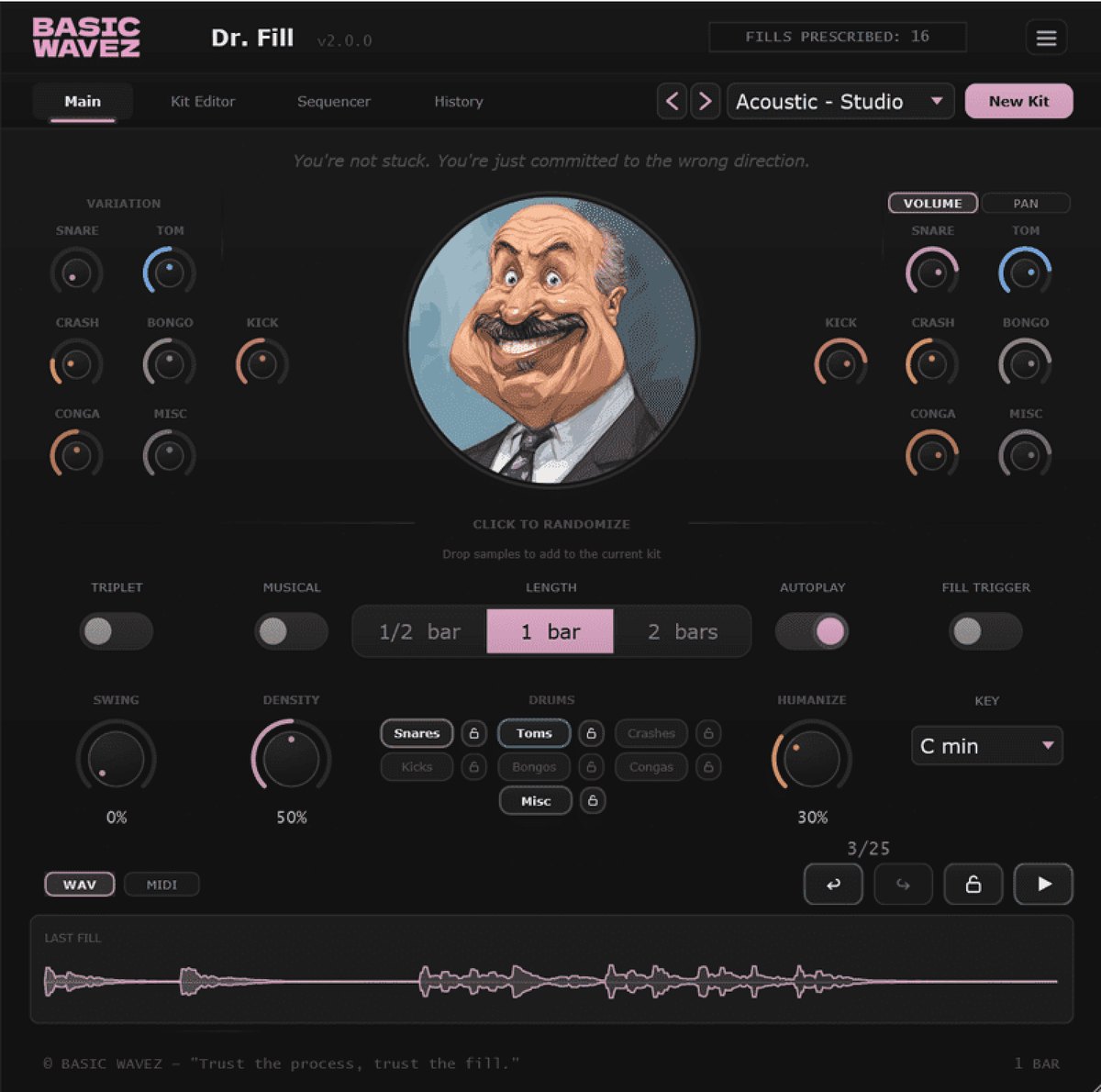
Dr. Fill is a plug-in from Basic Wavez that makes drum fills (short flourishes that mark a break in a song) automatically. You can adjust the density and swing of a generated fill and drag it into your DAW (per the manufacturer).
Features
Generate a drum fill with one click
Dr. Fill is a generator that makes the drum fills linking the sections of a song in a few seconds. The manufacturer says it makes fills that fit the song, without overthinking and without sounding tacked on.
Groove controls: Density, Swing and Humanize
You generate a fill, adjust it in detail and drag it into the DAW. Density, Swing and Humanize shape the groove. Pattern Lock lets you keep a rhythm you like and try different sounds (per the manufacturer).
Build a kit from your own samples with Kit Builder
Not only drums but also vocal chops, bass hits, textures and any sounds you like can make up your own kit. It automatically detects the kind of sample and the key of pitched material (per the manufacturer).
MIDI out, and triggering by MIDI in
You can export a fill as MIDI, or call up a fill with MIDI input (per the manufacturer).
Fill length and range of sounds
You can choose a fill length of half a bar, one bar or two bars. The range of sounds has also grown, with kick, bongo, conga and percussion, and there are controls for snare, toms, crash and variation (per the manufacturer).
After you buy: installation and activation
This is the general flow for products bought at Plugin Boutique. Activation differs by product (serial number, a manufacturer account, iLok and so on), so check the instructions in your library after purchase.
- Log in to your Plugin Boutique account and find the product in “Library”.
- Download the installer (you can switch between the Windows and Mac versions). Depending on the product, you also get a serial number, an unlock code or a key file.
- Product-specific steps are under “…” → “Installation Instructions” next to the product in your library, and also near the bottom of the product page.
Before you buy
- The end date is the one shown on Plugin Boutique. Offers can change, so confirm on the product page before you buy.
- Check the supported operating systems, plug-in formats (VST3, AU, AAX and so on) and the licensing method on the product page before buying.
Where to buy
- Dr. Fill: View at Plugin Boutique









Comments