
Disclosure: This page may contain affiliate links. Prices were checked on the date shown and may change.
An introduction to BLEASS BLEASS Flanger, based on information from the maker and distributors: what it does, how to use it and who it may suit. It is not scored.
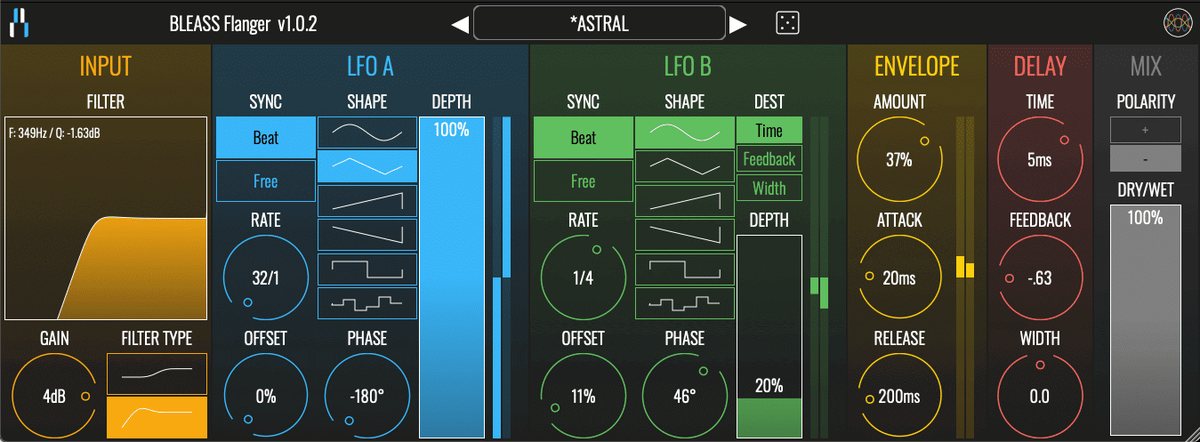
BLEASS Flanger harnesses the sonic characteristics of classic flanger effects and brings them fully up-to-date with a pair of flexible LFOs, variable modulation routing, an envelope generator and beat synchronisation.
— BLEASS official site
What is BLEASS Flanger?
BLEASS Flanger is a flanger effect plugin from BLEASS. The maker describes it as building on classic flanger character with two LFOs, switchable modulation routing, an envelope generator and beat synchronization.
A flanger modulates delay time to create its characteristic sweeping sound. Here several modulation sources can be combined, which the maker says allows detailed, evolving movement in the tone.
An envelope generator triggered by the incoming signal is included, so the effect can respond to the dynamics of a performance. The second LFO can also modulate the delay feedback or the stereo width.
A multi-mode input filter shapes the tonal character, and the LFOs can be synced to the beat of the DAW for rhythmic variation. It works on desktop as well as on iPad and iPhone.
Key features
Two LFOs with routing
LFO A modulates delay time. LFO B can modulate delay time, feedback or stereo width. Running them at different rates may suit building a more complex sweep.
Signal-triggered envelope generator
An envelope triggered by the input adds a response to playing dynamics. It may suit parts with large differences in expression, such as guitar or bass.
Beat sync and free-running mode
BEAT mode locks the LFO to the DAW tempo with Rate set as a fraction of a beat; FREE sets it in Hz. You can choose whether the sweep follows the song tempo.
Six LFO shapes
Shapes are sine, triangle, sawtooth up, sawtooth down, square and sample-and-hold, covering smooth movement through stepped changes.
Phase and Offset
Phase offsets the left and right LFO channels, fully inverted at 180 degrees. In BEAT mode, Offset shifts the start and end of the cycle relative to the beat. They help tune stereo spread and timing.
Multi-mode input filter and mix section
The input filter is low-shelf or high-pass, and Gain sets the level of the processed signal. In the mix section, Polarity adds or subtracts the wet signal and Dry/Wet sets the balance.
Specifications
| Item | Details |
|---|---|
| Type | Flanger (plugin) |
| LFOs | Two (six shapes, beat sync) |
| Envelope generator | Yes (triggered by input) |
| Windows | Windows 8 or later (64-bit), VST3 |
| Mac | macOS 10.9 or later (64-bit only, M1 supported), VST3 / Audio Unit |
| Note | iPad and iPhone versions available |
What is included and system requirements
- Flanger plugin (VST3 / Audio Unit)
- Supports Windows 8 or later and macOS 10.9 or later (64-bit)
- Works in VST3 or Audio Unit compatible DAWs
How to use it
- After installing, open BLEASS Flanger on a DAW track.
- Set Dry/Wet around the middle to hear the balance between source and effect.
- Set the basic speed and size of the sweep with LFO A Rate and Depth.
- To follow the tempo, switch Sync to BEAT and pick a fraction of a beat for Rate.
- Change Shape to compare how each waveform moves.
- Assign LFO B to a destination (time, feedback or width) to add more movement.
- Use the envelope to make the effect respond to playing dynamics.
- Finish by removing low end with the input filter and trying Polarity to change the color.
Where it may come in handy
Sweeps on guitar and bass
Using the envelope, the flanging changes with how hard you play, which may add expression to guitar or bass. You could also leave the low end untouched with the input filter.
Rhythmic changes on synths and drums
Setting Sync to BEAT may give tempo-locked sweeps on a drum bus or sequence. The sample-and-hold shape may suit stepped movement.
Stereo effects in a mix
Modulating width with LFO B and adjusting Phase may add left-right movement. Switching Polarity changes the tonal color further.
Who it may suit
- People who want to shape flanger modulation with tempo sync and an envelope
- People who want to build complex, evolving movement with two LFOs
- People who want the same flanger interface on Mac / Windows and iPad / iPhone
Good to know before you buy
- It requires a VST3 or Audio Unit host rather than running standalone.
- The iPad and iPhone versions are offered separately.
- The price shown on store pages can vary with the currency or region displayed, so check the store page before buying.
How it differs from similar products
We do not pick a winner; the official figures are placed side by side.
BLEASS Phaser
BLEASS Flanger works by modulating delay time and has two LFOs plus an envelope. BLEASS Phaser works with notch count, center frequency and spread, with one LFO for frequency and one for spread.
Price
Please check the official page for the price.
See BLEASS Flanger on the product page
More of the same kind
We have introduced 46 modulation effects. Here are some of the others.
- DHPlugins LFO-EQ
- Arturia Flanger BL-20
- UVI UVI Shade
- Blue Cat Audio Blue Cat's PolyVibe
- Waves Kaleidoscopes
- United Plugins Duoflux
We have introduced 16 other products from BLEASS.
- BLEASS BLEASS Phaser
- BLEASS BLEASS Chorus
- BLEASS BLEASS Motion EQ
- BLEASS BLEASS Spectral Resonator
- BLEASS BLEASS Multiband Compressor
See the full list in Product database: Effects.
Sources: bleass.com pluginboutique.com (checked 2026-10-27)










Comments