
Disclosure: This page may contain affiliate links. Prices were checked on the date shown and may change.
An introduction to Blue Cat Audio Blue Cat's DP Meter Pro, based on information from the maker and distributors: what it does, how to use it and who it may suit. It is not scored.
Blue Cat's DP Meter Pro (DPMP) is a unique audio analysis tool that combines very flexible and customizable audio meters with advanced side chaining control capabilities thanks to its MIDI and automation outputs.
— Blue Cat Audio official site
What is Blue Cat's DP Meter Pro?
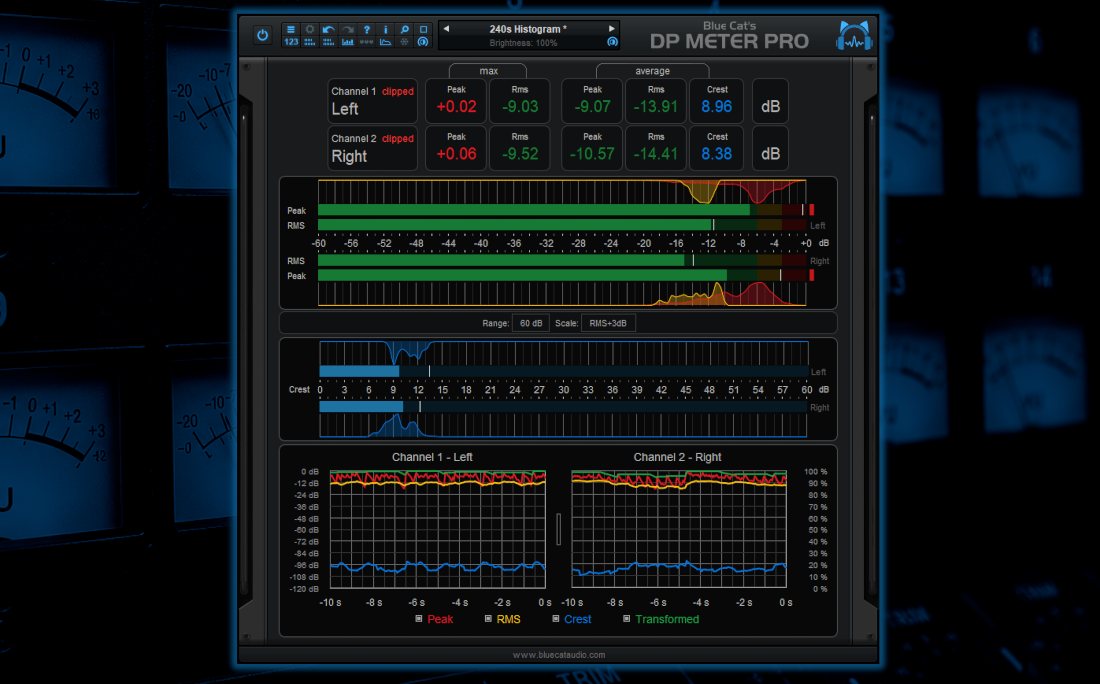
Blue Cat's DP Meter Pro (DPMP) is a plug-in from Blue Cat Audio that combines level metering with the ability to use measured values to control other plug-ins or devices. Peak, RMS and crest factor meters are highly configurable, and MIDI and automation outputs are provided.
Almost every aspect of the meters can be customized. Five scales are included by default, including Bob Katz's K-System scales (K-12, K-14, K-20), and you can create your own. Large statistics displays and histograms show how levels are distributed and measure the dynamic range of a track.
A mid-side switch lets you check mono compatibility and the stereo character of a source. It can analyze mono, stereo (left/right or mid/side), and surround or multichannel streams of up to 16 channels.
Another feature is reuse of the envelopes. Peak, RMS and crest factor envelopes can be reversed or modified and recorded as automation or sent as MIDI CC messages. The official tutorials include examples such as voice-over ducking and side chain compression.
Key features
Peak, RMS and crest factor
Three meter types can be set up in detail, including attack and release shape, which may help when you want numbers and history together.
K-System scales
Supports K-12, K-14 and K-20 scales and custom ones, which may suit people who work to a set reference level.
Dynamic range measurement
A level histogram measures the dynamic range of a track so you can compare the difference between songs.
MIDI CC and automation output
Measured values can be recorded as automation or sent as MIDI CC, so compatible plug-ins and external MIDI devices can be driven by loudness.
Envelope shaping
The output envelope can be reversed and its amount and offset adjusted, so its shape can be tailored for ducking or side chain uses.
Multichannel analysis
Analyzes from mono up to 16 channels of surround, and the official tutorials mention monitoring multiple tracks.
Specifications
| Item | Details |
|---|---|
| Product type | Audio meter and side chaining tool |
| Formats | VST, VST3, AU, AAX (Windows 32/64-bit, Mac 64-bit) |
| OS | macOS 10.9 or newer (Intel / Apple Silicon), Windows Vista / 7 / 8 / 10 / 11 |
| Maximum channels | 16 |
| Version | V4.42 (2025/09/08) |
What is included and system requirements
- The plug-in (formats above)
- Integrated preset manager
- A demo version with limitations is available from the official site
How to use it
- Get the installer from the official site and install it.
- Insert DP Meter Pro on the track you want to measure in your DAW.
- Choose the channel configuration (mono, stereo, M/S or surround).
- Select a scale and set up the peak and RMS displays.
- Play the audio and check the meters and histograms.
- To use the output, assign the envelope to automation or MIDI CC.
- Use MIDI Learn on the target parameter and confirm the result.
Where it may come in handy
Ducking music under a voice
The level of a voice could be tracked to lower background music automatically. It may also be worth trying for narration.
Checking dynamic range
Peak, RMS and crest factor could be used to check how wide the dynamics of a song are, including K-System scales.
Audio-driven automation
Measured values can be sent as MIDI CC or automation to move parameters of other plug-ins, which may suit experimentation.
Who it may suit
- People who want detailed views of level over time and dynamic range
- People who want audio to drive other parameters
- People who work to K-System references
Good to know before you buy
- The host must support MIDI output or automation writing.
- The demo limits the number of instances and bypasses the plug-in for a few milliseconds regularly.
- On Mac, a 64-bit host supporting VST, AU or AAX is required.
Price
$99 (Blue Cat Audio official site, checked 2026-10-27). Prices can vary by region and promotion, so check the official page before buying.
See Blue Cat's DP Meter Pro on the product page
More of the same kind
Other introduction articles of the same kind.
- United Plugins Phantomix
- Celemony Tonalic
- Baby Audio Baby Audio Parallel Aggressor
- Fiedler Audio Dolby Atmos Composer
- Eventide Physion Mk II
- Waves SoundShifter
We have introduced 21 other products from Blue Cat Audio.
- Blue Cat Audio Re-Head
- Blue Cat Audio Blue Cat's Miaow Wah
- Blue Cat Audio AcouFiend
- Blue Cat Audio Blue Cat's StereoScope Pro
- Blue Cat Audio Blue Cat's Remote Control
See the full list in Product database: Effects.
Sources: bluecataudio.com pluginboutique.com (checked 2026-10-27)










Comments